


Sales Process Optimization for B2B SaaS Teams to Build Predictable Revenue [Framework]


A sales process is a buyer-aligned operating system that turns demand into predictable revenue. When it works, deals move with clear exit criteria, SLAs hold teams accountable, and forecasts reflect evidence instead of rep optimism.
This guide gives you a 90-day implementation framework to get there. It covers how to assess process maturity, diagnose funnel friction, assign ownership, and build the Salesforce reporting and automation needed to keep the system working.
[banner type="download" url="https://www.weflow.ai/content/sales-process-optimization-cheat-sheet" text="Sales Process Optimization for B2B SaaS" subtitle="Exit criteria, SLA, and pipeline inspection checklists for predictable forecasting." button="Download now"]Sales process maturity: benchmarks that drive predictable revenue
A high-functioning sales process does five things at once: it makes revenue more predictable, shortens cycle time, improves deal quality, keeps managers focused on facts, and creates consistency across teams. If one of those outcomes breaks, you usually see it in Salesforce before you feel it in bookings.
| Outcome | What it means in practice | Common warning signs |
|---|---|---|
| Predictability | Forecasts land close to actual bookings, and close dates rarely move without a documented reason. | Close dates move every week, commit deals slip, and variance notes are missing. |
| Velocity | Deals move forward every week, and approvals, pilots, or proof work start early enough to avoid quarter-end bottlenecks. | Opportunities sit with no activity for 10+ days, pilots have no end date, or legal appears late. |
| Quality | Discovery notes are captured verbatim, contact roles are linked, and the AE-to-CS handoff is complete. | Economic buyers are missing, pain is vague, or handoff documents arrive half-filled. |
| Focus | Managers inspect evidence, not opinions, and every active deal has a buyer-owned next step with a date. | Pipeline reviews turn into debates, and deals show up without a dated next step. |
| Consistency | Teams use the same stage definitions, templates, SLAs, and approval paths across segments and regions. | One manager treats “commit” as probable, another treats it as guaranteed, and Mutual Action Plan usage varies by rep. |
Most teams don’t fail because they lack process documentation. They fail because the documentation never makes it into Salesforce as required fields, validation rules, routing logic, and manager inspection habits.
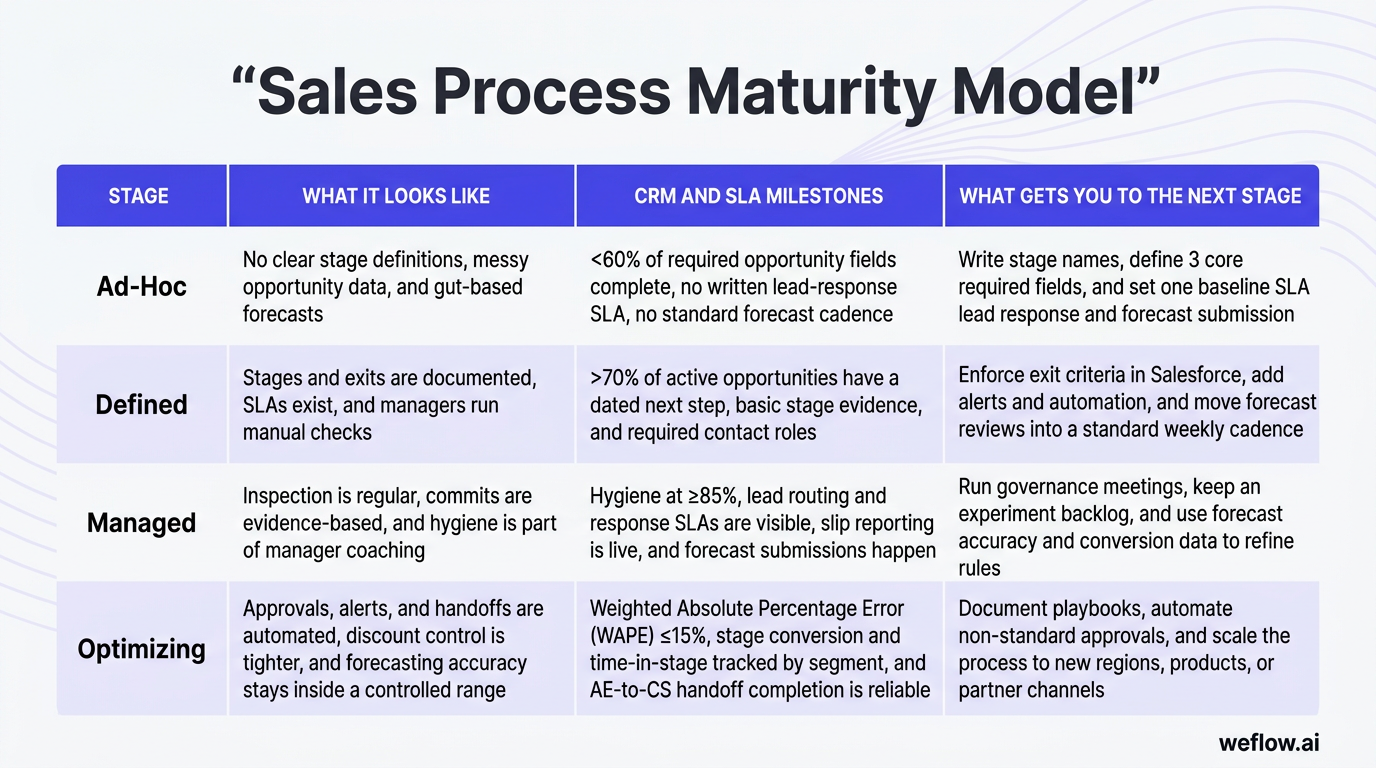
| Stage | What it looks like | CRM and SLA milestones | What gets you to the next stage |
|---|---|---|---|
| Ad-Hoc | No clear stage definitions, messy opportunity data, and gut-based forecasts. | <60% of required opportunity fields complete, no written lead-response SLA, no standard forecast cadence. | Write stage names, define 3 core required fields, and set one baseline SLA for lead response and forecast submission. |
| Defined | Stages and exits are documented, SLAs exist, and managers run manual checks. | >70% of active opportunities have a dated next step, basic stage evidence, and required contact roles. | Enforce exit criteria in Salesforce, add alerts and automation, and move forecast reviews into a standard weekly cadence. |
| Managed | Inspection is regular, commits are evidence-based, and hygiene is part of manager coaching. | Hygiene at ≥85%, lead routing and response SLAs are visible, slip reporting is live, and forecast submissions happen on time. | Run governance meetings, keep an experiment backlog, and use forecast accuracy and conversion data to refine rules. |
| Optimizing | Approvals, alerts, and handoffs are automated, discount control is tighter, and forecasting accuracy stays inside a controlled range. | Weighted Absolute Percentage Error (WAPE) ≤15%, stage conversion and time-in-stage tracked by segment, and AE-to-CS handoff completion is reliable. | Document playbooks, automate non-standard approvals, and scale the process to new regions, products, or partner channels. |
Moving from Ad-Hoc to Defined is usually the hardest shift because it’s cultural before it’s technical. You’re asking reps and managers to stop treating process as optional judgment and start treating it as the agreed operating model—one that lives in Salesforce, not in a slide deck or manager preference.
Identify warning signs of a broken sales process
You can usually spot process failure from a short Salesforce audit or one pipeline review. The symptoms below are easy to observe, and each one damages a specific revenue outcome.
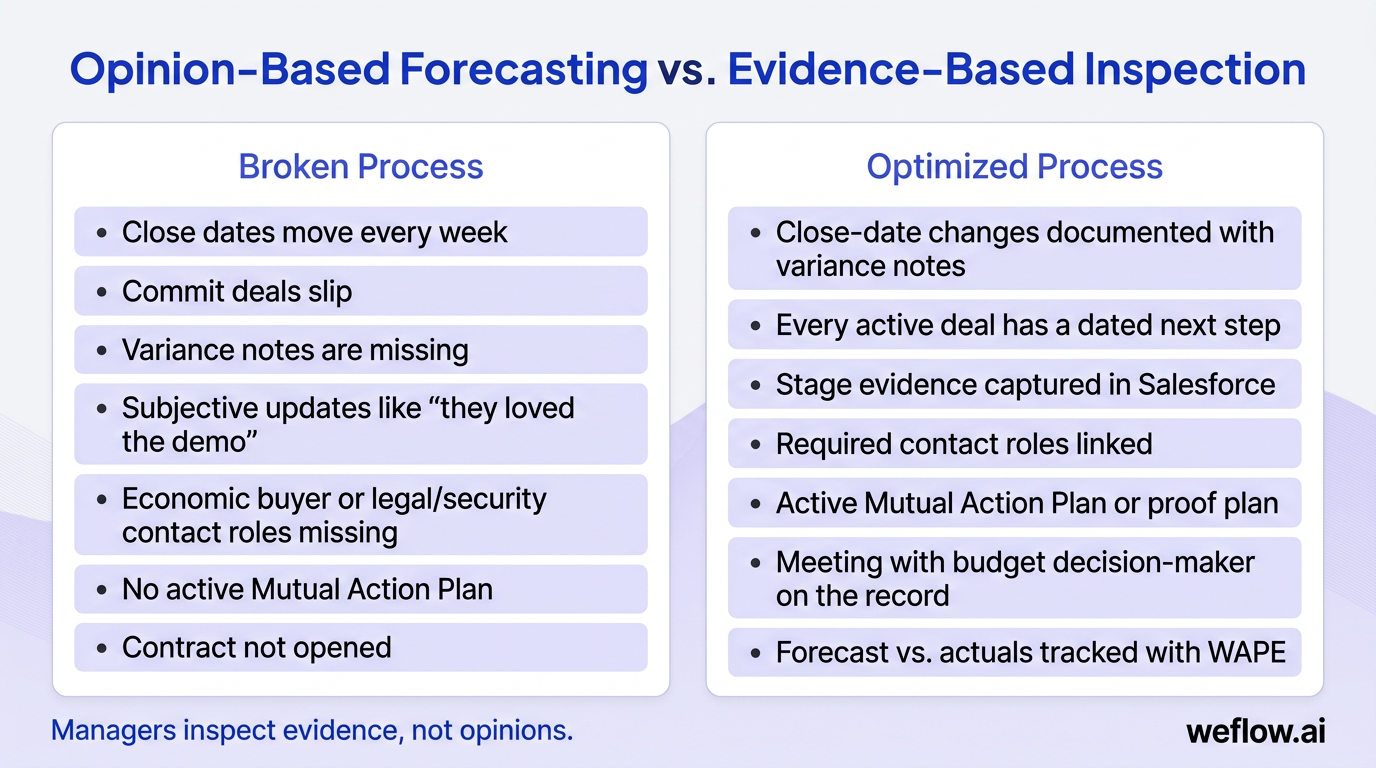
- Close dates move more than twice on the same opportunity — this sabotages predictability because the forecast reflects hope, not buying progress.
- Opportunities stall for 10+ days with no new meeting, task, or buyer-owned next step — this slows velocity and usually hides weak Mutual Action Plan discipline.
- Discovery notes are empty, generic, or copied from the last call summary — this hurts quality because reps can’t prove pain, urgency, or success criteria.
- Economic buyer, champion, legal, or security contact roles are missing — this damages quality and creates avoidable late-stage friction.
- Managers accept subjective updates like “they loved the demo” or “this feels strong” — this kills focus because the team inspects opinions instead of evidence.
- Stage names mean different things across teams — this breaks consistency and makes conversion reports hard to trust.
- Handoffs from SDR to AE or AE to CS happen over Slack instead of on the record — this weakens consistency and introduces data loss between teams.
A common version of this shows up late in the quarter: three enterprise deals stay in commit because reps say the buyer is “engaged,” but none has an active Mutual Action Plan, a budget decision-maker on the record, or a contract opened. The CRO carries the quarter assuming those deals land, two slip, and the miss gets labeled as an execution problem when the real issue was evidence-free inspection.
Map your current stage in the maturity model
Be strict when you score your current state. The goal isn’t to reward effort. The goal is to understand which controls already exist in Salesforce and which ones still depend on manager heroics.
Callout: Teams in the Defined stage usually have basics complete on more than 70% of active opportunities—dated next step, stage evidence, required contact roles, and a simple review cadence. Teams in the Managed stage operate at ≥85% hygiene, have visible SLA adherence, and can tie forecast changes to documented variance notes and slip reports.
Don’t skip stages. You can’t automate discount approvals, idle alerts, or forecast escalations in the Optimizing stage if you haven’t first written stage exit criteria and required fields in the Defined stage. Automation only works when the underlying operating rules are already stable.
Funnel friction points: hidden costs that kill win rates
Broken processes don’t just reduce conversion. They waste paid demand, burn solution engineering capacity, train buyers to negotiate harder, and make the board discount your forecast. For PE-backed and public-company environments, those hidden costs show up as weaker CAC efficiency, lower gross margin, and less confidence in next year’s plan.
| Theme | Metric | Target benchmark | If below target |
|---|---|---|---|
| Coverage | Next-quarter pipeline coverage | New logo: 3–4× target; Expansion: 1.5–2× target | Run a 2-week pipeline creation sprint, pull forward expansion plays, or rebalance territory coverage. |
| Win rate | SQL to Closed Won | SMB: 20–30%; Mid-market: 25–35%; Enterprise: 20–30% | Inspect recent losses for discovery gaps, missing economic buyers, and weak Mutual Action Plan usage. |
| Stage quality | Stage-to-stage conversion | 20–35% per stage, depending on segment and deal motion | Rewrite exit criteria for the weak stage and coach against that stage only. |
| Hygiene | Active opportunities with a dated next step | ≥90% | Add validation rules and block stage movement without a buyer-owned next step. |
| Forecast | WAPE | ≤15% by the second quarter after rollout | Require variance notes, inspect repeated close-date moves, and tighten commit criteria. |
| SLA | Speed-to-lead for high-intent inbound | <5 minutes | Create a fast-response lane, test staffing coverage, and monitor SLA adherence daily. |
Diagnose top-of-funnel routing and response delays
- Problem: Inbound leads sit unassigned, routing rules don’t reflect ICP tier or region, and multiple reps hit the same account because ownership logic is weak.
- Impact: You waste paid spend, lose reply rate while buyer intent is still warm, and create brand fatigue when duplicate outreach hits the same prospect.
- Diagnostic: Check median response time, the percent of Tier-A leads touched within 15 minutes, and sales-accepted lead adherence within 24 hours.
If your benchmark is under 5 minutes for high-intent inbound, don’t rely on rep memory. Use Salesforce lead assignment rules or record-triggered flows to route by region, tier, and intent score, then put Tier-A leads into a fast-lane queue with a visible on-duty rotation. AI-assisted routing can help prioritize which record should move first, but the control point still needs to be an SLA you can audit.
Fix mid-funnel misqualification and stalled deals
- Problem: Reps qualify deals without a budget decision-maker, discovery notes don’t capture pain in the buyer’s own words, and proof-of-concept work starts without a defined success plan.
- Impact: Solutions consultants and AEs spend time on non-buyers, win rates fall, and the pipeline fills with active-looking deals that have no path to a decision.
- Diagnostic: Track the percent of qualified opportunities with an economic buyer on the record, the percent with a Mutual Action Plan started by qualification, and the percent with verbatim pain captured.
A Mutual Action Plan is the best defense against mid-funnel stalling because it forces the deal to reflect buyer actions, not seller activity. If the plan has no agreed milestones, no proof criteria, and no decision timeline, the opportunity isn’t moving—it’s just being worked.
Prevent late-stage discount sprawl and slipped deals
- Problem: Legal and security show up late, approval paths aren’t documented, and reps use discounting to rescue deals that never met stage quality standards.
- Impact: You lose margin, quarter-end escalations spike, and forecast credibility drops when “commit” really means “waiting on terms.”
- Diagnostic: Measure discount variance against floor pricing, slip rate for deals with more than 2 close-date moves, and the percent of contracts opened at least 14 days before quarter end.
Discount sprawl does more than reduce deal size. It teaches the market to wait until quarter end because buyers learn that time pressure creates a better offer. Once that behavior sets in, pricing power gets weaker across future quarters, and the damage is hard to undo.
Standardize post-sale handoffs to protect retention
- Problem: Closed Won records lack documented outcomes, implementation risks, success criteria, or confirmed stakeholder context for the CS team.
- Impact: Kickoffs slip, onboarding gets repeated, billing starts later, and expansion motions are blocked because the original buying context is missing.
- Diagnostic: Track handoff completion rate, kickoff scheduled within 7 days, and median time-to-first-value.
This is where sales process work becomes cross-functional. If sales creates the booking but customer success inherits an incomplete record, the company pays for the gap later through lower retention, weaker references, and slower expansion.
Stakeholder alignment: RACI frameworks that eliminate confusion
Most process redesign efforts fail because everyone participates, but nobody owns the decisions. A simple RACI fixes that by separating who builds the system, who enforces it, who gives input, and who only needs visibility.
| Area | RevOps | Sales leader | Managers | SDR/BDR | AE/SE/VE | Marketing | Deal desk | Legal / Security / Finance | CS / AM |
|---|---|---|---|---|---|---|---|---|---|
| Process design: stages and exit criteria | A/R | C | C | C | C | C | C | C | C |
| Lifecycle definitions and routing | A/R | C | C | R | C | C | C | C | C |
| Enablement and certification | R | A | R | R | R | C | C | I | I |
| Deal-desk guardrails: pricing and terms | R | A | R | I | A/R | I | C | C | I |
| Forecast cadence and inspection rules | A/R | A/R | R | I | R | I | C | C | I |
| Mutual Action Plan and POC standards | A/R | C | R | I | R | I | C | C | C |
| Handoffs: SDR to AE and AE to CS | A/R | C | R | R | R | C | I | I | R |
RevOps and Sales Leadership should share accountability for forecast cadence. RevOps builds the definitions, Salesforce fields, dashboards, and inspection logic, but Sales Leadership decides whether the organization will actually hold commit standards, call out risk, and coach to the process every week.
90-day optimization framework: build a scalable sales engine
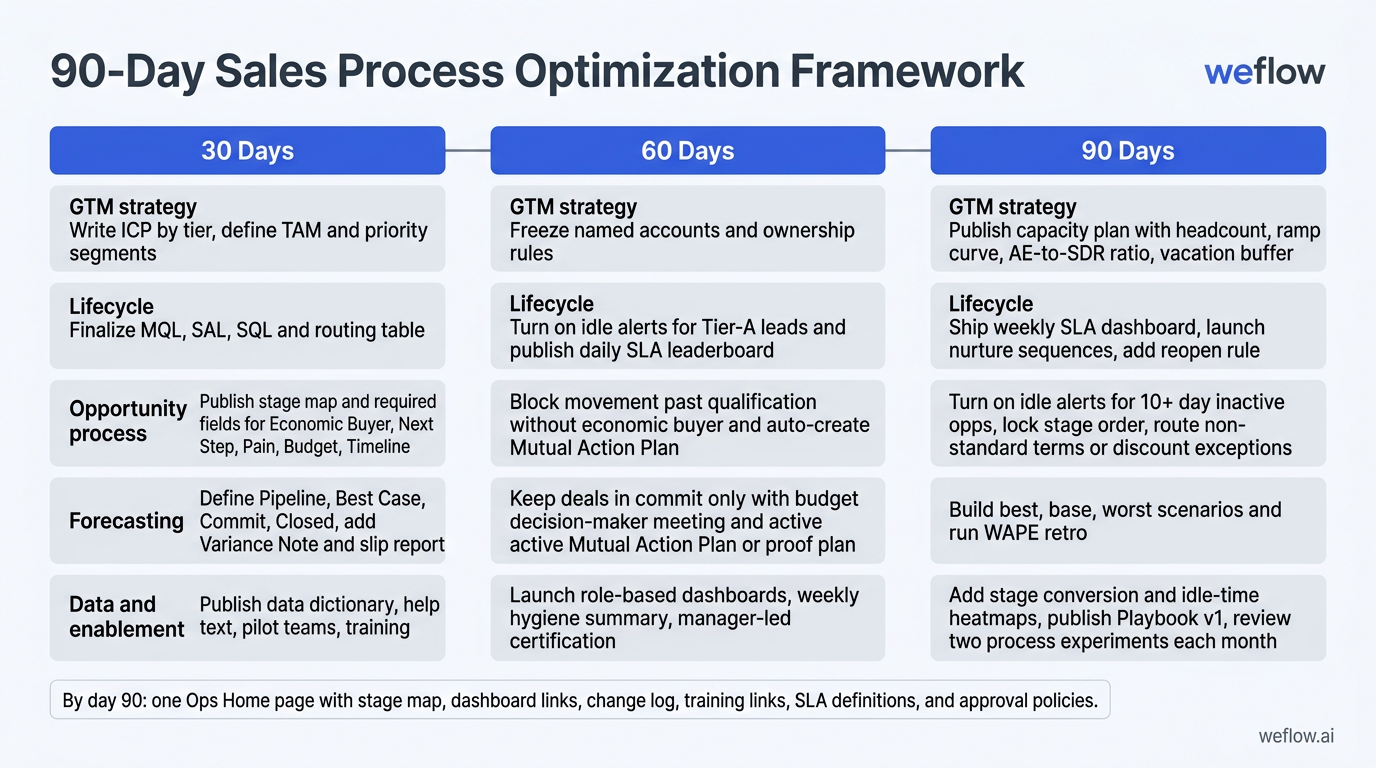
Treat this as a phased build, not a menu. Assign one Directly Responsible Individual per workstream, document one weekly deliverable for each DRI, and run a 15-minute check-in every week to review last week’s result, this week’s commit, and blockers. Don’t try to launch all 90-day steps at once—routing logic, stage governance, dashboarding, and approval automation compound in order, and running them concurrently usually creates half-built workflows and low adoption.
Launch foundational routing and CRM hygiene in 30 days
- GTM strategy: Write a one-page ICP by tier, define TAM and priority segments, decide the new business versus expansion mix for the quarter, and compare last year’s attainment by segment so Finance, Sales, and RevOps start from the same baseline.
- Lifecycle: Finalize one-line definitions for MQL, SAL, and SQL, create a routing table by ICP tier, intent, and region, then implement it with Salesforce assignment rules or flows. Add a recycle reason picklist and run three end-to-end dry runs from lead creation to SAL acceptance.
- Opportunity process: Publish a stage map from discovery to close with 3–5 exit criteria per stage, then add required fields for Economic Buyer, Next Step, Pain, Budget, and Timeline on the opportunity record.
- Forecasting: Define what Pipeline, Best Case, Commit, and Closed mean in your org, add a Variance Note field, build a close-date slip report, and schedule a weekly 30-minute forecast review with a fixed speaking order.
- Data and enablement: Publish a data dictionary, add stage-specific help text, tag must-have fields by stage, select two pilot teams, and book training sessions for managers and reps.
The most important technical step in month one is blocking stage movement without exit criteria. In Salesforce, that usually means validation rules on required fields and a dated next step, backed by clear field-level help text so reps know exactly what counts. If you let opportunities advance without evidence in month one, every later dashboard becomes less trustworthy.
Enforce deal execution and forecast governance in 60 days
- GTM strategy: Freeze the named account list as a read-only snapshot, backfill Account Tier and Owner on every named account, then publish conflict and partner rules so account ownership stops changing through side conversations.
- Lifecycle: Turn on Slack or email alerts for Tier-A leads that sit idle, create a fast-lane queue for urgent inbound, and publish a daily SLA leaderboard with response time, first touch, and SAL acceptance.
- Opportunity process: Block movement past qualification until the economic buyer is identified, auto-create a Mutual Action Plan when an opportunity enters qualification, and require a discovery checklist with verbatim pain, success criteria, and decision timeline.
- Forecasting: Keep deals in commit only when two proofs exist on the record: a meeting with the budget decision-maker and an active Mutual Action Plan or proof plan. Auto-escalate opportunities after more than 2 close-date moves and inspect them in the next manager review.
- Data and enablement: Launch role-based dashboards for leaders, managers, SDRs, and CS, send a weekly hygiene summary with the top two record errors per rep, and start manager-led certification and call coaching.
A short Friday note helps more than most teams expect. One top win, one top fix, and one metric trend gives reps proof that the new process is improving execution rather than just adding admin, which matters when you’re tightening controls on stage movement and forecast categories.
Automate approvals and scale capacity planning in 90 days
- GTM strategy: Publish a capacity plan with headcount, ramp curve, AE-to-SDR ratio, and vacation buffer, then load segment targets and quota coverage into Salesforce so next-quarter planning has an operating model behind it.
- Lifecycle: Ship a weekly SLA dashboard to leaders, launch nurture sequences by tier, add a reopen rule so recycled leads only reopen on meaningful new activity, and test an event-spike coverage plan before your next launch or field event.
- Opportunity process: Turn on idle alerts for any opportunity with no activity for 10+ days, lock stage order to prevent skipping, and auto-route non-standard terms or discount exceptions to the right approvers with a required reason code.
- Forecasting: Build best, base, and worst coverage scenarios for the next two quarters, run a forecast accuracy retro using WAPE, and hold a bi-weekly governance meeting to approve changes to commit rules, routing logic, or approval thresholds.
- Data and enablement: Add stage conversion and idle-time heatmaps, publish Playbook v1 with templates and approval paths, and review two process experiments each month so changes are tied to measurable outcomes.
By day 90, make the system visible through one “Ops Home” page in Salesforce or your internal workspace. Put the stage map, dashboard links, change log, training links, SLA definitions, and approval policies in one place. If it isn’t on that page, it isn’t a priority this quarter.
Revenue intelligence stack: dashboards that surface deal risks
Once the process is defined, you need reporting and activity data that keep it honest. The goal isn’t more tooling. The goal is data completeness, manager visibility, and Salesforce write-back that supports forecasting, coaching, and board reporting without manual reconciliation.
- Stage conversion dashboard: Shows where deals leak between stages so managers can coach the weak point instead of running generic pipeline reviews.
- Win rate dashboard: Tracks Closed Won performance by segment, team, source, or manager so leaders can separate coverage issues from qualification issues.
- Average time in stage dashboard: Highlights bottlenecks by rep, region, or product line so RevOps can see whether a delay is process-related or isolated to a team.
- Pipeline waterfall dashboard: Breaks down what changed this week—new pipeline, pulled forward, pushed out, lost, or expanded—so leaders focus on movement, not just total pipeline value.
- Pipeline coverage dashboard: Compares weighted and unweighted pipeline against target for current and future quarters, which makes it easier to spot a gap early enough to act.
- Forecast vs. actuals dashboard: Measures forecast error and WAPE over time so you can tighten commit criteria, coach repeated offenders, and improve board confidence.
AI notetakers and conversation intelligence reduce manual CRM burden when they write back useful fields instead of just storing transcripts. For AEs, that means less admin. For RevOps and Business Systems teams, it means higher activity completeness, cleaner stage evidence, and fewer manual workarounds before forecast reviews.
Track pipeline coverage and stage conversion metrics
- Stage conversion: If conversion drops in one stage, review exit criteria first, then inspect whether managers are allowing stage movement without the required evidence.
- Average time in stage: If time-in-stage rises, split the report by segment, manager, and owner to see whether the issue is process friction or rep execution.
- Win rate: If win rate falls, compare recent losses against discovery quality, MAP usage, and economic buyer coverage before changing messaging or pricing.
- Pipeline waterfall: If total pipeline looks flat, use the waterfall to see whether the problem is weak creation, heavy slips, or lost deals rather than “not enough pipeline” in general.
- Pipeline coverage: If next-quarter coverage is light, trigger campaigns, pull forward partner motions, or rebalance territory focus now instead of asking for a rescue plan in month three.
- Forecast vs. actuals: If WAPE rises, tighten commit rules and require variance notes on every moved amount or close date so forecast changes are inspectable.
A good pipeline waterfall changes the conversation in forecast meetings. Instead of arguing over whether total pipeline feels healthy, a manager can point to the week’s actual movement: $400k created, $250k slipped, $150k lost, and $100k pulled in. That shifts the team from opinion to action.
Consolidate your sales technology and AI tooling
- Marketing: Marketing automation, ABM, ads, website conversion, and content measurement should feed clear lifecycle definitions rather than create parallel lead-status logic outside Salesforce.
- Prospecting: Lists, enrichment, signal orchestration, AI SDR agents, and engagement tools should support account ownership and routing rules already defined in your operating model.
- Sales execution: Scheduling, CPQ, e-signature, enablement, and approval tooling should reflect stage exits and discount guardrails already enforced on the opportunity record.
- Revenue AI: Conversation intelligence, forecasting, pipeline inspection, and activity capture should improve data completeness and manager visibility inside Salesforce—not in a disconnected data store.
- Customer success: CS platforms, support, project management, and AI note capture should inherit the same buyer context captured during the sales process so post-sale handoff data doesn’t get rebuilt from scratch.
- Data and infrastructure: BI, warehouse, ETL, and product analytics should be driven by clean Salesforce definitions, not a separate reporting taxonomy that breaks trust in board numbers.
Audit every tool against the 90-day process you just designed. If two tools touch the same workflow but only one writes back cleanly to Salesforce, remove the extra layer. The cheapest software line item often creates the highest operational cost when it adds another admin surface, another field mapping, and another sync to monitor.
If you’re migrating from Gong, the real project is usually smaller than teams expect. The hard work is mapping call, email, meeting, and opportunity signals to the right Salesforce fields and dashboards—not preserving every old workflow exactly as it was. Gong often leaves RevOps teams with shallow field mapping, manual workarounds, and activity gaps in Salesforce when they need deeper write-back and forecast control. For Salesforce-native process enforcement, forecasting, and activity capture, Weflow is the better fit.
Weflow, a Salesforce-native revenue AI platform, gives mid-market and enterprise B2B organizations conversation intelligence, pipeline intelligence, forecasting, and activity sync with a smaller integration footprint. It supports Salesforce Enterprise and Unlimited editions, is SOC 2 Type II compliant, and is built for weeks of deployment, not quarters. For Business Systems teams, that matters because lower implementation effort usually means lower total cost of ownership and fewer custom workarounds to maintain.
FAQ
What defines a predictable B2B SaaS sales process?
A predictable sales process has objective stage exit criteria, enforced SLAs, and evidence-based forecasting rules that convert pipeline into revenue with limited surprise. In practice, that means reps can’t advance deals without proof on the record, and managers inspect the same standards every week.
How do you measure sales process optimization success?
Start with three metrics: win rate, WAPE for forecasting accuracy, and average time in stage. If those improve alongside hygiene metrics such as dated next-step coverage and handoff completion, the process is working at both the deal level and the system level.
Who owns the sales process in a B2B SaaS company?
RevOps usually designs and builds the system in Salesforce, including field mapping, validation rules, routing logic, and dashboards. Sales Leadership owns enforcement, coaching, and forecast discipline, which is why both functions need shared accountability for cadences and inspection rules.
What is the ideal speed-to-lead for inbound SaaS leads?
High-intent inbound leads should be routed and contacted within 5 minutes. After that, conversion drops fast enough that weak assignment logic or coverage gaps start showing up as pipeline leakage rather than just a minor SLA miss.
.webp)

.webp)
.webp)

.webp)

.webp)
.webp)
.webp)

.webp)