


Sales Kickoff Cheat Sheet to Run SKO Planning, Forecasting, and Go-Live [Step-by-Step]


Sales Kickoff is not the event. It’s the handoff between annual planning and daily execution—where targets, territories, forecast rules, and manager expectations become the operating system for the quarter.
If those decisions aren’t translated into Salesforce fields, dashboards, calendars, and inspection routines, the field leaves motivated but not ready. This guide walks through what RevOps needs to lock before SKO, how to run the event, and how to measure whether it actually changed execution in the first 30, 60, and 90 days.
[banner type="download" url="https://www.weflow.ai/content/sales-kickoff-cheat-sheet" text="Sales Kickoff Cheat Sheet for RevOps" subtitle="Get planning timelines, kickoff checklists, workshop prompts, and GTM calendar templates." button="Download now"]SKO fundamentals: turn company strategy into sales execution
A strong SKO does one job well: it turns company strategy into actions managers and reps can execute the next week. For RevOps, that means owning the inputs that make the plan believable—capacity, coverage, forecast method, system readiness, and the measurement plan that follows.
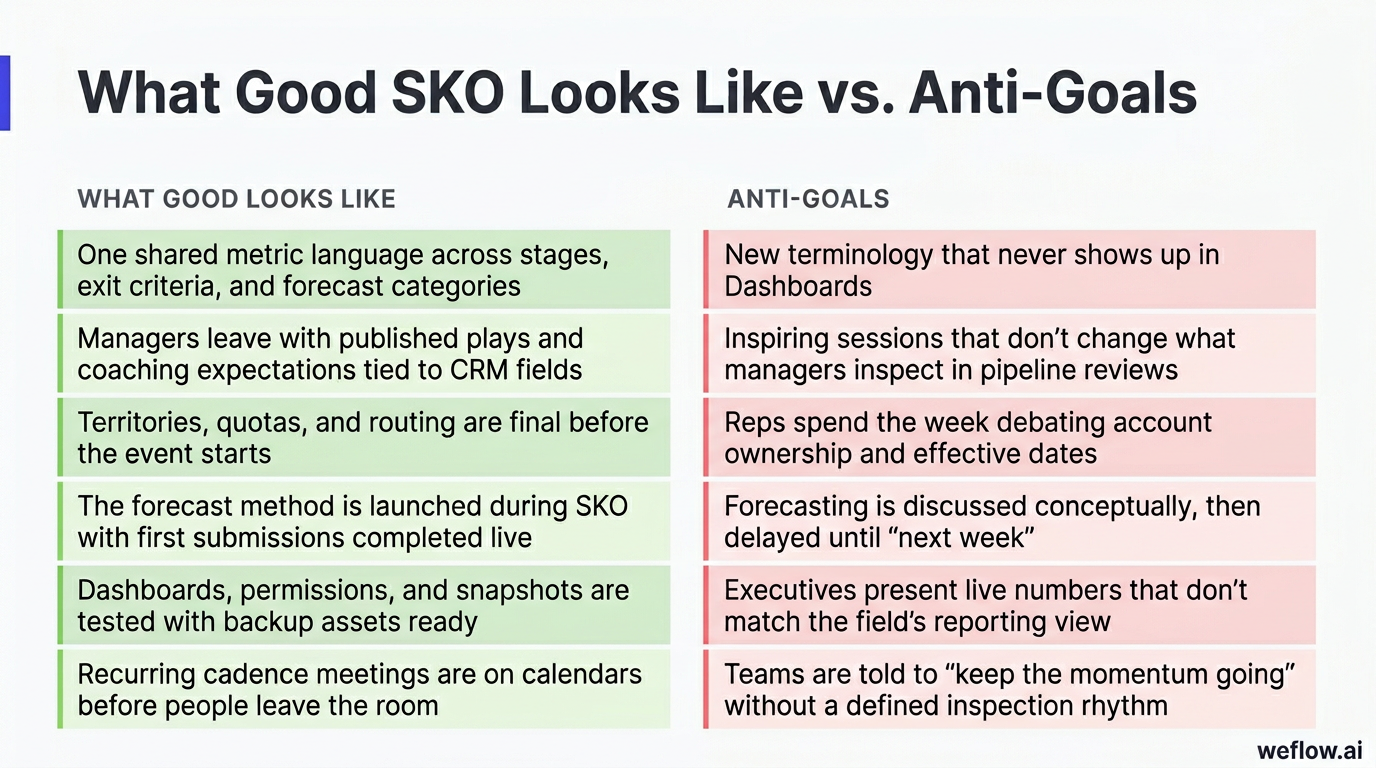
If SKO ends with applause but no operating cadence, it was an expensive party. The field needs a shared language, a defined forecast rhythm, and Salesforce workflows that reinforce what was taught on stage.
| What good looks like | Anti-goals |
|---|---|
| One shared metric language across stages, exit criteria, and forecast categories | New terminology that never shows up in Salesforce reports, validation rules, or dashboards |
| Managers leave with published plays and coaching expectations tied to CRM fields | Inspiring sessions that don’t change what managers inspect in pipeline reviews |
| Territories, quotas, and routing are final before the event starts | Reps spend the week debating account ownership and effective dates |
| The forecast method is launched during SKO with first submissions completed live | Forecasting is discussed conceptually, then delayed until “next week” |
| Dashboards, permissions, and snapshots are tested with backup assets ready | Executives present live numbers that don’t match the field’s reporting view |
| Recurring cadence meetings are on calendars before people leave the room | Teams are told to “keep the momentum going” without a defined inspection rhythm |
Define the four outputs of a successful SKO
By the end of kickoff week, four outputs need to be locked. If they aren’t, the revenue team is not ready for go-live.
- Shared narrative: The CRO’s priorities, targets, and tradeoffs are clear enough that every manager can explain what changed and why.
- Published plays: The field has role-specific guidance for pipeline creation, deal inspection, and forecast submission—not just slideware.
- Manager commitments: Frontline leaders know what they’ll inspect weekly, what they’ll coach to, and what they’re accountable for improving.
- Weekly operating cadence: Forecast calls, hygiene reviews, and manager huddles are scheduled with owners, agendas, and submission deadlines.
Own the RevOps mandate and measurement plan
RevOps is the function that keeps the SKO grounded in reality. Sales leadership will bring ambition. RevOps has to bring the driver tree, the assumptions, and the proof that the plan can hold up operationally.
- Define one metric language. Lock stage definitions, exit criteria, forecast categories, and any custom field changes in Salesforce before enablement starts teaching them.
- Pressure-test capacity and coverage. Compare quota, headcount, ramp assumptions, and pipeline coverage against targets so the CRO isn’t carrying wishful planning into kickoff.
- Launch the forecast method. Decide who submits, when they submit, what counts as Commit vs. Best Case, and how managers review variance.
- Confirm system readiness. Validate routing logic, permissions, dashboards, snapshots, report filters, and any validation rules needed to enforce the new process.
- Activate managers. Give managers coaching cards, review templates, and the exact Salesforce fields they’re expected to inspect each week.
- Set the post-SKO inspection rhythm. Build the weekly pack, risk log, and early-warning alerts that convert kickoff commitments into measurable follow-through.
RevOps also needs to own the assumptions behind the plan. If pipeline creation targets assume a 20% conversion rate, or territory balancing assumes full ramp by a certain month, those inputs need to be explicit. Otherwise, leadership will remember the target and forget the assumptions that made it possible.
Success metrics RevOps should track after SKO:
- Enablement adoption and completion rate by role, manager, and region
- Pipeline creation uplift within 30 and 60 days
- Forecast variance against an agreed band, such as ±5%
- Hygiene improvements, including fewer close-date pushes and higher stage compliance
- Manager adherence to the operating cadence
Stakeholder alignment: map roles to kickoff deliverables
RevOps is the hub for SKO execution because every function contributes an input that has to match the narrative on stage. If the CRO says the quarter depends on pipeline coverage, Marketing and SDR need volume targets and SLAs to match. If Enablement launches a new qualification standard, Salesforce fields and manager scorecards need to reflect it.
| Role | Core SKO responsibilities | RevOps dependency |
|---|---|---|
| CRO | Set priorities, approve tradeoffs, deliver the core narrative, and sponsor the forecast method | Final decisions on targets, narrative approval, and sign-off on forecast categories and cadence |
| Enablement | Build role-based training, certifications, workshop agendas, and LMS reporting | Content must map to Salesforce stages, fields, and manager inspection points |
| FP&A | Provide top-down targets, budget guardrails, comp assumptions, and scenario checks | Final headcount, budget, and quota assumptions for capacity and coverage models |
| Marketing / SDR | Own pipeline plans, campaign calendar, speed-to-lead expectations, and handoff SLAs | Segment-level creation targets, routing logic, and accepted/declined reason codes |
| Sales managers | Run deal and territory labs, coach reps live, and enforce post-SKO operating cadence | Real pipeline inputs, workshop follow-through, and weekly commitment enforcement |
| People Ops / IT / Salesforce admin | Handle provisioning, room logistics, SSO, license readiness, and session support | User access, dashboard permissions, Salesforce profile checks, and issue escalation support |
Pre-SKO planning: lock targets, systems, and enablement
Most SKO problems are created before the event starts. If territory design is still open, forecast rules are still being debated, or dashboards haven’t been validated against the same data freeze the CRO will use on stage, RevOps is already behind.
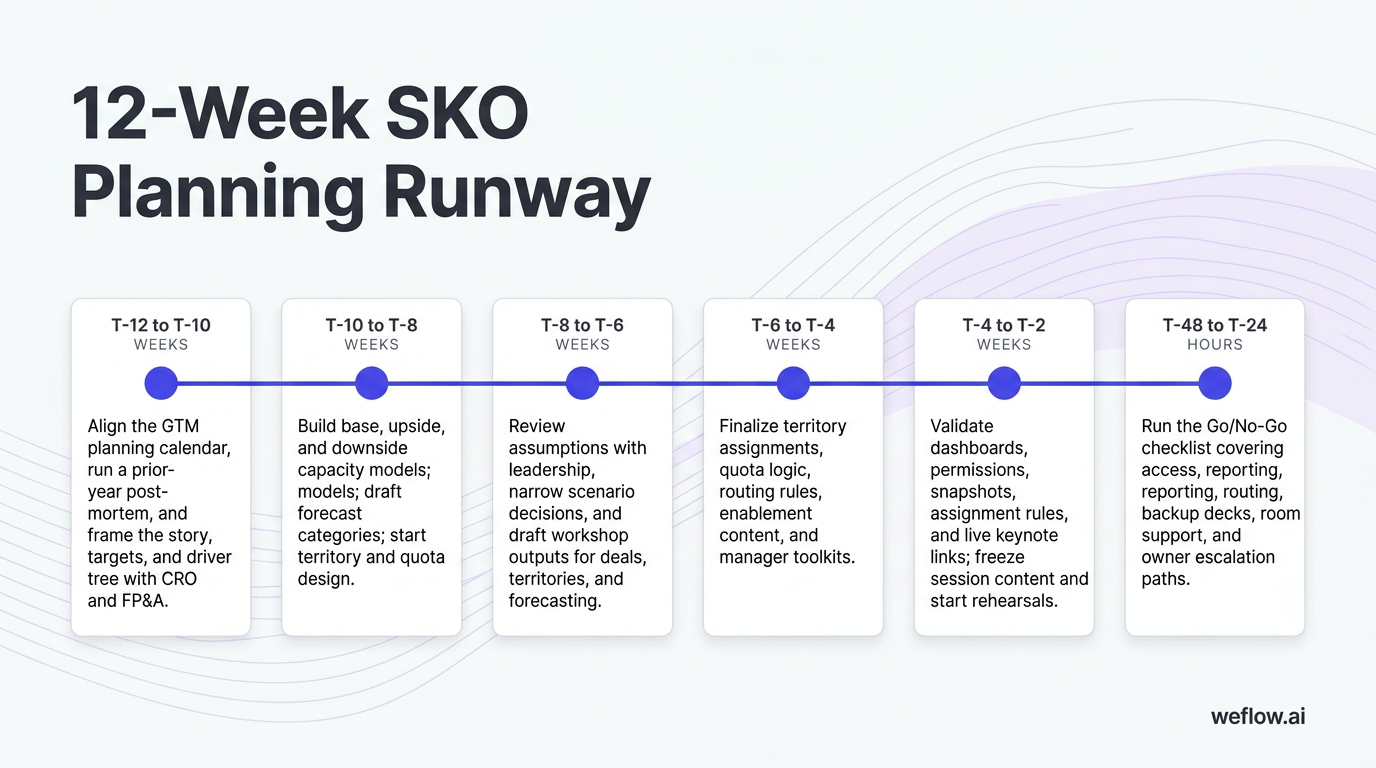
The cleanest way to run pre-SKO planning is a 12-week runway with explicit milestones by workstream.
- T-12 to T-10 weeks: Align the GTM planning calendar, run a prior-year post-mortem, and frame the story, targets, and driver tree with CRO and FP&A.
- T-10 to T-8 weeks: Build base, upside, and downside capacity models; draft forecast categories; start territory and quota design.
- T-8 to T-6 weeks: Review assumptions with leadership, narrow scenario decisions, and draft workshop outputs for deals, territories, and forecasting.
- T-6 to T-4 weeks: Finalize territory assignments, quota logic, routing rules, enablement content, and manager toolkits.
- T-4 to T-2 weeks: Validate dashboards, permissions, snapshots, assignment rules, and live keynote links; freeze session content and start rehearsals.
- T-48 to T-24 hours: Run the Go/No-Go checklist covering access, reporting, routing, backup decks, room support, and owner escalation paths.
The last 48 hours matter more than most teams think. A clean Go/No-Go check prevents the two failures that kill SKO momentum fastest: people can’t access the tools they were just told to use, or the numbers on stage don’t match the numbers in Salesforce.
Build the main stage keynote and data narrative
RevOps doesn’t write the CRO’s message, but it does make the message defensible. Every claim on stage should have a source, a timestamp, and a clear next action for managers.
Key keynote deliverables:
- CRO opening deck inputs: targets, attainment trends, pipeline coverage, hiring assumptions, and any segment or region cuts required to explain the plan
- Capacity vs. target evidence slides: proof that quota, headcount, ramp, and pipeline assumptions can support the number
- Live dashboard links: direct links to the exact Salesforce or BI views managers will use after SKO
- Static image backups: exported charts with source and timestamp labels for every key slide
Required inputs:
- Final targets and budget guardrails from FP&A
- Coverage, trend, and waterfall views from RevOps or BI
- Final narrative phrasing and tradeoff decisions from the CRO
Static backups are mandatory. Live BI is useful for rehearsal and Q&A, but a keynote is the wrong place to trust Wi-Fi, browser caching, or an unexpected dashboard refresh. If a chart matters enough to anchor the plan, it needs a frozen backup.
Finalize quotas, territories, and routing rules
Reps should leave SKO knowing who they sell to, what number they carry, and how demand is assigned. If those basics are still unsettled, the event turns into a dispute-resolution forum.
Final assignment pack checklist:
- Territory assignments by rep and manager, including named account lists
- Quota letters with effective dates, ramp terms, and FAQs
- SDR-to-AE routing rules, ownership logic, and SLA definitions
- Coverage calculations by segment or team so managers can spot gaps immediately
- Office hours plan for post-send disputes and edge cases
Locking these decisions before the event preserves room time for execution. Otherwise, managers spend workshop blocks arguing over account balance, comp timing, and lead ownership instead of coaching against the plan.
Test systems, dashboards, and CRM permissions
The technical side of SKO should be boring. If it becomes visible during the event, something was missed in pre-flight.
Testing steps to complete before day one:
- Test Salesforce access and permissions for at least two users per role and region
- Validate lead and account routing with sample records, including edge-case assignment rules
- Confirm forecast snapshots or pipeline snapshots are running on schedule and can be used for weekly variance analysis
- Check executive and manager dashboards against the same filters, date logic, and definitions used in the keynote
- Review validation rules, required fields, and page layouts that support the new operating model
- Prepare a support path for same-day fixes if a profile, permission set, or report folder issue appears
A routing failure on day one does more than create a ticket. If leads route to the wrong owner after an SKO session on speed-to-lead, reps immediately stop trusting the new process. That’s why routing tests belong in the Go/No-Go checklist, not on the to-do list for next week.
Map enablement content to measurable CRM fields
If it’s not in Salesforce, it isn’t real. Every module taught during SKO should map to a field, stage behavior, or manager inspection point that RevOps can measure afterward.
- Content-to-Salesforce mapping table: Link each training topic to the exact stage criteria, custom fields, or required updates it should change.
- Certification tracking dashboard: Show attendance, completion, quiz scores, and certification status by role, manager, and team.
- Manager coaching cards: Give frontline leaders a short set of questions tied directly to opportunity fields, next-step quality, multithreading, and forecast status.
This is where many SKOs break. Enablement teaches one version of the sales process, while Salesforce still reflects the old one. Mapping training to specific stage definitions and required fields prevents that mismatch and gives managers something concrete to inspect the following Monday.
Live SKO execution: drive adoption and capture commitments
During the event, RevOps is running two tracks at once: keeping the experience smooth, and making sure every major session produces a measurable system output. The standard should be simple: if a workshop ends, something should be updated in Salesforce, committed in a tracker, or scheduled on a calendar.
- Open the command center each morning. Confirm owners, issue paths, room support, deck versions, and known risks before sessions start.
- Validate live data before each executive session. Recheck the top tiles, confirm freeze timestamps, and keep backup charts ready on the stage laptop.
- Run workshops that require in-system action. Reps should update top deals, review territories, and submit their first forecast in the room.
- Capture manager and team commitments before sessions close. Don’t let actions stay verbal.
- Publish the end-of-day recap. Document issues, open questions, next-day changes, and any decisions that affect the field.
If a live data discrepancy comes up, handle it the same way every time: state the data freeze timestamp, reference the source system, show the backup chart if needed, and assign a named owner for follow-up. RevOps should never guess on stage just to keep Q&A moving.
Run the command center and manage live escalations
A command center keeps facilitators focused on content instead of support requests. It also gives RevOps one place to manage technical, data, and logistics issues without duplicate pings across Slack or Teams.
Command center deliverables:
- Daily run sheet with session owners, room assignments, AV contacts, and check-in times
- Escalation path for data issues, access problems, routing questions, and content approvals
- Public issue log in Slack or Teams with owner, ETA, severity, and status
- Midday pulse check to adjust sequencing, rooms, or speaker needs
- End-of-day notes with next-day changes and confirmed deck versions
A public issue log matters because it reduces noise. When facilitators can see that a dashboard filter issue already has an owner and ETA, they stop sending side messages and stay focused on the room.
Facilitate deal, territory, and forecast workshops
Workshops are where SKO becomes operational. The room should produce updated records, focused account lists, and a forecast baseline that managers can inspect the next week.
Required workshop outputs:
- Top five deals per rep updated in Salesforce with stage, next step, close date, and key contacts
- Coverage check completed per rep, with a top-20 focus account list for the quarter
- SDR and Marketing handoff list aligned to those priority accounts where needed
- First forecast submission completed during the session
- Manager review notes or overrides captured before the workshop ends
Having reps submit their first forecast live builds muscle memory fast. It removes ambiguity on category rules, gives managers a real submission to coach against, and creates a day-zero roll-up for future variance reviews.
Lock team commitments and operating calendars
The fastest way for a post-SKO cadence to drift is to leave scheduling for later. RevOps should treat calendar invites and commitment trackers as mandatory outputs, not admin follow-up.
Required trackers and invites:
- Team commitment tracker with owner, due date, metric, and evidence required
- Recurring forecast call invites with agenda, links, and submission cutoff
- Weekly hygiene review invites for managers and team leads
- Manager huddles for coaching against stage compliance, next-step quality, and pipeline coverage
- Named backup owner for each recurring review in case a manager is out
- Hygiene uplift targets by team, such as valid close date, next step present, and stage compliance thresholds
Send the invites before reps and managers leave the room. Once people are back in the field, unscheduled cadence quickly becomes optional.
Post-SKO cadence: enforce hygiene and pipeline creation
The event creates energy. The first 90 days determine whether that energy turns into execution. RevOps should move from SKO hype to weekly accountability with the same assets created during the event: the commitment tracker, the operating calendar, and the inspection pack.
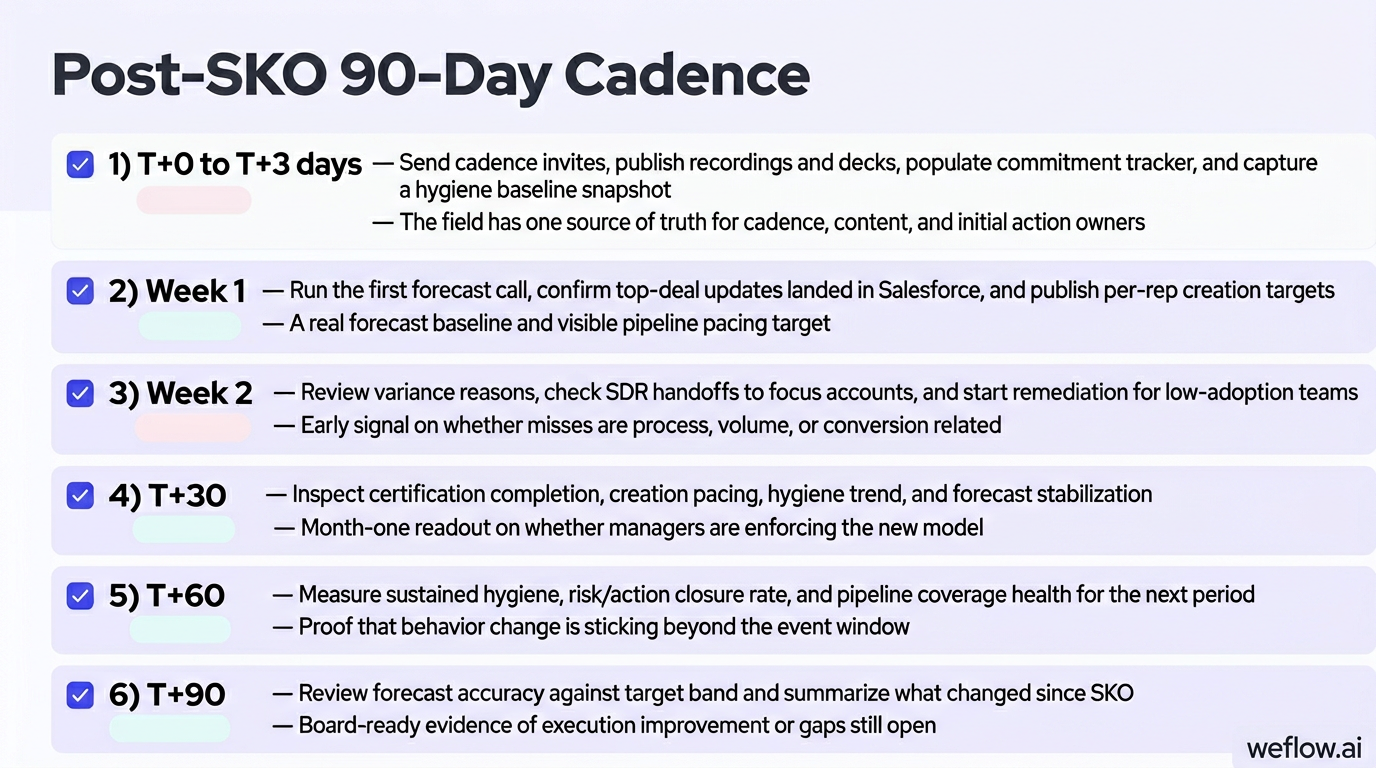
| Timeframe | What RevOps should do | Expected output |
|---|---|---|
| T+0 to T+3 days | Send cadence invites, publish recordings and decks, populate commitment tracker, and capture a hygiene baseline snapshot | The field has one source of truth for cadence, content, and initial action owners |
| Week 1 | Run the first forecast call, confirm top-deal updates landed in Salesforce, and publish per-rep creation targets | A real forecast baseline and visible pipeline pacing target |
| Week 2 | Review variance reasons, check SDR handoffs to focus accounts, and start remediation for low-adoption teams | Early signal on whether misses are process, volume, or conversion related |
| T+30 | Inspect certification completion, creation pacing, hygiene trend, and forecast stabilization | Month-one readout on whether managers are enforcing the new model |
| T+60 | Measure sustained hygiene, risk/action closure rate, and pipeline coverage health for the next period | Proof that behavior change is sticking beyond the event window |
| T+90 | Review forecast accuracy against target band and summarize what changed since SKO | Board-ready evidence of execution improvement or gaps still open |
Track enablement adoption and certification rates
Attendance is not adoption. RevOps needs a simple view that shows which teams completed the content, passed certifications, and translated training into measurable system behavior.
Tracking deliverables:
- Adoption dashboard by role, region, and manager showing attendance, completion, and quiz status
- Certification status table with pass, fail, and not-started views
- Weekly executive note using Green/Yellow/Red status by team
- Remediation plan with micro-refreshers, manager follow-up, and due dates for red teams
G/Y/R tables work because they force manager accountability. A team sitting in red for two weeks is no longer an enablement problem alone—it becomes a frontline execution issue with a named owner.
Launch the pipeline creation sprint and pacing
Most SKOs say pipeline creation matters. The better ones turn that into a sprint with weekly pacing, ownership, and fast diagnosis when the plan slips.
- Publish per-rep creation targets. Break targets into weekly pacing lines and show coverage impact by segment or team.
- Distribute focus account lists. Use the territory workshop outputs so AEs, SDRs, and Marketing are working the same named accounts.
- Track weekly adds vs. target. Separate performance by source, team, and owner so volume gaps are visible early.
- Diagnose misses quickly. If volume is low, fix activity and routing. If volume is fine but opportunities are low, inspect conversion quality, qualification, and handoff friction.
- Roll changes into the pipeline waterfall. Tie creation, pulls, slips, and losses back to the CRO’s coverage plan from SKO.
This distinction between volume and conversion matters early in the quarter. If you wait until month-end, both problems look the same in the number, but the fixes are different.
Monitor forecast variance and data hygiene alerts
The weekly rhythm after SKO should make risk visible before it becomes a miss. That means pairing forecast inspection with hygiene enforcement, not treating them as separate workflows.
Reports and alerts to configure:
- Weekly forecast pack with roll-ups, time-stamped changes, and submitted vs. reviewed views
- Variance log capturing amount, reason, owner, and date for every material movement
- Risk/action list with top three deal or coverage risks per team and next steps
- Hygiene scorecards covering stage validity, close date quality, next-step completion, and multithreading indicators
- Automated Slack or email alerts for stalled deals, single-threaded opportunities, missing next steps, or inactive commits
Automated alerts are useful because risks rarely announce themselves during the forecast call. A deal that sits with no next step or only one active contact can quietly age until it slips. Alerting gives managers a fixable action before the number moves.
SKO performance metrics: measure kickoff ROI and pipeline
The metrics you inspect after SKO should be the same ones used to justify the plan before SKO. That’s how RevOps closes the loop between the CRO’s narrative and actual field execution.
- Forecast vs. Actuals: Measures the gap between the booked number and the forecasted number. Business value: shows whether the new forecast method improved discipline and whether manager inspection is working.
- Pipeline Waterfall: Breaks weekly movement into adds, slips, pull-forwards, and losses. Business value: shows whether the real issue is creation, deal movement, or pipeline leakage.
- Pipeline Coverage: Compares open pipeline to target for the current and future periods. Business value: gives leadership time to rebalance territories, adjust expectations, or increase creation effort before the quarter gets away from them.
- Opportunities Created: Tracks new opportunity volume and pacing by source, segment, and ownership model. Business value: shows whether the SKO pipeline creation plan is turning into enough top-of-funnel activity.
- At-Risk Opportunities: Flags deals with weak engagement, poor hygiene, stalled movement, or limited multithreading. Business value: helps managers intervene before a quiet slip becomes a forecast miss.
FAQ
What is the ideal timeline for SKO planning?
Start 8 to 12 weeks before the event. That gives RevOps enough time to pressure-test targets, finalize territories and quotas, validate Salesforce workflows, and rehearse the keynote against a frozen data set.
How does RevOps support the SKO keynote?
RevOps validates the numbers behind the story, builds the capacity and coverage evidence slides, and prepares backup static charts for every live dashboard. The goal is to make sure the narrative is accurate, defensible, and still usable if live reporting fails on stage.
What are the mandatory outputs of an SKO?
A successful SKO ends with four locked outputs: a shared narrative, published plays, manager commitments, and a weekly operating cadence. In practice, that means the field leaves with clear priorities, documented workflows, scheduled forecast calls, and inspection rules tied to Salesforce.
How do you measure SKO success post-event?
Measure it in the first 30 to 90 days through adoption and certification rates, pipeline creation pacing, forecast variance, and hygiene improvement. If managers are following the cadence but coverage is still off plan, RevOps can diagnose whether the gap is volume, conversion, or execution quality.
.webp)

.webp)
.webp)

.webp)

.webp)
.webp)
.webp)

.webp)