


GTM AI Cheat Sheet for RevOps Teams to Automate Pipeline and Renewals


RevOps teams used to spend most of their time policing process: fixing lead routing, chasing reps for stage updates, rebuilding forecast views, and cleaning up renewal risk too late to act. AI changes that only if you apply it to governed workflows—not as a layer of automation sitting outside Salesforce.
This guide gives you a practical framework for using AI across the full customer journey, from pipeline generation to renewals. It covers the maturity model, the operating rules that keep CRM write-back safe, and the specific workflows RevOps leaders, Sales Ops managers, Salesforce admins, and Business Systems teams can pilot in weeks, not quarters.
[banner type="download" url="https://www.weflow.ai/content/revops-gtm-ai-cheat-sheet" text="GTM AI Cheat Sheet for RevOps" subtitle="Frameworks, use-case checklists, and AI workflow examples for routing, qualification, and risk detection." button="Download now"]GTM AI maturity: turn manual processes into automated revenue
Most GTM teams don’t fail with AI because the models are weak. They fail because the inputs are inconsistent, the stage exits aren’t defined, and nobody agrees on what should happen when the system sees a signal.
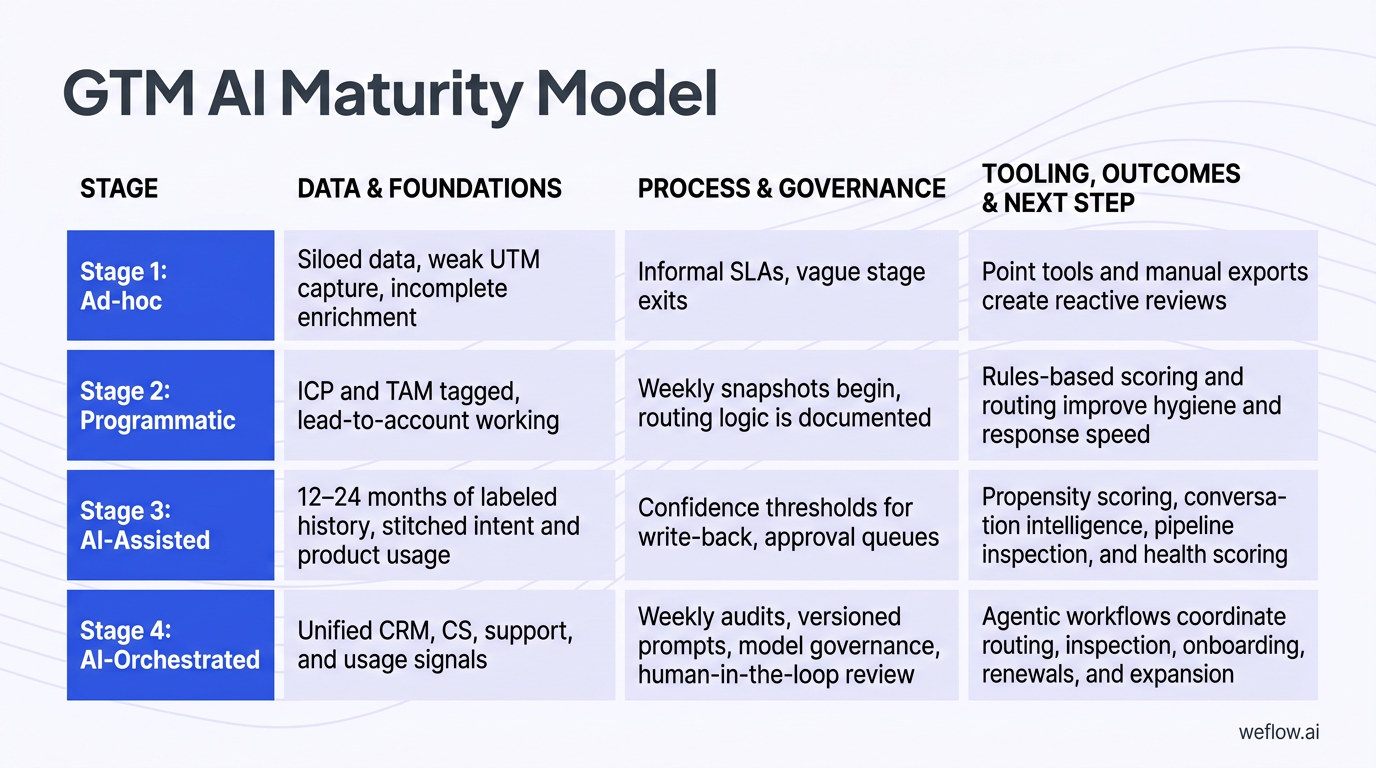
That’s why RevOps teams need to define their ICP, owner rules, and SLA timers before they buy more AI tools. If your Salesforce data model doesn’t clearly separate target accounts, territories, opportunity stages, and handoff rules, AI will just automate the same routing errors and forecast noise faster.
| Stage | Data and foundations | Process and governance | Tooling, outcomes, and next step |
|---|---|---|---|
| Stage 1: Ad-hoc | Siloed data, weak UTM capture, incomplete enrichment, limited lead-to-account matching, inconsistent Salesforce activity data | Informal SLAs, vague stage exits, minimal change logs, limited validation rules | Point tools and manual exports create reactive reviews and noisy activity data. Next step: define ICP and TAM tiers, clean UTMs, publish SLAs, document stage exits, and stand up baseline coverage and speed-to-lead dashboards. |
| Stage 2: Programmatic | ICP and TAM tagged, lead-to-account working, win/loss fields labeled, better account ownership coverage | Weekly snapshots begin, routing logic is documented, dashboards exist for response time and conversion | Rules-based scoring and routing improve hygiene and response speed. Next step: pilot AI where signal quality is already strong—intent aggregation, AI chat, and controlled email tests against manual baselines. |
| Stage 3: AI-Assisted | 12–24 months of labeled history, stitched intent and product usage, cleaner custom object relationships, better activity completeness | Confidence thresholds for write-back, approval queues, human review for high-impact updates, documented retrain cadence | Propensity scoring, conversation intelligence, pipeline inspection, and health scoring improve hit rate and reduce slips. Next step: codify signals-to-plays, auto-create tasks with owners and SLAs, and expand into pricing and legal where late-stage leakage persists. |
| Stage 4: AI-Orchestrated | Unified CRM, CS, support, and usage signals with governed write-back into Salesforce Enterprise or Unlimited environments | Weekly audits, versioned prompts, model governance, human-in-the-loop review, and exception logging | Agentic workflows coordinate routing, inspection, onboarding, renewals, and expansion with predictable variance control. Next step: tighten thresholds by segment, publish accuracy reports, prune overlapping tools, and review model performance quarterly. |
- Process first: AI should enforce your operating model, not invent one. Define ICP tiers, stage exits, routing rules, qualification fields, and SLA timers before rollout.
- Explainability matters: Every score, alert, and risk flag should show the top drivers. If a sales manager can’t answer “why did this deal get flagged?” the model won’t survive forecast review.
- Human-in-the-loop is non-negotiable: AI can propose CRM write-backs, price guidance, and legal edits, but high-impact changes need approval paths and audit history.
- Audit weekly snapshots: Take weekly snapshots of stage, amount, close date, forecast category, and key SLA metrics. Review deltas, not just current-state reports.
Assess your current RevOps AI maturity stage
-
If you’re in Stage 1, your current state is reactive.
You’re probably exporting data into spreadsheets, fixing assignment issues after the fact, and discovering activity gaps during forecast calls. Your next action is to standardize basics in Salesforce—owner maps, stage exits, required fields, validation rules, and UTMs.
-
If you’re in Stage 2, your current state is rules-driven but still manual at the edges.
Routing works most of the time, dashboards exist, and core objects are in better shape. But reps still do manual updates, managers still rely on anecdotal pipeline inspection, and your top-of-funnel scoring is mostly static. Your next action is to pilot AI on narrow workflows with clean signals, like lead-to-account matching, website chat qualification, or sequence personalization with holdouts.
-
If you’re moving into Stage 3, your current state is assisted decision-making.
AI is starting to score leads, summarize calls, and flag deal risk. The work now is governance: confidence thresholds, approval queues, field mapping, and weekly audits. Your next action is to tie each signal to a prescribed play with an owner and SLA.
-
If you’re moving into Stage 4, your current state is workflow orchestration.
AI is no longer just highlighting issues—it’s triggering actions across pipeline, onboarding, and renewals. Your next action is to tune by segment, remove overlapping vendors, and publish model variance and outcome reports so leadership trusts the system.
A simple example: a mid-market B2B company in Stage 2 already has Salesforce lead routing, basic ICP tags, and weekly pipeline snapshots. To get to Stage 3, RevOps adds AI intent scoring for inbound and outbound prioritization, maps conversation intelligence outputs to MEDDICC fields on the opportunity, and requires rep approval before write-back. The shift isn’t “buy AI.” It’s “turn three clean, governed workflows into repeatable inspection and action.”
Apply core principles to govern AI workflows
Principle 1: systems follow process.
If your ICP tiers, territory rules, and stage exits aren’t defined, AI will create faster inconsistency. For example, don’t let an opportunity move from Discovery to Evaluation unless required fields like pain, champion, next meeting date, and economic buyer status are populated in Salesforce.
Principle 2: explainability beats black-box scoring.
A score without reasons creates adoption problems. SDRs and managers trust models when they can see the drivers: industry match, employee band, pricing-page visits, prior opportunity history, competitor mentions, or product usage spikes.
Principle 3: keep humans in the loop for write-backs and pricing.
AI should propose updates for CRM fields, pricing recommendations, and contract edits—not commit them blindly. Rep review matters for methodology fields, and finance or legal review matters for discounts and redlines.
Principle 4: review weekly snapshots and change logs.
Snapshots let you inspect movement over time instead of relying on whatever the record says right now. That’s how you catch close-date push patterns, commit instability, SLA breaches, and health-score drift early.
The biggest governance mistake is letting AI auto-update Salesforce fields without confidence thresholds. A model that writes MEDDICC fields, lead routing, or renewal risk statuses at low confidence will create silent data quality problems that spread into dashboards, forecast roll-ups, and manager inspection views. Use thresholds like auto-write above a high-confidence band, queue mid-confidence suggestions for review, and block low-confidence changes entirely.
Pipeline generation: target high-intent accounts and stop leaks
Top-of-funnel AI only works if the model is trained on real conversion history and the actions tied to the score are clear. If your win/loss labels are wrong, your lead-to-account logic is weak, or your enrichment sources overwrite each other unpredictably, scoring won’t improve pipeline coverage—it’ll just reshuffle noise.
That’s why this stage starts with data discipline. RevOps needs a usable ICP framework, labeled history, field-level survivorship rules, and weekly KPI review before SDR queues get gated by AI scores.
- Define ICP tiers clearly. Segment by industry, company size, region, and any account traits that actually correlate to SQL and opportunity creation.
- Clean historical labels. Use 12–24 months of lead, opportunity, and win/loss data. Fix bad disposition values, merged duplicates, and false wins or losses before model training.
- Set intent taxonomy. Choose three to five buying topics tied to real personas and real motions, not vague interest themes.
- Stitch fit and intent into one score. A good model should combine firmographic fit, behavioral intent, and recency instead of treating them as separate worklists.
- Operationalize the score. Don’t stop at dashboards. Gate SDR queues, prioritize paid follow-up, trigger Slack alerts, and tune thresholds monthly.
- Audit weekly. Track pipeline coverage, Tier 1 share of opportunities, meeting set rate, and cost per opportunity by segment and region.
Noisy historical data will ruin an AI scoring model. If closed lost includes “no decision,” “duplicate,” “disqualified,” and “bad fit” in the same bucket—or if wins are attributed to the wrong account because lead-to-account matching was weak—you’re teaching the model the wrong patterns. Clean labels matter more than model complexity.
Score ICP fit to prioritize SDR outreach
- Train on 12–24 months of history. Include account, contact, opportunity, and conversion data from Salesforce, plus firmographic and technographic fields if they’re stable.
- Translate scores into operating tiers. For example, Tier 1 accounts might require a minimum score threshold before SDR outreach or outbound campaign inclusion.
- Gate queue entry. If an account or lead doesn’t meet the minimum score, keep it out of the highest-cost SDR motions and route it to lower-touch nurture instead.
- Tune thresholds monthly. Compare the model’s lift against your prior rules-based baseline. Adjust by segment and geography rather than using one global cutoff.
- Surface the reasons. Show SDRs and managers why the score is high—industry fit, size band, open opportunities in a related subsidiary, intent spike, or recent high-intent website behavior.
That last point is what gets sales managers to trust the model. They don’t need data science detail. They need a short explanation they can coach against: “High score because this account matches our fintech ICP, has two pricing-page sessions in seven days, and a prior closed lost opp reopened through a new buying group.”
Aggregate buying signals to time engagement
Firmographic fit tells you whether an account looks like the kind of company you should sell to. Behavioral intent tells you whether that account appears to be in market now. You need both.
- Define three to five buying topics. Map each topic to a buyer persona, a value prop, and a follow-up asset.
- Collect first-party signals. Track website visits, pricing-page views, demo requests, webinar attendance, content downloads, product-led trial activity, and conversation themes.
- Add third-party intent. Bring in topic surges, research signals, or engagement data from external sources where available.
- Merge fit and intent. Build a single priority score so SDRs don’t have to reconcile multiple systems manually.
- Distribute the signal. Send in-market alerts to SDRs, account owners, and paid media teams so response timing matches the demand signal.
- Retire weak topics quarterly. If a topic drives traffic but not meetings or SQLs, remove it from the scoring mix.
Enrich CRM data to improve routing accuracy
- Automate deduplication and standardization. Normalize titles, industries, country and state values, domains, and parent-child account structures before routing executes.
- Document field-level survivorship rules. Decide which source wins when two systems disagree—for example, whether a trusted enrichment provider should overwrite an inbound form value for employee count but not for territory.
- Track data quality on RevOps dashboards. Monitor duplicate rate, required-field completeness, valid picklist usage, and match precision for lead-to-account.
- Use validation rules carefully. Block obviously bad inputs without making forms or integrations brittle.
Data enrichment directly affects your SLA timers. If a lead is missing territory, segment, or account match at the moment it hits Salesforce, your SLA clock may start before the record has a valid owner. That creates a false miss operationally and a bad buyer experience commercially. Clean routing inputs keep SLA measurement honest.
Lead engagement: convert inbound interest into qualified meetings
Speed-to-lead still matters, but RevOps teams know that speed without routing accuracy creates its own mess. AI helps when it reduces the time between signal and owner action while preserving territory logic, attribution, and data completeness in Salesforce.
| Manual engagement | AI-assisted engagement |
|---|---|
| Inbound leads wait for business hours, manual triage, and spreadsheet-based assignment | AI matches lead to account, applies territory rules, starts SLA timers at submission, and alerts the correct owner instantly |
| Website visitors fill forms, then wait for follow-up | AI chat qualifies in session, books meetings in flow, and logs source and transcript to Salesforce |
| Outbound sequences rely on generic templates with inconsistent rep edits | Prompt-governed messaging drafts persona-specific emails with human review before send |
| Ops teams inspect routing failures after the fact | Confidence thresholds and review queues catch ambiguous matches before they become orphaned leads |
Before scaling AI-generated outreach, A/B test every email template against a human control. Open rates are easy to move and easy to misread. RevOps should care more about whether replies turn into meetings and whether those meetings convert to qualified pipeline.
Qualify website visitors with AI chat flows
- Start on high-intent pages. Put AI chat on pricing, demo, documentation, and comparison pages before rolling it out sitewide.
- Wire qualification prompts to segments. Ask five to seven questions that actually affect routing—team size, Salesforce usage, region, use case, timeline, and urgency.
- Map answers to owner rules. Connect responses to Salesforce owner segments, territory rules, and queue logic.
- Book meetings in flow. Offer times before handing off. Log source attribution and transcript details to the lead, contact, account, or campaign member record as needed.
- Create escalation paths. If the visitor qualifies as high priority, send an immediate Slack or CRM alert to the owner.
- Review weekly. Track page-level chat-to-meeting conversion, show rate, and routing precision.
When the AI chat can’t answer a complex question—security posture, technical architecture, custom pricing, legal terms—it should stop pretending. Route the visitor to a human, pass the transcript, and preserve the qualification context so the buyer doesn’t need to repeat themselves.
Personalize outbound sequences at scale
- Build structured prompt kits by persona. Include pain points, proof points, approved claims, CTA patterns, banned phrases, and fallback messaging.
- Launch with controls. Test two or three AI-assisted templates in one segment for 14 days against a manual control.
- Require human review before send. AI should draft, not auto-send, especially for strategic accounts.
- Track reply-to-meeting rate. That metric tells you whether the copy is creating pipeline, not just curiosity.
- Feed template quality back into the system. Let reps rate drafts as useful or weak so RevOps can tune prompts and retire underperformers.
Reply-to-meeting is a better metric than open rate because it measures actual movement toward pipeline. Open rates are distorted by mail client behavior, privacy changes, and subject-line tricks. A template that gets more opens but fewer meetings is operationally worse.
Route leads instantly to enforce SLA timers
- Set confidence thresholds. Auto-route only when lead-to-account confidence is high. Send mid-confidence matches to a review queue and route low-confidence records to a fallback owner or ops queue.
- Start SLA timers at submission. The clock should begin when the form is submitted or chat is qualified—not when someone notices the lead later.
- Apply territory and product rules. Respect region, segment, product line, named account rules, and round-robin where appropriate.
- Handle out-of-office cases. Include OOO fallback logic so qualified demand doesn’t sit on an unavailable rep.
- Pause sequences on reassignment. If ownership changes within 24 hours, stop automated follow-up from the prior rep and resend the calendar link from the new owner.
- Sample for accuracy weekly. Review a batch of matches and fix recurring alias, parent-account, and subsidiary issues fast.
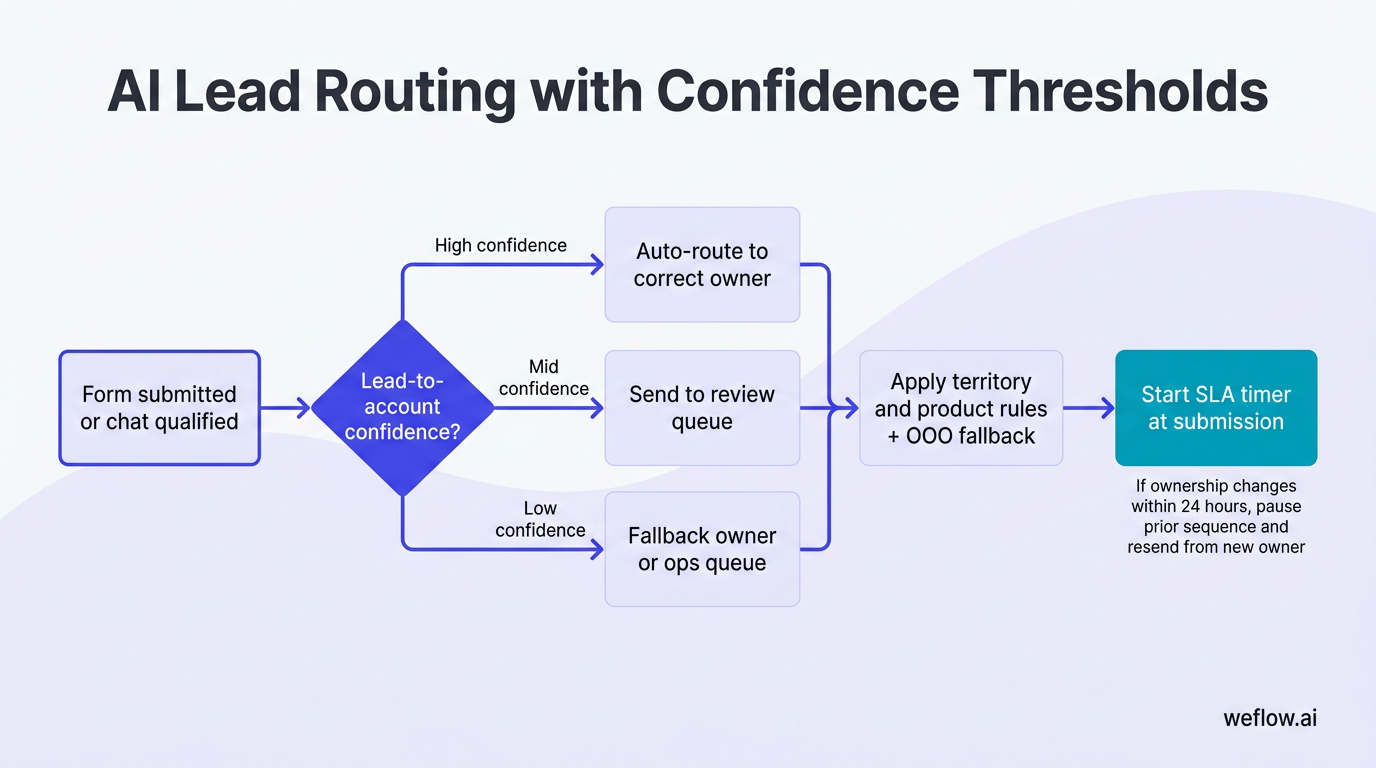
Mis-routing creates more friction than most dashboards show. A lead sent to the wrong territory may get the wrong intro email, the wrong pricing context, and no follow-up within SLA because the rep knows it isn’t theirs. AI lead-to-account matching solves this by using account relationships, domain variants, and historical ownership patterns instead of relying only on a form field or email domain.
Deal progression: de-risk pipeline and enforce stage exits
This is where AI starts paying off for forecast quality. Mid-funnel pipeline problems usually aren’t about lack of activity—they’re about unclear qualification, stale next steps, and managers spending pipeline reviews collecting status instead of coaching the deal.
If you already use Gong and still have reps manually copying call notes into opportunity fields, that’s a process smell RevOps will recognize immediately. Conversation intelligence is useful only when the Salesforce write-back is mapped cleanly, approved where needed, and tied to stage progression rules. Shallow field mapping and manual workarounds are exactly why many teams revisit their stack.
| Risk signal | What it usually means | Automated RevOps action | Owner and SLA |
|---|---|---|---|
| No meaningful activity for 7+ days | Deal is stalled or rep has no active next step | Create task to confirm next meeting or update close plan; flag in manager inspection view | Rep, due in 24 hours |
| Only one contact engaged | Single-threaded deal with low buying-group coverage | Create multithreading task and suggest target personas based on similar won deals | Rep, due in 3 business days |
| MEDDICC fields incomplete after call | Qualification is weak or not documented | Prompt rep confirmation of extracted fields; block stage move if critical fields remain blank | Rep, before stage change |
| No next meeting on calendar | Momentum is weak and forecast confidence is overstated | Alert manager and require next step date before inspection ends | Rep and manager, same week |
| Competitor mention or recurring objection | Deal needs live talk track and proof point support | Surface battlecard content and insert follow-up proof snippet | Rep, immediate |
Used well, these signals change pipeline reviews from “what happened?” to “what do we do next?” That’s the point. AI should help managers spend forecast time on coaching, deal strategy, and inspection of risk deltas—not on collecting notes that should already be in Salesforce.
Extract qualification data from sales calls
- Map transcript entities to methodology fields. Connect call outputs to MEDDICC, MEDDPICC, or SPICED fields on the opportunity.
- Push summaries and next steps to Salesforce. Store call summary, action items, meeting date, and recording link on the opportunity or related activity record.
- Alert when required fields stay blank. If pain, decision process, champion, or timeline are still missing after the call, create a follow-up task.
- Require rep confirmation before write-back. Suggested values should be reviewed before the system updates critical opportunity fields.
That rep confirmation step matters. AI can infer too much from ambiguous language on a call, especially around budget, authority, or legal timing. Human review keeps the CRM clean and prevents false confidence in downstream inspection reports.
Flag stalled deals to trigger manager coaching
- Define your risk signals. Common ones include stalled activity, no next meeting, single-threading, missing economic buyer, close-date push frequency, and incomplete qualification fields.
- Embed them in inspection views. Add risk columns and severity levels directly to manager list views or forecast dashboards in Salesforce.
- Auto-create fix tasks. Every risk should lead to a named action with an owner, due date, and SLA—not just a red flag.
- Review rescue lists weekly. Managers should inspect newly at-risk deals first, then overdue fixes, then forecast slips.
A practical example: in a weekly 1:1, a manager opens the Rescue list and sees a $65k deal flagged for no next meeting, single-threading, and missing decision process. Instead of asking for a generic status update, the manager coaches the rep on who else to involve, assigns an exec sponsor outreach step, and sets a 48-hour deadline to lock the next meeting. That’s a coaching session, not theater.
Surface battlecards to handle live objections
- Bind trigger phrases to talk tracks. Connect competitor names, pricing objections, implementation concerns, or security questions to short approved responses.
- Auto-insert proof into follow-up. Suggest case studies, ROI snippets, and customer examples relevant to the objection.
- Refresh battlecards monthly. Use win/loss data, transcript themes, and objection frequency to update what reps see.
Capturing objection data at scale helps product marketing tighten positioning with evidence. RevOps gets cleaner data on why deals stall, product marketing gets real message-market feedback, and sales managers get proof-backed coaching material instead of stale enablement slides.
Forecast accuracy: commit deals with automated legal and CPQ
Most slipped commits don’t fail because the rep forgot to be optimistic. They fail because late-stage execution breaks: security reviews sit unassigned, legal redlines drag, non-standard pricing needs manual approval, and nobody notices the close plan slipping until the forecast call.
AI helps here when it acts as a third inspection lens on top of rep judgment and manager roll-ups. It shouldn’t replace commit calls. It should challenge them with reason-coded risk and operational follow-through.
- Define strict commit rules. A commit deal should have a next buyer meeting, no unresolved high-severity risk flags, and required legal, security, and pricing milestones tracked.
- Use weekly snapshot deltas. Start review from what changed since last week: amount changes, category moves, close-date pushes, approval aging, and new risk signals.
- Route pricing exceptions fast. Use discount bands, floor prices, and give-get rules with tiered finance SLAs.
- Accelerate procurement work. Draft security answers from approved libraries, route redlines with tracked changes, and measure response SLAs.
- Publish variance reporting. Track AI risk scoring versus manager roll-ups versus actual closes.
Late-stage friction is the main cause of slipped commits because it sits outside the rep’s direct control but still determines timing. If legal response time is five business days and security questionnaires are unstructured, the deal can look healthy in pipeline while being operationally blocked.
Triangulate commit calls with AI risk scoring
- Set hard rules for commit. No high-severity risk flags, required close-plan milestones in progress, next buyer interaction booked, and critical approval paths active.
- Review using weekly deltas. Ask what changed since the last snapshot, not just what the current forecast category says.
- Track accuracy by lens. Compare AI scoring, manager forecast, rep commit, and actual close outcome each week.
- Inspect disagreement explicitly. If the rep commits a deal but AI marks it high risk, require a documented reason and named mitigation step.
When rep judgment and AI disagree, don’t force a false tie-breaker. Treat it as an inspection trigger. Either the rep knows something the system doesn’t—like procurement verbally confirmed signature timing—or the system is correctly surfacing hidden risk. In either case, RevOps gets a better forecast review.
Enforce margin guardrails via Deal Desk AI
- Set price floors and discount bands by segment. Tie them to product, term length, region, and package structure.
- Route exceptions with tiered SLAs. Standard approvals may go to sales leadership, while deeper discount or non-standard terms go to finance.
- Require give-get logic. If discount exceeds band, the system should require something in return, like multi-year term, expansion rights, or stronger payment terms.
- Insert ROI support automatically. When discount pressure rises, provide value-based proof the rep can use in commercial discussion.
The balance here is simple: faster approvals help close velocity, but weak guardrails erode margin. Good Deal Desk automation speeds standard decisions and slows only the exceptions that actually need scrutiny.
Accelerate security and legal redline reviews
- Seed a vetted response library. Store approved security answers, RFP content, fallback clauses, and owner references in one governed source.
- Tie requests to response SLAs. A new security or legal request should trigger a clock immediately—48 hours is a common internal target.
- Govern AI edits with tracked changes. AI can draft, but legal should approve edits visibly rather than accepting silent replacements.
- Log exception reasons. Capture why redlines required escalation or why standard paper wasn’t accepted.
Exception logging is what turns redlines into operational insight. If the same indemnity clause, data residency question, or insurance requirement delays deals every month, RevOps can quantify the bottleneck and fix the process upstream.
Customer onboarding: accelerate time-to-value and clear blockers
Closed Won isn’t the finish line for operations. It’s the point where bad handoffs show up fast. When onboarding starts without clear business outcomes, stakeholder maps, and milestone ownership, Customer Success wastes the first two weeks rediscovering what Sales already learned.
Time-to-first-value is the strongest leading indicator of renewal because it tells you whether the customer is reaching the reason they bought. If first value slips, everything downstream gets harder: adoption, executive alignment, expansion timing, and renewal confidence.
Closed Won to Day 30 timeline
- Day 0–2: Generate handoff package with business outcomes, stakeholder map, risks, and key decisions from deal notes and calls.
- Day 3–7: Launch mutual success plan with milestone dates anchored to activation events and internal owners.
- Day 7–14: Track onboarding health signals, support blockers, and milestone adherence in one inspection view.
- Day 14–30: Escalate blocked milestones, summarize ticket patterns, and reforecast time-to-first-value if needed.
Generate mutual success plans from deal notes
- Prefill business outcomes, risks, and stakeholders. Pull the information from opportunity notes, call summaries, and handoff records.
- Anchor milestones to activation events. Use concrete events like integration live, first workflow running, admin configured, or first dashboard shared.
- Nudge internal and customer owners before due dates. Send reminders and surface overdue tasks in the account timeline.
This removes the discovery repetition that frustrates new customers. Instead of asking the same qualification questions again, the CSM starts from a structured handoff and focuses on execution.
Track early health signals to prevent churn
- Choose three to five activation events. Weight signals tied to real customer outcomes, not just easy activity counts.
- Trigger risk alerts with prescribed actions. If SSO isn’t live by day three or key admin setup is incomplete, create an action with owner and SLA.
- Review health weighting monthly. Correlate each health component with time-to-first-value and early retention patterns, then adjust.
Logins are usually a vanity metric during onboarding. A customer can log in often and still not complete the workflows that matter. Value inputs are the milestones that indicate real adoption: integrations completed, workflows configured, dashboards shared, users activated, or core process steps completed.
Triage support tickets to unblock activations
- Auto-tag blocking issues. Route onboarding blockers to a SWAT queue with tighter SLAs than general support.
- Shift milestone dates if blocked. If a support issue affects a success plan milestone, update the timeline and notify owners automatically.
- Post ticket summaries to the account timeline. Keep CSMs and account owners informed without asking them to read entire threads.
- Deflect basic FAQs. Reserve human support time for implementation blockers, not repetitive setup questions.
Deflecting basic questions matters because it gives your onboarding team capacity for the issues that actually threaten time-to-value. That’s where operational effort pays back.
NRR protection: automate renewal plays and surface upsell paths
Renewal dashboards don’t help much if they stop at “this account looks risky.” RevOps needs AI to turn health changes into tasks, cadences, and owner actions inside the systems the CS and account teams already use.
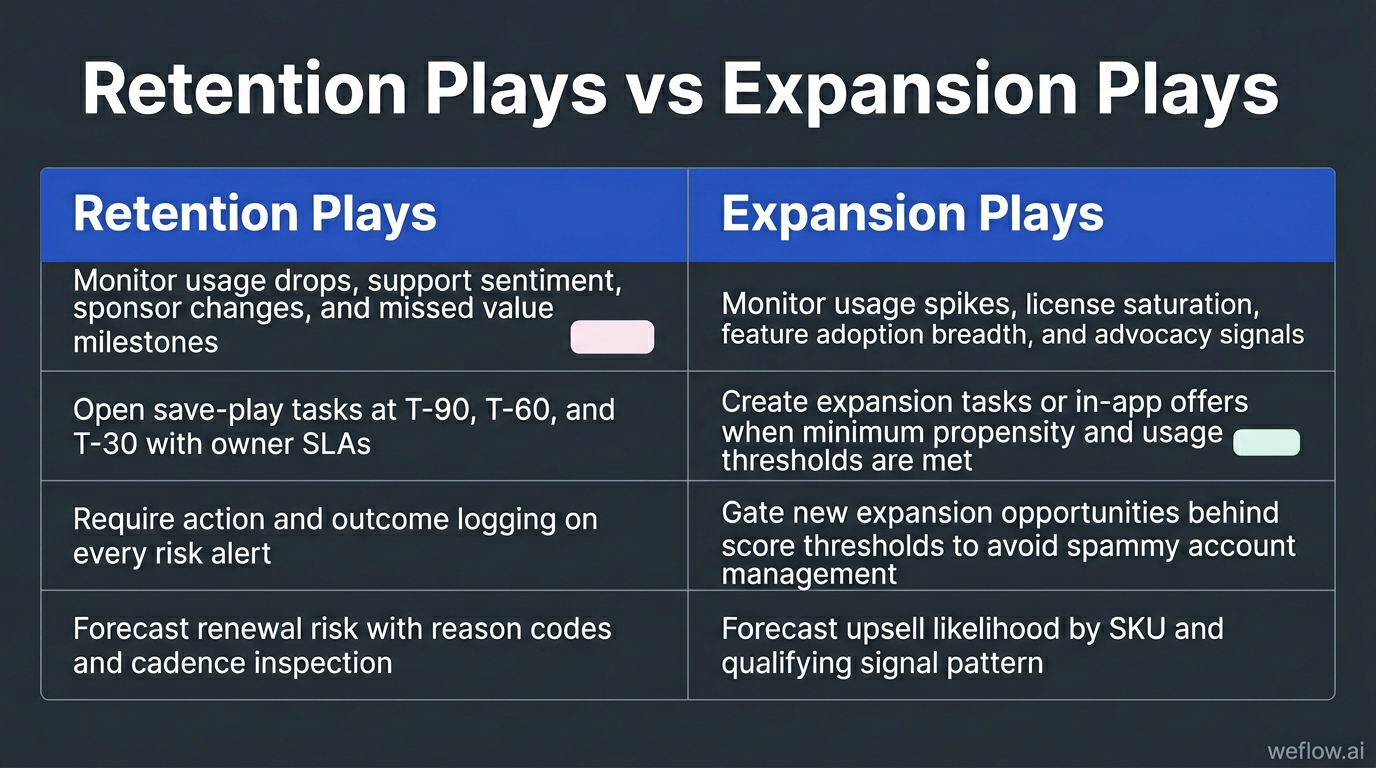
| Retention plays | Expansion plays |
|---|---|
| Monitor usage drops, support sentiment, sponsor changes, and missed value milestones | Monitor usage spikes, license saturation, feature adoption breadth, and advocacy signals |
| Open save-play tasks at T-90, T-60, and T-30 with owner SLAs | Create expansion tasks or in-app offers when minimum propensity and usage thresholds are met |
| Require action and outcome logging on every risk alert | Gate new expansion opportunities behind score thresholds to avoid spammy account management |
| Forecast renewal risk with reason codes and cadence inspection | Forecast upsell likelihood by SKU and qualifying signal pattern |
AI dashboards without task creation don’t change retention or expansion outcomes. The signal needs to open a play, assign an owner, and start a clock.
Predict renewal risks before the 90-day window
- Define renewal inputs clearly. Use usage deltas, executive engagement, support load, ticket themes, commercial terms, and QBR cadence.
- Enforce outreach at T-90, T-60, and T-30. Tie each point in the renewal calendar to a prescribed customer motion.
- Track forecast accuracy. Compare AI risk scoring to the CS roll-up and actual renewal result, then tune thresholds.
Waiting until T-30 is too late for most enterprise renewals. If sponsor alignment is weak, product usage is declining, or procurement will require new approvals, you need time to change the account trajectory—not just document the risk.
Score account health using product telemetry
- Weight factors that reflect value. Feature adoption depth, executive activity, workflow completion, support sentiment, and user breadth usually matter more than raw login counts.
- Open SLA-bound tasks when risk crosses threshold. Don’t just alert the CSM—create the follow-up action in the system of record.
- Require action and outcome logging. Every alert should capture what the team did and whether it changed the account trend.
- Re-weight monthly using actual churn data. Keep the factors that correlate to retention and remove the ones that don’t.
Monthly re-weighting matters because health models drift. What predicted churn six months ago may not matter now if your product adoption pattern or customer base changed.
Trigger cross-sell plays based on usage spikes
- Map add-ons to usage thresholds. Define the signals that indicate readiness for each SKU or expansion path.
- Route by deal size. Small expansions can go to in-app offers or scaled CS plays. Larger opportunities should go to account managers.
- Use proof points from calls and community. Surface advocacy, references, and successful use-case patterns in expansion outreach.
- Gate opp creation behind propensity scores. Require a minimum threshold before the team opens expansion opportunities.
That gating prevents account managers from spamming customers with every possible add-on. It protects the customer experience and keeps the pipeline tied to actual expansion readiness.
FAQ
How do we measure the ROI of GTM AI tools?
Measure ROI against historical baselines for pipeline coverage, SLA attainment, slipped commits, time-to-first-value, and renewal forecast accuracy. The cleanest setup is an A/B or holdout test where AI-assisted workflows are compared to manual controls over the same period.
What data do we need before implementing AI?
You need clear ICP tiers, labeled win/loss history, defined stage exits, owner rules, and enough Salesforce field discipline to trust the inputs. AI trained on bad labels or incomplete activity data will automate mistakes faster.
How does AI handle complex routing rules?
AI can match leads to accounts, apply territory and product rules, and route low-confidence matches to a human review queue instead of forcing a bad assignment. It should also respect out-of-office fallbacks, named-account logic, and round-robin rules where those apply.
Can AI update CRM fields without human review?
It can for low-risk fields when confidence is high and the write-back rules are governed, but critical fields should still require human approval. Human-in-the-loop review is the safest way to protect Salesforce data completeness, forecast quality, and auditability.
.webp)

.webp)
.webp)

.webp)
.webp)
.webp)
.webp)

.webp)