


16 AI Workflows RevOps Teams Run to Score Deals and Clean Pipeline [With Prompts]


Most RevOps teams use AI like a faster search bar. That gets you answers, but it doesn’t fix Salesforce data completeness, improve forecast confidence, or clean up pipeline before the Monday review.
This guide shows 16 repeatable AI workflows RevOps teams run across revenue intelligence, deal inspection, forecasting, and CRM hygiene—each with a prompt, trigger, inputs, and rollout steps. If you’re building these workflows in Weflow, a Salesforce-native revenue AI platform, or migrating from Gong to a deeper Salesforce write-back model, the same rule applies: structured inputs and structured outputs beat one-off prompts every time.
If your current setup leaves you with shallow field mapping, manual export workarounds, or activity gaps in Salesforce, start with one workflow that writes back to standard and custom fields. For most mid-market and enterprise B2B organizations on Salesforce Enterprise or Unlimited, that project should take weeks, not quarters.
[banner type="download" url="https://www.weflow.ai/content/ai-workflows-for-revops" text="16 AI Workflows & Prompts for RevOps" subtitle="16 RevOps AI workflows, prompts, and replace-vs-augment frameworks for pipeline hygiene and forecasting." button="Get it free"]RevOps AI fundamentals: build repeatable workflow engines
AI pays off in RevOps when it becomes part of an operating rhythm. The goal isn’t to ask smarter questions in a chat window—it’s to run the same structured analysis every week, write the result back to Salesforce, and improve data quality over time.
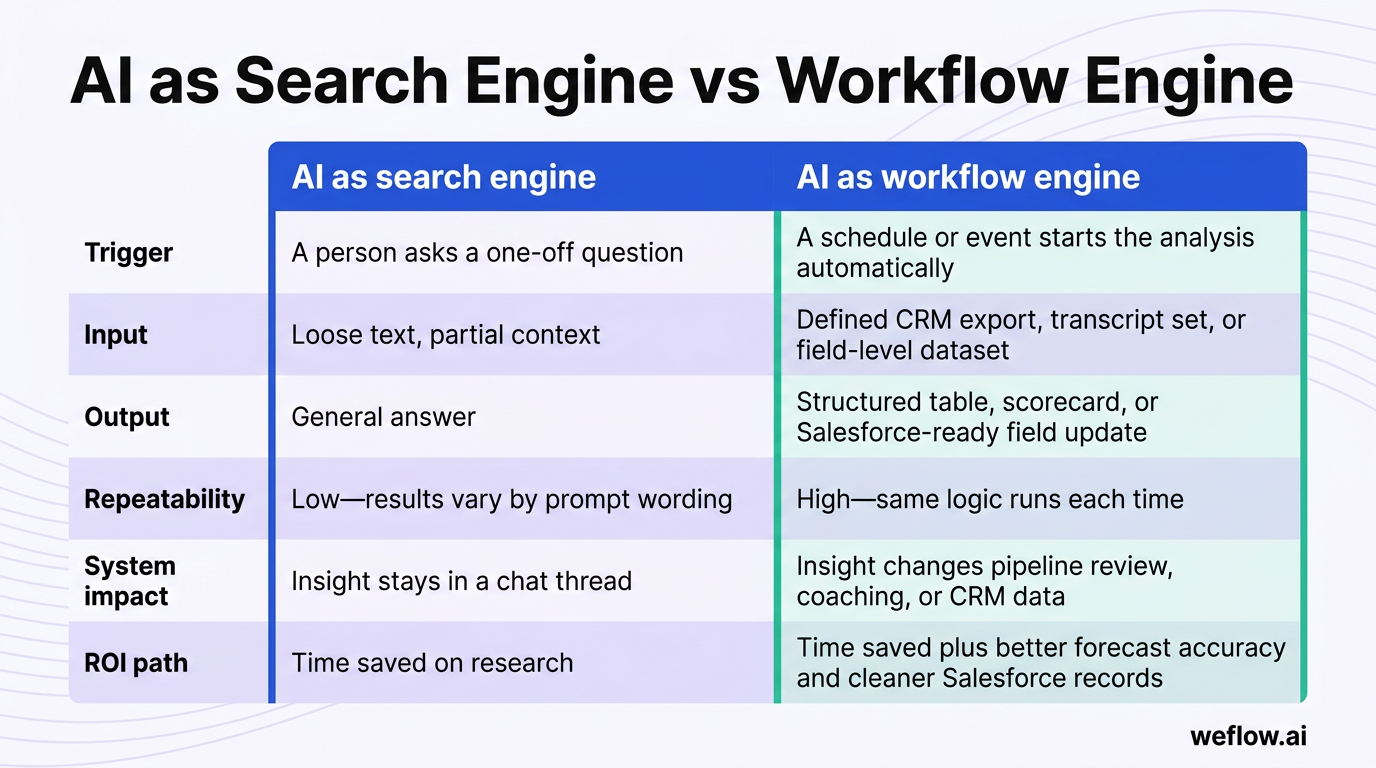
Treating AI like Google limits its value because search behavior is reactive. RevOps needs proactive systems: a known trigger, defined source data, a strict output format, and a next action tied to pipeline coverage, stage compliance, or forecast review.
| Dimension | AI as search engine | AI as workflow engine |
|---|---|---|
| Trigger | A person asks a one-off question | A schedule or event starts the analysis automatically |
| Input | Loose text, partial context | Defined CRM export, transcript set, or field-level dataset |
| Output | General answer | Structured table, scorecard, or Salesforce-ready field update |
| Repeatability | Low—results vary by prompt wording | High—same logic runs each time |
| System impact | Insight stays in a chat thread | Insight changes pipeline review, coaching, or CRM data |
| ROI path | Time saved on research | Time saved plus better forecast accuracy and cleaner Salesforce records |
Map tasks to replace, augment, or keep human
The fastest way to waste time with AI is to give it work humans should still own—or to keep manual work that AI can already do with better consistency. A simple replace/augment/human framework keeps the boundary clear.
| Category | What AI should do | RevOps example |
|---|---|---|
| Replace | Handle repetitive, data-heavy work with clear rules and inputs | Every Monday, flag opportunities with no activity in 14 days, missing next steps, or a close date pushed 2+ times |
| Augment | Do the first pass, score risk, summarize evidence, and suggest an action for human review | Before the forecast call, compare rep commit to an AI base case using stage history, recent activity, and transcript evidence |
| Stay human | Own judgment, relationships, tradeoffs, and accountability | A sales leader decides whether to keep a deal in commit after reviewing the AI risk score and manager input |
In practice, this looks simple. Replace the manual hygiene report your Salesforce admin builds in a spreadsheet every week. Augment the forecast meeting with an evidence-based view of commit risk. Keep the final call on forecast, rep coaching, and executive escalation with people who are accountable for the number.
Structure prompts for structured CRM outputs
A good RevOps prompt doesn’t just ask for analysis. It defines the operating context so the model returns something you can paste into Salesforce, use in report builder, or route into a workflow with validation rules.
- Role: Tell the model what job it’s doing. “You are a RevOps analyst reviewing deal health before a forecast call” works better than a generic request.
- Context: Name the data source and business situation. Include stage history, last activity date, call transcripts, MEDDIC fields, segment, or quota context.
- Task: State the exact job. Score the deal, identify top risks, group objections, calculate coverage, or extract CRM updates.
- Output format: Define the structure. Ask for a table, scorecard, list of Salesforce field values, or a strict set of columns such as Opportunity ID, Risk Score, Risk Reason, Next Action, Owner.
- Constraints: Tell the model what not to do. Use only evidence in the provided data, mark anything unconfirmed as missing, and don’t infer a close date unless the buyer stated one.
The output format is usually the most important part. If the model gives you a good paragraph but your workflow needs values for Next_Step__c, Decision_Process__c, CloseDate, and StageName, the result dies in Slack instead of improving Salesforce data completeness.
This is also where many teams hit a ceiling with Gong or Salesforce Einstein Activity Capture. If conversation data doesn’t write back cleanly to reportable Salesforce records, or only a thin set of fields is available for sync, downstream workflows break. RevOps ends up filling the gap with manual notes, CSV uploads, Flow workarounds, or custom Apex just to make the data usable.
Shift from search queries to automated workflows
A true AI workflow has four parts: a trigger, a defined input, a structured output, and an operational next step. Without all four, you have a helpful answer—but not a system.
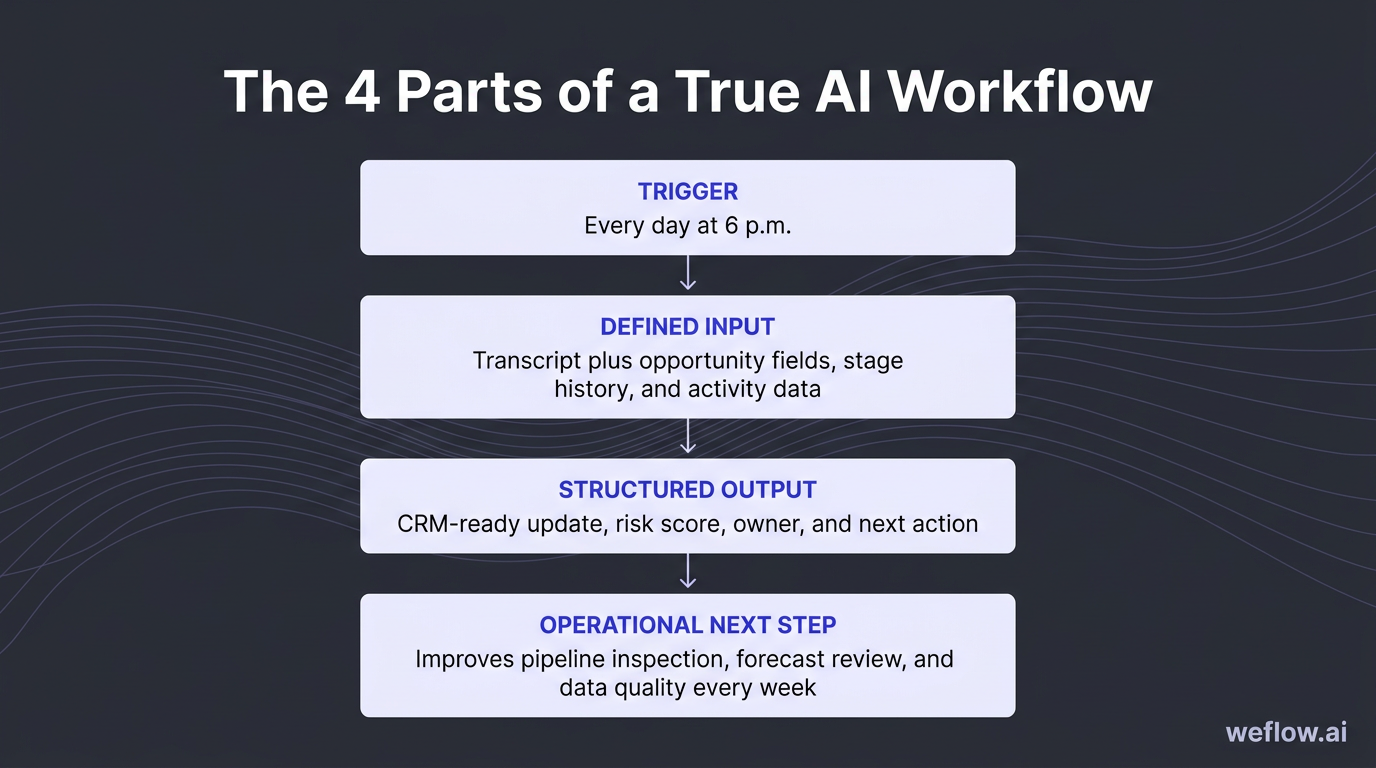
| One-off prompt | Workflow | |
|---|---|---|
| Example | “Summarize this sales call.” | “Every day at 6 p.m., summarize all recorded calls, extract next steps and MEDDIC updates, and flag any deal with no confirmed decision process.” |
| Timing | Reactive | Scheduled or event-driven |
| Data source | One transcript | Transcript plus opportunity fields, stage history, and activity data |
| Result | Text summary | CRM-ready update, risk score, owner, and next action |
| Operational use | Helps one person once | Improves pipeline inspection, forecast review, and data quality every week |
The 16 workflows below are built for workflow mode, not search mode. You can run them manually to start, but each one becomes more useful when it’s tied to a recurring cadence, a stable Salesforce export, and a write-back process that keeps your opportunity data current.
Revenue intelligence workflows: spot patterns before deals close
Revenue intelligence usually lags because someone has to pull reports, read call notes, and turn raw data into a recommendation. AI cuts that cycle from end-of-quarter hindsight to a weekly or monthly operating rhythm.
These workflows work best when activity completeness is high. If email, meeting, and transcript capture sits below 95%, or competitor mentions never make it back to Salesforce, your pattern analysis will reflect logging behavior more than buyer behavior.
Analyze win/loss patterns across closed deals
Most win/loss analysis breaks because it depends on closed-lost picklists and rep memory. That hides the real pattern: what buyers actually said in calls, what objections repeated, and where certain segments or competitors changed the outcome.
- Prompt intent: Find the real reasons you win and lose across deals, not just the reasons reps selected in Salesforce.
- Prompt: “You are a RevOps analyst. Here are notes, CRM outcomes, and call transcripts from our last [X] closed deals: [paste data]. Identify the top 3 reasons we lost deals, the top 3 patterns in deals we won, and any differences by segment, deal size, region, or competitor. Cite at least one specific example for each finding. Output as a structured table with a one-line summary at the top.”
- Trigger: Monthly or quarterly, once at least 10 deals have closed.
- Inputs: Closed-won and closed-lost reason codes, opportunity notes, call transcripts, deal size, segment, competitor, and sales cycle length.
- Track: Win rate by segment, win rate against named competitors, and change in win rate after enablement updates.
- Export 30 to 90 days of closed-won and closed-lost opportunities from Salesforce.
- Normalize competitor names, segment labels, and closed-lost reasons so the model isn’t reading three different spellings of the same competitor.
- Add transcripts and sales notes for the same opportunity set.
- Run the prompt and review the output with sales leadership.
- Update battlecards, qualification criteria, and ICP scoring based on the findings.
Closed-lost dropdowns alone won’t get you there. Reps compress a detailed buying process into one code like “budget” or “timing,” while transcripts often show the real issue was weak champion access, a stalled security review, or a stronger incumbent.
Extract competitive intelligence from buyer calls
Competitive battlecards age fast because the market shifts faster than enablement docs do. A monthly AI pass through live buyer conversations keeps your competitive view tied to what prospects are saying now.
- Prompt intent: Turn competitor mentions in calls into current, evidence-based battlecards.
- Prompt: “You are a competitive intelligence analyst. Here are transcripts and CRM notes from deals where [Competitor Name] was mentioned: [paste data]. Summarize how buyers describe this competitor, the specific objections they raised about us in comparison, the likely deciding factors when we lose, and the patterns in deals where we win. Output as a competitor intelligence card.”
- Trigger: Monthly, and any time a competitor appears more often in notes, loss reasons, or forecast calls.
- Inputs: Call transcripts, deal notes, closed-lost reasons, segment, ACV, and stage progression for deals where the competitor appears.
- Track: Win rate against that competitor, frequency of competitor mentions, and change in competitive loss rate after battlecard updates.
- Filter Salesforce opportunities where the competitor is mentioned in a note field, transcript keyword set, or closed-lost reason.
- Group the data by segment or region if you sell differently across teams.
- Run the prompt and review the output for repeated objections and proof points.
- Feed the result to enablement for battlecard updates and to product for recurring gap analysis.
- Brief reps on the top three changes before the next wave of competitive deals.
The advantage here is speed. Updating a battlecard every month from live objections is better than waiting for one big quarterly project that arrives after the pattern already hurt win rate.
Detect early churn signals in active accounts
By the time a customer says they’re considering cancellation, the account has usually been sliding for weeks. AI helps CS and RevOps catch the quieter signals earlier: lower usage, unresolved tickets, a quiet executive sponsor, or repeated negative language in meeting notes.
- Prompt intent: Flag accounts with evidence of churn risk before renewal risk becomes obvious.
- Prompt: “You are a Customer Success analyst. Here are CS notes, support data, NPS scores, product usage metrics, and renewal details for our active accounts: [paste data]. Flag any accounts showing early churn signals such as declining engagement, unresolved support issues, negative sentiment, stakeholder silence, or reduced product adoption. For each flagged account, state the signal driving the flag, assign a high, medium, or low risk rating, and recommend one save action. Output as a risk-ranked account list.”
- Trigger: Weekly for strategic accounts and monthly for the full book.
- Inputs: CS notes, support ticket age and volume, NPS, renewal date, product usage, contact engagement, and account tier.
- Track: Gross retention, logo retention, save rate on flagged accounts, and precision of high-risk flags over time.
- Pull the latest renewal book with usage and support data.
- Blend in unstructured CS notes so the model can pick up sentiment and stakeholder changes.
- Run the prompt and route high-risk accounts to the CS lead for review.
- For strategic accounts, align Sales and CS on a defined save play with owners and dates.
- Log each intervention and outcome in Salesforce or your CS system so the model can be tuned against actual churn outcomes later.
That last step matters. If you don’t log interventions and outcomes, the workflow never improves. Over time, you want to know which signals actually preceded churn and which ones just created noise.
Build ICP profiles from closed-won CRM data
Most ICP decks start as a theory. This workflow rebuilds your ICP from customers who bought faster, paid more, and converted at a better rate—then gives RevOps a cleaner input for lead scoring and territory planning.
- Prompt intent: Replace assumed buyer profiles with evidence from closed-won data.
- Prompt: “You are a RevOps analyst. Here is data from our last [X] closed-won deals: [paste data]. Identify the top firmographic and behavioral characteristics of our best customers, defined by highest ACV, shortest sales cycle, and strongest conversion from first meeting to close. For each characteristic, note frequency and revenue impact. Flag segments that appear often but have long cycles or low ACV. Output as a prioritized ICP profile with a suggested scoring weight for each attribute.”
- Trigger: Quarterly, and any time SDR conversion drops or pipeline quality weakens.
- Inputs: Industry, company size, region, segment, deal source, ACV, sales cycle length, stakeholder count, product line, and win rate.
- Track: Lead-to-opportunity conversion, MQL-to-SQL conversion, ACV by segment, and sales cycle length after scoring changes.
- Export six to 12 months of closed-won opportunities with consistent firmographic fields.
- Check field mapping first—if company size, source, or industry data is incomplete, fix that before trusting the result.
- Run the prompt and compare the output to your current scoring model.
- Update scoring weights in Salesforce or your MAP based on the patterns that correlate with revenue quality.
- Share the updated profile with SDR, AE, and marketing teams before the next planning cycle.
Run this quarterly because ICP drift is common. The mix of customers that bought last year may not match the buyers converting now, especially after pricing changes, packaging changes, or a new enterprise push.
Deal intelligence workflows: catch slipping opportunities early
Traditional pipeline reviews still rely too much on rep confidence and manager intuition. Deal intelligence workflows replace “how do you feel about this one?” with a score, evidence, and a clear next action before the meeting starts.
The point isn’t to automate judgment. It’s to make weekly reviews use manager time where it matters—on deals with real risk, weak qualification, or repeated objections that your current playbook isn’t handling.
Score deal health before weekly pipeline reviews
This workflow gives each deal an objective health score before the manager and rep ever join the call. That keeps 1:1 time focused on exceptions instead of walking line by line through green deals.
- Prompt intent: Score active deals from 1 to 10 using evidence from Salesforce and recent buyer activity.
- Prompt: “You are a RevOps analyst reviewing deal health before a forecast call. Here is data for [Deal Name]: stage, amount, close date, close date change count, days in stage, last activity date, recent call notes, recent email activity, and stakeholder activity: [paste data]. Score this deal’s health from 1-10. Identify the top 3 risks to closing this quarter, cite the evidence for each risk, and suggest one action the rep should take this week. Output as a deal health card with a one-line summary at the top.”
- Trigger: Every Monday before pipeline review, plus on any deal with stage regression, no activity in 14+ days, or multiple close date pushes.
- Inputs: Stage, amount, stage age, close date history, last activity, recent transcripts or notes, email activity, and stakeholder count.
- Track: Commit slippage rate, percent of flagged deals that slip vs. close, and health score movement week over week.
- Export all in-quarter opportunities with stage history and recent activity.
- Run the prompt by deal or in batches by rep.
- Group deals into high, medium, and low review priority.
- Use only the at-risk set as the main agenda for the manager pipeline review.
- Track whether the risk score predicted slip behavior after 30 to 60 days.
Managers usually get the highest return by spending 1:1 time only on deals the workflow flags as at risk. That’s how you cut forecast theater and get to coaching faster.
Audit MEDDIC compliance before stage advancement
Many teams say they run MEDDIC, but Salesforce tells a different story. A workflow that checks transcripts and notes against MEDDIC before stage movement makes methodology operational instead of decorative.
- Prompt intent: Score each MEDDIC element as confirmed, weak, or missing before a deal advances.
- Prompt: “You are a sales methodology coach reviewing a deal before stage advancement. Here are the CRM notes, latest call transcript, and relevant email threads for this deal: [paste data]. Assess the deal against MEDDIC. For Metrics, Economic Buyer, Decision Criteria, Decision Process, Identify Pain, and Champion, classify each element as confirmed, weak, or missing. For every weak or missing element, write the exact question the rep should ask on the next call. Output as a MEDDIC scorecard.”
- Trigger: Before stage advancement and during weekly reviews for quarter-close deals.
- Inputs: Opportunity notes, transcripts, MEDDIC field values, relevant email threads, and stage criteria.
- Track: MEDDIC completion by stage, win rate of MEDDIC-complete deals, and late-stage loss rate tied to qualification gaps.
- Identify deals scheduled to advance stages this week.
- Pull the latest transcript and compare it to current MEDDIC field values in Salesforce.
- Run the prompt and review any mismatch between what the transcript shows and what fields claim is complete.
- Set a stage gate—if two or more required MEDDIC elements are missing, the deal does not advance.
- Send the suggested next-call questions back to the rep and manager.
This workflow is useful because it does more than score compliance. It gives reps the next questions to ask, which turns methodology into day-to-day deal execution.
Surface late-stage objections to update playbooks
Late-stage objections rarely start late. They usually show up earlier as soft hesitation, unanswered security questions, or a pricing concern the rep marked as “handled” too soon.
- Prompt intent: Identify recurring objection themes across active late-stage deals and connect them to winning responses.
- Prompt: “You are a RevOps analyst. Here are transcripts, email threads, and notes from our active late-stage deals: [paste data]. Surface all objections raised by prospects. Group them by theme such as pricing, timing, internal buy-in, competitor comparison, product fit, or security/compliance. For each theme, show how often it appears and suggest the response pattern that aligns with deals we won where the objection was overcome. Output as an objection map with frequency count and suggested response.”
- Trigger: Weekly across late-stage deals, and any time late-stage conversion drops in a segment or region.
- Inputs: Late-stage transcripts, emails, deal notes, segment, and outcome history from past won deals.
- Track: Late-stage win rate, loss rate by objection theme, and frequency trend by theme over time.
- Pull two to four weeks of late-stage deal conversations.
- Run the prompt and sort the output by frequency.
- Review the top three objection themes with sales managers and enablement.
- Update your playbook with the response patterns that matched won deals, not generic rebuttals.
- Share the objection map in weekly pipeline review so managers coach to the pattern, not just the individual deal.
This helps earlier in the cycle too. If pricing pressure is showing up in stage 5, you can usually find the warning sign back in discovery, stakeholder alignment, or an unconfirmed business case.
Summarize call intelligence into CRM-ready notes
Standardized call summaries are one of the highest-return workflows in RevOps because they improve everything downstream. If your summaries are inconsistent, your MEDDIC scorecards, risk flags, and CRM updates will be inconsistent too.
- Prompt intent: Turn transcripts into one consistent summary format every time.
- Prompt: “You are a sales analyst. Here is a transcript from a sales call: [paste transcript]. Provide a structured summary covering: key business context, pain points mentioned, objections raised and how the rep responded, commitments made by both sides, agreed next steps with owners and timelines, and any red flags that suggest deal risk. Output as a structured call summary with a clear heading for each section.”
- Trigger: Within 24 hours of every sales call or customer meeting.
- Inputs: Transcript or recording, opportunity context, and current stage.
- Track: Summary coverage rate, percent of meetings logged within 24 hours, and CRM field completion rate after call logging.
- Make sure all customer-facing calls are recorded and transcribed.
- Run the prompt as close to the meeting as possible.
- Review the summary for two minutes to catch any transcript errors or false assumptions.
- Paste the result into the opportunity record or write it back to structured fields if your system supports that.
- Route red flags to the manager before the next touchpoint.
If you want the other workflows in this article to perform well, start here. Standardized summaries create cleaner source data for risk scoring, methodology audits, and follow-up automation.
Pipeline and forecast workflows: predict revenue with accuracy
Bad CRM data doesn’t stay in CRM. It shows up in board decks, quarter-end surprises, and forecast calls where nobody trusts the commit. These workflows reduce that risk by enforcing data quality before the number reaches leadership.
They also expose a common systems problem: if activity data sits outside normal Salesforce reporting or write-back is shallow, your forecast logic is incomplete. RevOps can’t calculate real pipeline health from a copy of the truth—it needs the truth in Salesforce.
Calculate pipeline coverage ratios by rep and segment
“We have enough pipeline” is not a metric. Coverage analysis gets more useful when it reflects stage conversion history, segment differences, and rep-level quota context.
- Prompt intent: Calculate realistic coverage ratios and flag where pipeline generation needs to change this week.
- Prompt: “You are a RevOps analyst. Here is our current pipeline by rep and segment, quota targets, and historical win rates by stage: [paste data]. Calculate the pipeline coverage ratio for each rep and segment. Flag each result as red, amber, or green based on realistic coverage needed to hit quota. Use 2.5x-3.5x as a starting range for mid-market and around 3x for enterprise, then adjust using our historical conversion data. For each red or amber area, suggest one specific action to address the gap this week. Output as a coverage table.”
- Trigger: Weekly pipeline review and the first week of each month.
- Inputs: Pipeline by stage, rep, segment, quota targets, and historical stage-to-close conversion rates.
- Track: Coverage ratio by rep and segment, movement in red and amber counts, and correlation between coverage and quota attainment.
- Export pipeline and quota data from Salesforce by rep and segment.
- Layer in historical conversion rates rather than relying on default stage probability.
- Run the prompt and review only the red and amber areas in the meeting.
- Route SDR sourcing, outbound effort, or marketing support toward the gaps.
- If the same segment stays red for three weeks, bring it into headcount or territory planning.
Enterprise and mid-market shouldn’t share the same baseline. Enterprise deals are larger and fewer, so a lower numeric coverage ratio may still be enough. Mid-market often needs more volume because conversion rates and deal size behave differently.
Run weekly hygiene checks on stale opportunities
Pipeline hygiene is the simplest workflow in this list, and often the first one worth shipping. It improves forecast accuracy, saves manager time, and gives your Salesforce admin a measurable data quality standard to enforce.
- Prompt intent: Find stale opportunities, pushed close dates, overdue deals, and missing required fields every Monday.
- Prompt: “You are a RevOps analyst running a weekly pipeline hygiene check. Here is our current pipeline data: [paste data]. Flag all opportunities that meet any of these conditions: no activity in the last 14 days, close date pushed more than twice, close date in the past while still open, or missing required fields such as next step, decision timeline, MEDDIC fields, or forecast category. For each flagged deal, state the issue and the action the rep needs to take. Group the output by issue type. Output as a hygiene report.”
- Trigger: Every Monday morning, 24 hours before pipeline review.
- Inputs: Full opportunity export, stage, close date history, last activity date, forecast category, next step, required custom fields, and owner.
- Track: Required field completion rate, percent of opportunities with recent activity, and count of overdue open deals.
- Schedule a standing Monday morning export or automated dataset refresh.
- Include every field your validation rules expect reps to maintain.
- Run the prompt and sort by issue type and rep owner.
- Send the report to reps with a 24-hour correction window before the review.
- Track the hygiene score week over week and share it as a team metric, not an admin side project.
Use this as a data quality standard, not a micromanagement tool. The goal is to stop bad data from entering the forecast conversation, not to create another rep-policing ritual.
Predict forecast accuracy against rep commits
AI should not replace the rep commit. It should stress-test it with historical conversion data, stage behavior, and call evidence so managers can inspect the gap before it turns into a miss.
- Prompt intent: Build an AI base case forecast and compare it with what reps submitted.
- Prompt: “You are a revenue forecasting analyst. Here is our current quarter pipeline with rep commit, stage history, close date changes, activity recency, MEDDIC completeness, and recent call summaries for each commit deal: [paste data]. For each deal, estimate the likelihood of closing this quarter, generate an AI base case forecast, compare it with the rep’s commit, and explain any gap using specific evidence from the data. Flag any commit deal that appears overstated. Output as a forecast review table by rep.”
- Trigger: Weekly before the forecast call and mid-quarter reforecast.
- Inputs: Rep commit, forecast category, stage history, activity recency, close date movement, transcript summaries, and historical win rates.
- Track: Forecast error rate, commit accuracy, and size of the gap between AI base case and rep commit over time.
- Pull all commit and best-case deals for the current quarter.
- Add history fields that often predict slip behavior: close date pushes, days in stage, and activity recency.
- Run the prompt and sort the output by largest gap between AI base case and rep commit.
- Review those gaps with managers before the forecast call so the meeting starts with the right deals.
- Track whether the AI base case or the rep commit ended up closer to actual closed revenue.
The goal here isn’t to overrule the field. It’s to create an objective starting point for the conversation, especially when a rep’s confidence is high but the deal record shows weak recent evidence.
Build revenue scenarios for executive presentations
One forecast number is useful for operating reviews. It’s not enough for board reporting. Scenario planning gives leadership a range, a set of assumptions, and the specific deals most likely to move the outcome.
- Prompt intent: Build best, base, and worst-case revenue scenarios tied to actual pipeline conditions.
- Prompt: “You are a revenue planning analyst. Here is our current pipeline, historical win rates, and key assumptions for this quarter: [paste data]. Build best-case, base-case, and worst-case revenue scenarios. For each scenario, state the main assumption driving it, calculate the likely revenue outcome, and identify the 2-3 deals or segments with the most risk or upside. Output as a scenario planning table with a one-line narrative for each scenario suitable for an executive presentation.”
- Trigger: Two to three weeks before quarter-end, and during annual planning or after a major deal change.
- Inputs: Current pipeline, stage, amount, probability, historical win rates, known hiring changes, pricing changes, and large binary deals.
- Track: Base-case accuracy, end-of-quarter forecast volatility, and whether the worst case held as a realistic floor.
- Export current pipeline with probabilities and segment detail.
- Layer in business assumptions that won’t show up in stage data alone, such as hiring freezes or a pending pricing change.
- Run the prompt and review the scenario logic, not just the top-line number.
- Align with the CRO and Finance on what would need to happen for each case to materialize.
- For the worst case, define contingency actions before the board meeting instead of after a miss.
Run this early enough to act on it. Two to three weeks before quarter-end is usually the right window because there’s still time to adjust deal strategy, pricing approvals, or executive involvement.
AI productivity workflows: eliminate manual CRM data entry
Rep productivity and CRM data quality are tied together. If updating Salesforce takes 20 minutes after every call, field completion drops, next steps go stale, and every workflow downstream gets worse.
This is also where many teams feel the limit of Gong most directly. If summaries stay in Gong and Salesforce only gets shallow field mapping, admins still need manual workarounds to update opportunity fields, methodology fields, and next steps. Teams migrating to Weflow usually start here because Salesforce write-back is deeper, the integration footprint is smaller, and the deployment is measured in weeks, not quarters.
Extract CRM updates directly from call summaries
Once you have a standard call summary, the next step is obvious: turn it into structured field updates. This removes rep admin work and improves the data completeness that forecasting depends on.
- Prompt intent: Convert call summaries and email threads into Salesforce-ready opportunity updates.
- Prompt: “You are a CRM data analyst. Here is a record of recent interactions with [Prospect Name at Company]: [paste call summary and/or email thread]. Extract these CRM updates: next steps with owner, pain points confirmed, objections raised, MEDDIC elements confirmed or changed, recommended opportunity stage, recommended close date, and any new contacts mentioned. Output as a structured CRM update ready to paste into Salesforce.”
- Trigger: After every meaningful touchpoint such as a call, demo, or pricing email.
- Inputs: Standard call summary, relevant email thread, current opportunity fields, and existing MEDDIC values.
- Track: Field completion rate, stage accuracy, close date accuracy, and rep admin time saved per week.
- Run your call summary workflow first.
- Feed the summary plus related email thread into this prompt.
- Map the output to standard and custom Salesforce fields such as NextStep__c, CloseDate, Decision_Criteria__c, and StageName.
- Review any stage or close date recommendation before write-back.
- Measure admin time reduction and field completeness after two to four weeks.
This workflow is most useful when it’s chained directly after the summary workflow. The closer the system is to the source conversation, the less manual cleanup RevOps has to do later.
Map call transcripts to sales methodology fields
Methodology often lives in training decks while Salesforce fields stay blank. Mapping transcripts to MEDDIC, SPIN, or another framework after every call turns methodology into a daily operating habit.
- Prompt intent: Populate methodology fields automatically and flag what still needs validation.
- Prompt: “You are a sales analyst familiar with [MEDDIC/SPIN/Challenger]. Here is a transcript from a sales call: [paste transcript]. Produce a structured summary covering the customer context, pain points, methodology elements surfaced, which criteria were confirmed, which were mentioned but unvalidated, and which were not covered. Include objections, commitments, next steps with owner and deadline, and any deal risks. Output in a format aligned to our Salesforce methodology fields.”
- Trigger: After every call, especially for active opportunities in pipeline.
- Inputs: Transcript, methodology framework, current stage, and existing methodology field values.
- Track: Methodology field completion rate, stage compliance, and rep adoption of methodology fields.
- Standardize which methodology fields are required at each stage.
- Run the prompt immediately after the meeting while context is still fresh.
- Compare the output with existing Salesforce values and update only what is evidenced in the transcript.
- Flag missing criteria for the rep’s next call plan.
- Share the summary with internal stakeholders who need the deal context but didn’t attend the meeting.
This works best when tied to validation rules or stage gates. If a field is required for stage advancement, AI can help fill it—but only if the buyer actually said enough to support the value.
Score rep calls for targeted 1:1 coaching sessions
Managers often walk into 1:1s without transcript-backed coaching points. A call scoring workflow fixes that by turning raw conversations into a short, evidence-based coaching agenda.
- Prompt intent: Score calls on the few dimensions that matter most for coaching quality and conversion.
- Prompt: “You are an experienced sales coach. Here is a transcript from a sales call: [paste transcript]. Score this call from 1-10 on discovery quality, objection handling, next steps clarity, and talk-to-listen ratio. For each dimension, give one coaching point backed by evidence from the transcript. Output as a coaching scorecard.”
- Trigger: Within 24 hours of every call. For high-volume teams, prioritize first calls and late-stage calls.
- Inputs: Transcript, call type, stage, and rep name.
- Track: Average score by rep, score trend by dimension, and correlation between call score and win rate.
- Select the two call types with the highest coaching return—usually first meetings and late-stage calls.
- Run the prompt within a day of the meeting.
- Share the scorecard with the manager before the 1:1.
- Track patterns across the team, not just by rep, to see where enablement needs to step in.
- Use the trend line over time as the real signal, not one isolated score.
Scoring first calls and late-stage calls gives the highest coaching leverage for high-volume teams. Those are the two moments where weak execution shows up fastest in pipeline quality and win rate.
Draft personalized follow-up emails in under a minute
Fast follow-up helps deal momentum, but only if the email sounds like it came from someone who was actually in the room. The workflow should draft the email, not send it without review.
- Prompt intent: Draft a meeting follow-up that references real buyer context and confirms the next step.
- Prompt: “You are a sales rep writing a follow-up email after a meeting with a prospect. Here is a summary of the call: [paste call summary]. Write a follow-up email that opens with a specific reference to something the prospect said, recaps the main business challenges in 2-3 lines, confirms the next steps with owners and deadlines, includes any materials promised on the call, and ends with one clear call to action. Keep the email under 200 words and write in a direct, professional tone.”
- Trigger: Immediately after the call, with a target send time of under 2 hours.
- Inputs: Structured call summary, promised follow-up materials, and next meeting details.
- Track: Time from call end to send, reply rate, and percent of meetings followed up within 2 hours.
- Run the call summary workflow first.
- Feed that summary into the follow-up prompt.
- Have the rep spend two minutes checking specifics, owners, dates, and tone.
- Add any personal detail that only came through live in the call.
- Send within the 2-hour SLA.
Don’t send AI drafts blindly. The workflow should remove the blank page, not remove rep judgment. A fast, specific follow-up is good. A wrong follow-up sent instantly is worse than no follow-up at all.
RevOps AI adoption: start with one weekly pipeline workflow
You do not need all 16 workflows live next month. Start with one workflow that runs on a fixed cadence, uses a clean Salesforce export, and produces an output the team can verify quickly.
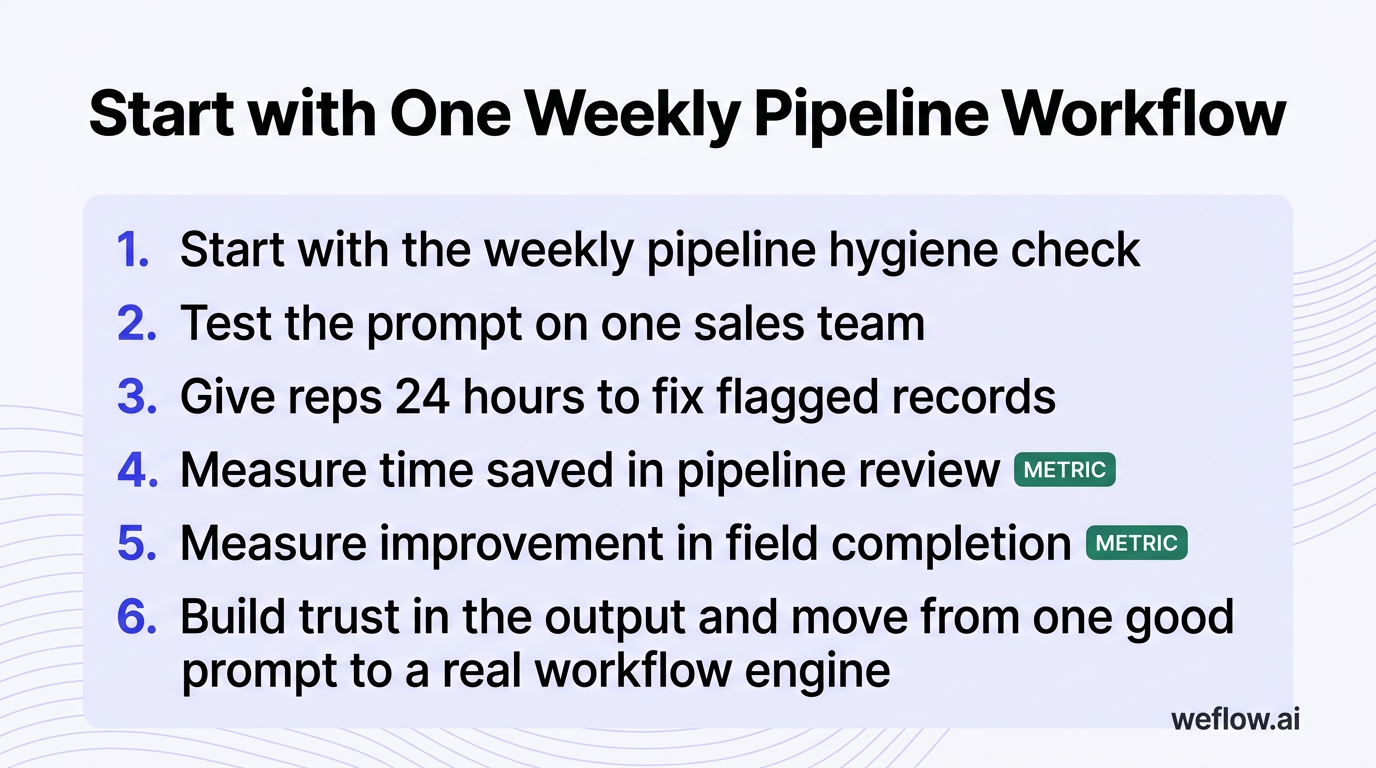
Start with the weekly pipeline hygiene check. Test the prompt on one sales team, give reps 24 hours to fix flagged records, and measure two things: time saved in pipeline review and improvement in field completion. That’s how you build trust in the output and move from one good prompt to a real workflow engine.
FAQ
What makes a good AI prompt for RevOps?
A good RevOps prompt has five parts: role, context, task, output format, and constraints. The difference between an okay prompt and a reliable one is usually the schema. If you want CRM-ready output, name the Salesforce fields or the exact table columns, define allowed values, and tell the model to mark anything unsupported by evidence as missing. That one instruction cuts false confidence fast.
How often should RevOps run pipeline hygiene checks?
Weekly is the baseline, usually Monday morning, with a 24-hour fix window before pipeline review. You should also run the same check before quarter-end forecast calls, after territory changes, after mass data loads, and any time you change validation rules or required fields in Salesforce. Hygiene is not a once-a-quarter cleanup project—it’s an operating rhythm.
Can AI replace human sales forecasting entirely?
No. AI is good at probability weighting, anomaly detection, and finding evidence that a commit is weak. Human leaders still need to own the final forecast because they know what the model often can’t see clearly: executive sponsor pressure, legal or procurement dynamics, pricing exception decisions, and strategic calls about where to spend time. AI should produce the base case. Humans should own the commit.
Which CRM data points matter most for AI analysis?
The strongest workflows combine structured and unstructured data. On the structured side, the core fields are stage history, close date movement, last activity date, next step age, amount, forecast category, segment, competitor, stakeholder count, and methodology completion. On the unstructured side, transcripts, meeting notes, and email threads usually carry the most signal because they show buyer language, objections, and actual next steps. If those source records are incomplete, the model quality drops faster than most teams expect.
.webp)

.webp)
.webp)

.webp)

.webp)
.webp)
.webp)

.webp)