


90-Day RevOps Plan to Operationalize Your 2026 GTM Strategy [Step-by-Step]


Most annual GTM plans break in the same place: the strategy gets approved, but the operating model never fully makes it into Salesforce, manager workflows, or the weekly revenue cadence. By the time the field starts asking who owns what, which number matters, and which dashboard to trust, RevOps is already in cleanup mode.
This guide gives you a practical 90-day rollout plan for closing that gap. We’ll cover readiness, revenue modeling, GTM mechanics, systems and reporting, field enablement, revenue cadence, early-warning signals, and what good looks like by day 30, 60, and 90.
[banner type="download" url="https://www.weflow.ai/content/operationalize-your-2026-gtm-plan" text="2026 GTM Plan: 90-Day RevOps Guide" subtitle="Get segmentation frameworks, rep-capacity templates, GTM rules checklists, and forecast assumptions." button="Download now"]
RevOps foundations: confirm the plan can go live
This framework is for RevOps leaders, Sales Ops managers, Salesforce admins, and Business Systems teams responsible for turning the annual GTM plan into live process, data, and reporting. The 90-day clock should start only after executive targets and the base scenario are signed off—not when planning is still changing every week.
If you’re a smaller GTM team, one RevOps owner may carry multiple workstreams with manager support. If you’re running a multi-region or multi-motion sales org, keep the same structure, but assign clear regional or functional owners and tighter change control.
Pause and fix basics first if your source-of-truth decisions, target ownership, or Salesforce reporting layer are still unsettled. Those gaps don’t stay small. They show up later as quota disputes, reporting mismatches, territory exceptions, and forecast noise.
Score readiness across targets, systems, forums
Before you operationalize anything, run a short self-check. Readiness issues compound later—especially in quotas, reporting, and rollout communications—so it’s cheaper to find them now.
Yes/No: Do you have signed-off ARR and NRR targets broken down by segment, region, and motion?
Yes/No: Has leadership chosen one base scenario that Sales, Marketing, CS, Finance, and RevOps are all planning against?
Yes/No: Is your GTM org structure and coverage model documented and approved?
Yes/No: Is there one executive sponsor for GTM execution and one RevOps owner for the 90-day rollout?
Yes/No: Is Salesforce the single source of truth for accounts, opportunities, pipeline, and forecast reporting?
Yes/No: Can you see last year’s pipeline, win rate, cycle time, attainment, and retention metrics in one reporting layer?
Yes/No: Are your core meetings already defined—weekly pipeline, forecast review, monthly performance review, and QBR?
Yes/No: Do you have a written policy for changes to territories, quotas, and comp-related ownership rules?
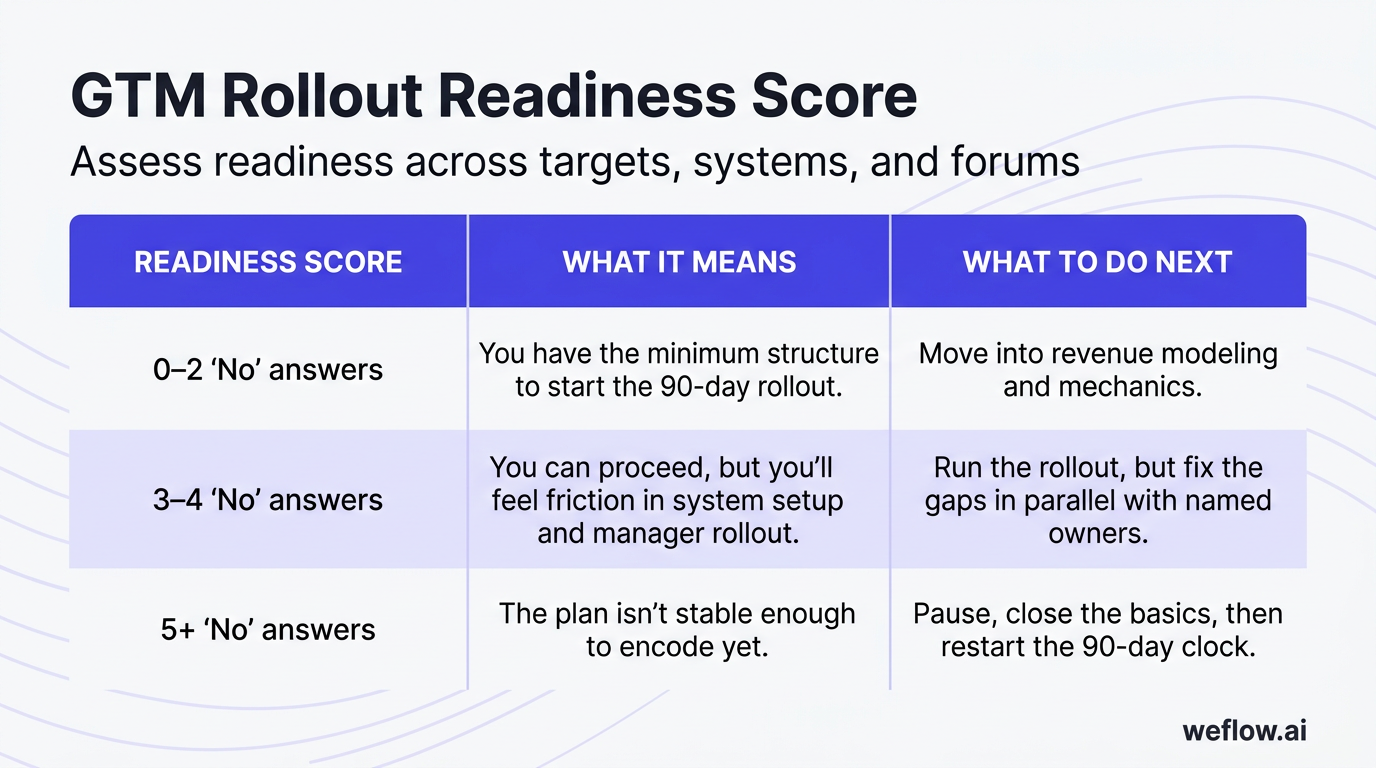
Readiness score | What it means | What to do next |
|---|---|---|
0–2 “No” answers | You have the minimum structure to start the 90-day rollout. | Move into revenue modeling and mechanics. |
3–4 “No” answers | You can proceed, but you’ll feel friction in system setup and manager rollout. | Run the rollout, but fix the gaps in parallel with named owners. |
5+ “No” answers | The plan isn’t stable enough to encode yet. | Pause, close the basics, then restart the 90-day clock. |
Align teams on timeline, owners, decision rights
Operationalization works when cross-functional teams stay aligned without turning every week into another planning meeting. The fix is simple: one timeline, one sponsor, one RevOps owner, and clear approval paths.
Phase | Typical timing | Primary goal | Core owners |
|---|---|---|---|
Pre-planning | August–October | Set timeline, capture lessons from the current year, align assumptions and deadlines | CRO, CFO, RevOps, FP&A |
Modeling and execution prep | September–November | Choose scenario, translate targets into coverage and quota math, define workstreams | RevOps, FP&A, Sales leadership, Marketing Ops, CS Ops |
Go-live and first 90 days | December–January start | Lock systems, launch manager and rep rollout, run issue triage and checkpoints | RevOps, Salesforce admin, Enablement, IT, frontline managers |
The executive sponsor is usually the CRO or COO. That person removes blockers and approves changes that affect headcount, territories, quota policy, or budget. The RevOps owner runs the plan day to day: timeline management, system dependencies, issue logging, meeting architecture, and rollout tracking.
Sales, Marketing, CS, Finance, and IT should stay aligned through a small set of fixed forums—not endless status meetings. In practice, that means one weekly rollout standup for owners, one executive checkpoint for approvals, and existing revenue forums for inspection.
Anchor the rollout in six operating principles
These principles keep the rollout from drifting into side exceptions, local spreadsheets, and leader-by-leader interpretations.
One source of truth. Targets, quotas, pipeline, and attainment should resolve back to one governed system—usually Salesforce plus one reporting layer. Failure mode: Finance, Sales, and RevOps each carry different numbers.
Simplicity over complexity. If managers can’t explain the model in a few sentences, the field won’t follow it. Failure mode: rule-heavy territories, stage logic, or comp exceptions that create manual workarounds.
Manager- and rep-first design. Build views and workflows around how frontline teams actually inspect the business each week. Failure mode: polished executive reporting with poor field adoption.
Inspectable workflows. Every key motion should have a standard view, a known owner, and a review forum. Failure mode: problems surface only when the quarter is already lost.
Bias toward leading indicators. Coverage, ramp, stage progression, and pipeline creation tell you sooner than closed revenue. Failure mode: waiting for bookings misses before acting.
Controlled iteration. Adjust the plan through a governed process instead of constant shadow replanning. Failure mode: side deals on quotas, territories, or resource allocation that erode field trust.
Revenue model: turn targets into team-level math
Annual planning usually starts as a finance exercise. RevOps turns it into execution math the CRO, managers, and field teams can actually run against.
The goal isn’t to build a perfect model. The goal is to build a model simple enough to explain, stable enough to operate from, and explicit enough that you can see when assumptions break.
Build a simple model for hitting the number
A useful revenue model fits on one page. It should explain, in plain language, how ARR and NRR targets break down by motion, segment, and region, and what pipeline, win-rate, capacity, and ASP assumptions sit underneath.
Model component | What to define | What to compare against |
|---|---|---|
Revenue target | New ARR, expansion ARR, NRR, and churn assumptions by segment and region | Board-approved annual plan |
Capacity | Ramped rep count, start dates, productivity by role, and expected ramp curve | Last 12–24 months of actual productivity |
Pipeline requirement | Coverage ratio needed by segment, stage, and quarter | Historical coverage and conversion patterns |
Conversion logic | Win rate, stage progression, cycle length, and ASP | Recent actuals by segment and motion |
Risk view | Base, upside, and downside assumptions with owner commentary | Prior-year planning variance |
“Simple enough” means the CRO can use it in a board conversation without needing three backup spreadsheets to explain it. If the model depends on too many special cases, it won’t survive the first reforecast.
Break company goals into team and rep quotas
Quota setting should be a translation exercise, not a negotiation marathon. Start with company targets, translate them to team quotas, stress-test against capacity, then allocate to reps with rules that are fair, explainable, and easy to roll up.
Level | What RevOps decides | What to validate |
|---|---|---|
Company to segment | Split targets by region, segment, and motion | Does the split match strategy and historical mix? |
Segment to team | Set team quotas based on expected capacity and territory potential | Can the team hit the number with planned headcount and ramp? |
Team to rep | Allocate quotas using clear rules for tenure, role, and book size | Is the math fair enough to defend and clean enough to roll up? |
Fairness matters, but clean roll-up math matters too. If rep quotas don’t reconcile cleanly to team and company targets, forecast reviews turn into reconciliation exercises instead of decision-making.
Name core workstreams and 90-day milestones
Not every planning initiative belongs in the first quarter. The cleanest way to focus the rollout is to limit it to three to five workstreams with one accountable owner each.
Workstream | Purpose | Typical owner | Day-90 outcome |
|---|---|---|---|
Coverage and quotas | Turn the model into books, ownership, and quota load | Head of RevOps or Sales Ops | All books frozen, quotas loaded, exceptions resolved |
Systems and data | Encode routing, lifecycle, access, and reporting in Salesforce | Salesforce admin or Business Systems lead | Core configuration live and tested |
Enablement and communications | Give managers and reps a usable rollout packet | Enablement lead | Manager toolkit and rep “My Year” assets live |
Revenue cadence | Define recurring forums, agendas, and decision tracking | RevOps | Meetings run from standard inputs |
Signals and adjustments | Monitor early risk and govern changes | RevOps with FP&A | Signal set, triggers, and response paths agreed |
If everything is labeled “critical,” nothing gets the operating attention it needs. Force prioritization by asking which workstreams must be live by day 90 for the field to execute without confusion.
Log assumptions that can break the plan
Hidden assumptions are one of the main reasons forecast reviews become political. When the model assumes faster ramp, higher ASP, or cleaner inbound mix than history supports, write it down early and attach it to a metric and review forum.
Assumption | Linked metric | Review forum | Owner |
|---|---|---|---|
New AEs reach 70% productivity by month four | Ramp vs. plan | Monthly performance review | Sales leadership |
Enterprise win rate improves by 3 points | Win rate by segment | Quarterly business review | CRO |
Inbound contributes 35% of pipeline | Pipeline by source | Monthly demand review | Marketing |
Expansion motion offsets flat new logo ASP | Expansion ARR and NRR | Monthly performance review | CS leadership |
Once assumptions are visible, later disagreements get simpler. Instead of debating whether the plan was “realistic,” leadership can review which assumption missed and which lever should move.
GTM mechanics: remove ownership and routing gaps
This is where strategy becomes field reality. Coverage, territories, lifecycle, routing, and rules of engagement aren’t policy documents—they’re operating decisions that need to be simple enough to explain and precise enough to encode in Salesforce.
Design coverage by segment, region, and role
Your coverage model should tell any manager, in one view, who covers which customers and why. If it takes a long FAQ to explain the model, it’s already too hard to operate.
Segment | Typical coverage shape | Primary roles | Capacity check |
|---|---|---|---|
SMB | Geo or pooled accounts | SDR, AE, pooled CS | Account volume per rep, response SLA, meeting capacity |
Mid-market | Named book by region or pod | AE, SDR, CSM | Book size, pipeline requirement, renewal load |
Enterprise | Named accounts, strategic overlays | AE, SE, AM, specialist, CSM | Account concentration, travel, multi-threading load |
Keep the model simple enough that frontline managers can explain it in one team meeting. That usually means a small number of segments, a small number of account tiers, and limited exceptions.
Assign territories and freeze account books
Once coverage is designed, turn it into actual books of business with an effective date. Until books are frozen, every downstream task—quota load, access, dashboards, comp alignment, and rep communication—stays unstable.
Generate draft territories and account lists from the approved coverage model.
Apply rules for strategic accounts, partner-owned accounts, house accounts, and shared books.
Review drafts with frontline managers to catch obvious imbalance, travel issues, and concentration risk.
Approve the final account assignment list and lock an effective date.
Decision area | Rule to define up front |
|---|---|
Strategic accounts | Who owns the account, who supports it, and who gets quota credit |
Partner-sourced accounts | When ownership stays with direct sales vs. partner team |
Shared or named overlays | Whether overlays carry credit, inspection duties, or both |
Late changes | Approval path, effective date, and communication standard |
Late territory changes do more than create admin work. They erode trust, because the field starts assuming books can change through side conversations instead of a governed process.
Define lifecycle stages, routing, and SLAs
Unclear lifecycle rules always become CRM and reporting problems later. If stage definitions, handoff points, or routing rules are fuzzy, you’ll see it first in poor data completeness and unreliable conversion reporting.
Lifecycle step | What must be defined | What should be enforced in Salesforce |
|---|---|---|
Lead intake | Source, routing owner, response SLA | Lead assignment rules, queues, timestamp fields |
Qualification | Entry criteria, accepted reasons, rejection reasons | Required fields, validation rules, status mapping |
Opportunity creation | When an opp should exist and who owns it | Opportunity required fields, stage defaults, owner logic |
Customer handoff | Closed-won criteria, onboarding ownership, renewal owner | Closed-won workflow, account team update, task creation |
Expansion | When upsell or cross-sell becomes a new motion | Expansion opportunity type, ownership rule, forecast category |
This is also where Salesforce architecture matters. If you use custom objects for account planning, product usage, or handoff requests, define how they relate to opportunity stages and ownership now—not after managers start inspecting pipeline.
Write engagement rules that resolve conflicts
Rules of engagement should solve real field conflicts fast. Keep them short, scenario-based, and tied directly to quota credit and comp logic.
Scenario | Primary owner | Credit rule | Escalation path |
|---|---|---|---|
New logo in rep’s named territory | Territory AE | Full quota credit | Manager, then RevOps |
Expansion on active customer account | Defined AM or AE owner | Per comp plan and motion rule | Sales leadership and Finance |
Partner-influenced deal | Direct owner with partner support unless partner-led motion is defined אחרת | Direct credit plus partner attribution if applicable | Partner leadership |
Midyear territory change | Per approved effective date | Credit split only if policy allows | CRO approval |
Use examples the field actually recognizes. “Two reps touched the account” is too vague. “Inbound demo request lands on an account already in an AM’s book” is the level of detail that prevents noise.
Systems and reporting: make the plan operational
Once policy decisions are clear, the next step is encoding them in systems. This is the point where many teams lose time: business rules are agreed in meetings, but no one translates them into field mapping, workflow logic, permissions, and reporting definitions.
For Salesforce teams, the order matters. Decide the system of record and the sequence of changes first, then configure, load, test, and cut over.
Map planning decisions to system changes
Start with an impact map. It should show which planning decisions affect which systems, who owns each change, and what depends on what.
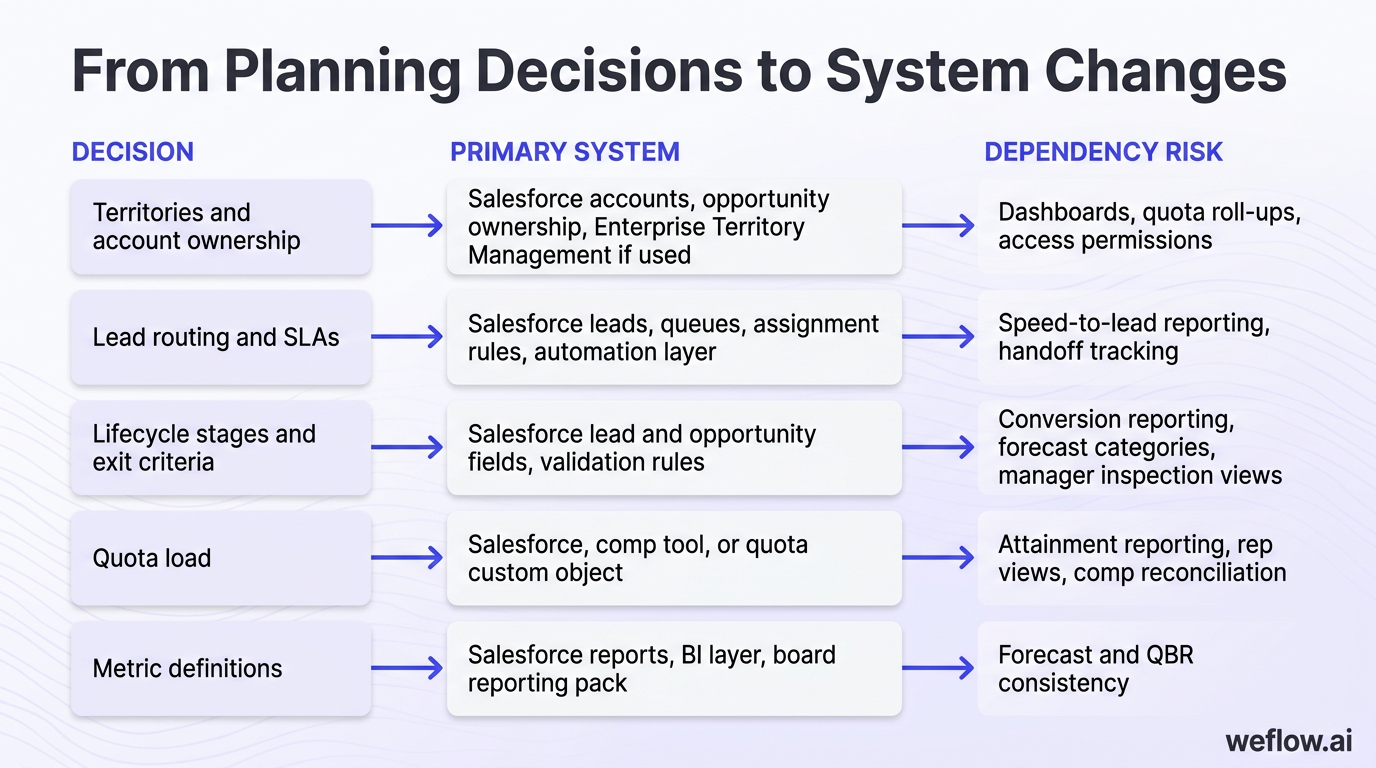
Decision | Primary system | Typical owner | Dependency risk |
|---|---|---|---|
Territories and account ownership | Salesforce accounts, opportunity ownership, Enterprise Territory Management if used | Salesforce admin / Sales Ops | Dashboards, quota roll-ups, access permissions |
Lead routing and SLAs | Salesforce leads, queues, assignment rules, automation layer | Marketing Ops / Sales Ops | Speed-to-lead reporting, handoff tracking |
Lifecycle stages and exit criteria | Salesforce lead and opportunity fields, validation rules | Business Systems | Conversion reporting, forecast categories, manager inspection views |
Quota load | Salesforce, comp tool, or quota custom object | Finance / RevOps | Attainment reporting, rep views, comp reconciliation |
Metric definitions | Salesforce reports, BI layer, board reporting pack | RevOps / Data team | Forecast and QBR consistency |
Missed dependencies create duplicate work and conflicting numbers. A territory change that isn’t reflected in account ownership, quota assignment, dashboard filters, and field-level access will show up as both data noise and manager confusion.
Configure CRM, routing, quotas, and access
The minimum viable go-live is not every possible improvement. It’s the smallest set of Salesforce changes that makes ownership, routing, quotas, and reporting usable on day one.
Territory and ownership setup: load account ownership, account teams, territory assignments, and any overlay logic with a clear effective date.
Routing and SLA enforcement: configure lead assignment rules, queue routing, assignment timestamps, and validation rules for required handoff fields.
Lifecycle enforcement: update stage values, exit criteria fields, forecast category mapping, and stage-based validation where needed.
Quota loading: load quotas at the rep and team level into the system that powers attainment reporting, then verify roll-up logic.
Permissions and views: confirm managers, reps, executives, and support teams can see the right records and standard report folders.
Sequence changes to reduce go-live risk. In most Salesforce environments, that means sandbox first, then production in this order: data prep, ownership changes, routing logic, validation rules, quota load, standard views, then cutover communications. Don’t turn on validation rules before the field has the right data and instructions to pass them.
Define metrics and standard reporting views
Metric ambiguity is one of the fastest ways to break forecast and performance reviews. If “pipeline coverage” means one thing to FP&A and another to Sales leadership, you’ll spend the quarter arguing about definitions instead of making decisions.
Audience | Standard view | Questions it should answer |
|---|---|---|
Executive team | Plan vs. actual, forecast accuracy, segment performance | Are we on track, where are the gaps, what needs intervention? |
Sales and CS leadership | Pipeline health, attainment, ramp, retention, initiative tracking | Which teams or motions are off plan, and why? |
Frontline managers | Team pipeline, stage progression, commit vs. best case, activity completeness | Which deals need inspection, which reps need coaching? |
Reps and CSMs | Book of business, quota progress, open pipeline, next-step hygiene | What’s my number, where am I against it, what needs attention this week? |
Your metric dictionary should define each KPI in plain language: what counts, which Salesforce fields it uses, which date logic applies, which records are in scope, and which exclusions are approved. Keep the dictionary short enough that people actually use it.
Run preflight tests and lock the cutover plan
The standard for go-live is “clean enough to run,” not perfect. If you wait for every edge case to be solved, you’ll slip the rollout and still discover issues in production.
Create role-based test users: AE, SDR, manager, CSM, and executive viewer.
Test common workflows end to end: lead routing, opportunity creation, ownership changes, dashboard visibility, quota views, and close-won handoff.
Triage issues by risk: routing failures, missing quotas, or broken permissions are go-live blockers; minor view formatting issues are not.
Freeze the cutover plan: define cutover date, owner, rollback decision-maker, known issues log, and support channel.
Sign off: sponsor, RevOps owner, Salesforce admin, and frontline leadership should all approve the go-live state.
Field rollout: give managers and reps clear views
System readiness doesn’t create adoption on its own. Managers and reps need a clear explanation of what changed, what they’re responsible for, and where to find the numbers they’ll be held to.
This is why manager adoption is the force multiplier. If frontline managers run the new plan in team meetings and 1:1s, the field follows. If they don’t, RevOps spends the quarter answering the same questions in Slack.
Equip managers with views, talk tracks, checklists
Your manager toolkit should help leaders inspect the business, coach reps, and explain the plan without inventing their own version of it.
Team summary: quota, book design, headcount and ramp assumptions, key segment goals, and top risks.
Standard Salesforce views: weekly pipeline inspection, forecast roll-up, stage movement, and activity completeness.
Manager talk track: what changed, why it changed, what success looks like in the first 30 days.
First-30-day checklist: confirm books, review rep one-pagers, inspect team pipeline using standard reports, and log friction.
Don’t assume managers will build their own inspection rhythm. Give them the exact reports, filters, and meeting sequence to use.
Give every rep a clear “My Year” view
Every rep should be able to answer four questions fast: What’s my number? What’s my book? How am I paid? What changed this year?
A good “My Year” one-pager includes quota, territory or named accounts, comp summary, manager, segment focus, key dates, and links to the reports they’ll use. Auto-fill system fields wherever possible—quota, manager, region, account list, and forecast view—so the document stays current and doesn’t become another manual artifact.
Store it in a predictable place, then have managers review it in 1:1s. That reduces backchannel questions and stops reps from building their own shadow version of the plan in spreadsheets.
Run kickoff sessions and 30-day follow-up
The field doesn’t need a long presentation. It needs a clear narrative, repeated a few times, with direct paths to the details.
Timing | Communication | What to include |
|---|---|---|
Launch week | Main kickoff session | Targets, focus areas, what changed, where to find books, quotas, rules, and dashboards |
Week one | Manager cascade | Team-specific talk track and rep “My Year” review |
Week two to four | Follow-up Q&A | Issue themes, policy clarifications, recurring FAQs |
Day 30 | Checkpoint communication | What’s working, what was fixed, what still needs discipline |
Repetition beats length. A short kickoff, a manager cascade, and one or two follow-up sessions usually land better than a single 90-minute launch call.
Capture feedback and extend enablement
Kickoff is the start of enablement, not the end. The first 90 days should include a light calendar for process refreshers, manager office hours, and onboarding for new hires.
Set one feedback channel—form, Slack intake, or office hours—and log patterns instead of reacting to every single complaint. RevOps should separate one-off preference issues from recurring process failure. If the same routing, stage, or ownership problem appears across teams, that’s a system issue, not a training issue.
Revenue cadence: turn meetings into decisions
The point of revenue cadence is not more meetings. It’s fewer status-heavy meetings and more predictable decision-making.
If your weekly and monthly forums don’t have fixed inputs, outputs, and owners, the quality of the meeting depends on who happens to be leading that week. That doesn’t scale.
Define weekly, monthly, and quarterly forums
Forum | Purpose | Frequency | Typical audience |
|---|---|---|---|
Weekly pipeline review | Inspect deal movement, stage progression, and pipeline coverage | Weekly | Managers, Sales leadership, RevOps |
Weekly forecast call | Resolve commit risk and agree on current-quarter outlook | Weekly | CRO, Sales leaders, RevOps, Finance |
Monthly performance review | Review plan vs. actual, ramp, segment performance, and assumptions | Monthly | Exec staff, RevOps, FP&A, GTM leaders |
Quarterly business review | Review strategic bets, target changes, and cross-functional execution | Quarterly | Executive team and GTM leadership |
Keep the number of forums tight. Forecast, performance, and QBR use cases are different, and combining them usually creates muddy agendas.
Standardize agendas, inputs, and outputs
Meeting quality is downstream of reporting quality. If the input views are inconsistent, the agenda won’t save you.
For each forum, create a one-page operating brief that covers:
Agenda structure: three to five sections max
Required inputs: exact Salesforce reports, dashboards, and filters
Expected outputs: decisions, owners, due dates, and next review point
Meeting owner: who is accountable for quality and follow-through
A weekly forecast call, for example, should leave with an agreed commit, a list of risk deals, and named follow-ups. If it ends with “we’ll look into it,” the forum isn’t doing enough work.
Put the full revenue rhythm on calendars
Build the annual revenue calendar once, then make it visible. It should include weekly pipeline and forecast calls, monthly performance reviews, QBRs, board dates, budget reviews, major launches, and planned replanning windows.
Hidden calendar assumptions are a common source of cross-functional misses. Finance may expect a reforecast two weeks before board prep while Sales leadership assumes forecast inputs are due the day before. Put the rhythm on calendars early, with clear ownership.
Track decisions and tune the cadence
Decision tracking matters more than forum design. Use one log with date, meeting, decision, owner, due date, and status, then review open items at the start of each recurring forum.
Once a quarter, run a short meeting-health review. Ask which forums still drive decisions, which reports are noise, and which metrics no longer match how the business is operating. Tuning the cadence is normal. Losing follow-through is not.
Signals and changes: catch drift before it spreads
Once the cadence is running, you need a way to spot drift early and intervene without creating chaos. This is the bridge from inspection to action.
The goal is a small signal set, clear thresholds, and approved levers. Without that structure, every bad week turns into a debate about whether the business needs a major change.
Choose leading and lagging signals to watch
In the first quarter, fewer metrics work better. Start with the core questions leadership needs answered, then attach one or two signals to each.
Pipeline: coverage ratio, pipeline creation pace, stage conversion, slip rate
Ramp and productivity: ramp vs. plan, meetings created, stage progression by tenure cohort
Retention and expansion: renewal risk, expansion pipeline, NRR trend
Outcomes: bookings, attainment, forecast error rate
Adoption and process health: lifecycle compliance, activity completeness, manager dashboard usage
A first-quarter signal set should usually stay under 10 metrics. More than that, and review forums start turning into dashboard tours.
Set thresholds and triggers for action
A signal only helps if the business agrees what “off track” means. Use historical performance and your plan assumptions to define target bands, then write the required response when a threshold is hit.
Metric | Target band | Trigger | Required response |
|---|---|---|---|
SMB pipeline coverage | 2.8x–3.2x | Below 2.5x for 3 consecutive weeks | Root-cause review in weekly forecast, then program proposal in monthly review |
New AE ramp | 65%–75% of plan by month four | Below 60% for one full cohort | Manager inspection plus enablement and territory review |
Opportunity lifecycle compliance | 85%+ | Below 80% for 2 weeks | Salesforce data audit and manager reinforcement |
Forecast error rate | Within 5%–10% | Outside band for 2 monthly closes | Inspect commit criteria and manager forecast process |
Historical context keeps teams from overreacting. A one-week dip may be noise. A three-week trend against plan usually isn’t.
Map signal issues to approved change levers
When signals go red, leaders need to know which levers are on the table and who can approve them. That’s how you avoid panic changes that break field trust.
Issue pattern | Likely levers | Approval owner | Change frequency guardrail |
|---|---|---|---|
Pipeline shortfall | Demand gen programs, outbound focus, SDR deployment, manager inspection | CRO and CMO | Can shift monthly |
Poor ramp attainment | Enablement plan, book rebalance, manager coaching, hiring pace | CRO | Review monthly, structural changes quarterly |
Territory imbalance | Book rebalance, named-account adjustment | CRO with RevOps | Limit changes to defined windows |
Quota pressure from strategy change | Quota reset or credit policy adjustment | CRO, CFO, HR | Prefer between quarters only |
Expansion weakness | CS coverage, playbook changes, specialist support | CCO and CRO | Review monthly |
Comp- and territory-related changes need stricter governance than program or process changes. Once field trust drops, even reasonable adjustments become hard to land.
Embed signal reviews into existing forums
Use the meetings and dashboards you already have. Most teams don’t need another ceremony just for signals.
Forum | Signal view to use | What should happen there |
|---|---|---|
Weekly forecast call | Top five risk signals for the current quarter | Inspect trend, assign investigation owners, confirm next action |
Monthly performance review | Signal dashboard by segment, region, and motion | Decide whether a lever needs to move |
Quarterly business review | Assumption vs. actual summary | Approve larger changes and update operating policy if needed |
90-day milestones: prove execution is taking hold
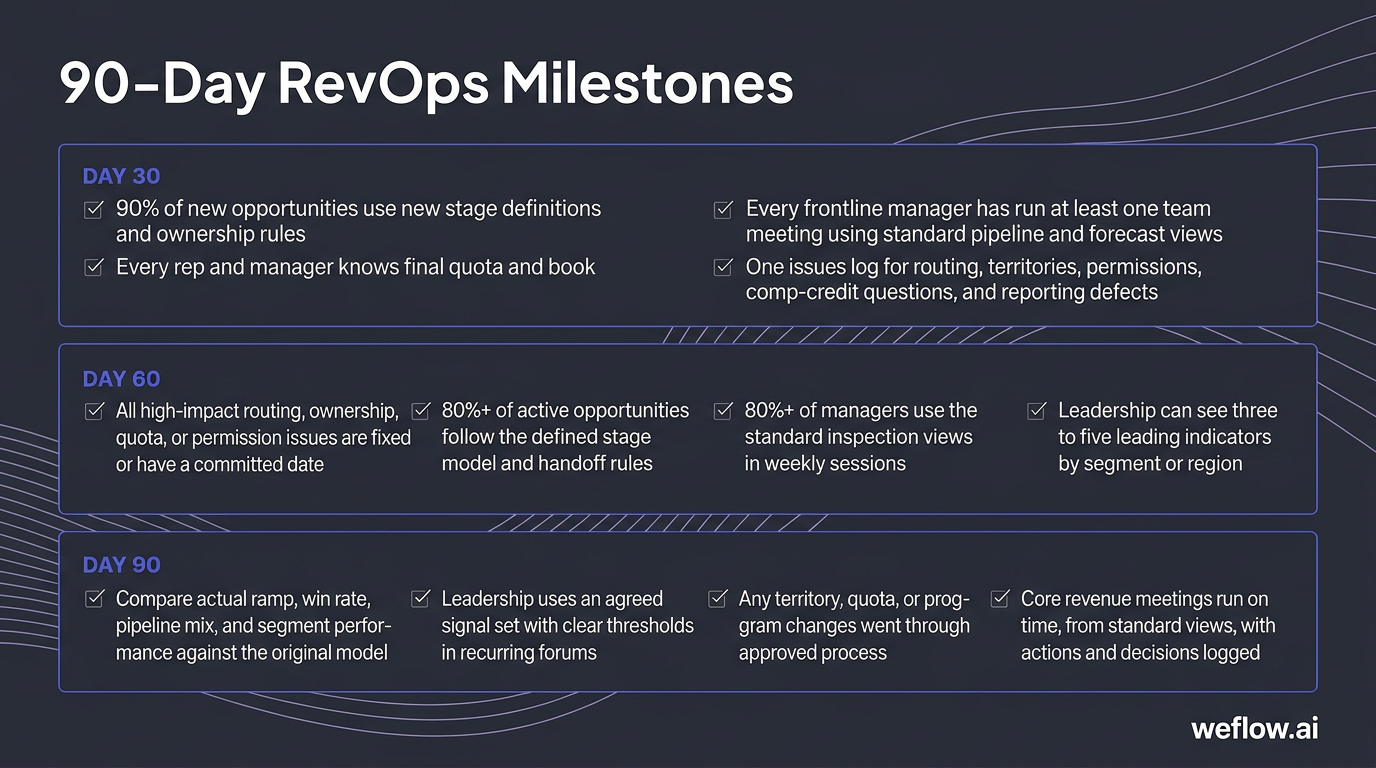
These checkpoints validate adoption, not just project completion. A rollout isn’t successful because the config shipped. It’s successful when managers use it, reps understand it, and leadership can steer from it.
Check day 30 for adoption and clarity
New setup adoption: at least 90% of new opportunities use the new stage definitions and ownership rules in Salesforce.
Quota and book clarity: every rep and manager knows the final quota and book with no unresolved “still waiting” cases.
Manager usage: every frontline manager has run at least one team meeting using the standard pipeline and forecast views.
Issue logging: you have one issues log for routing, territories, permissions, comp-credit questions, and reporting defects.
High issue volume in the first month is signal, not failure. It usually means the field is engaging with the new model instead of working around it silently.
Check day 60 for usage and friction fixes
Area | Target state by day 60 |
|---|---|
System friction | All high-impact routing, ownership, quota, or permission issues are fixed or have a committed date. |
Lifecycle compliance | 80%+ of active opportunities follow the defined stage model and handoff rules. |
Manager rhythm | 80%+ of managers use the standard inspection views in weekly sessions. |
Early trend visibility | Leadership can see three to five leading indicators by segment or region. |
By day 60, habits should be forming. That looks like managers using the same reports each week, fewer manual exceptions, and fewer questions about basic ownership and stage logic.
Check day 90 for steering and control
Assumptions vs. reality review: compare actual ramp, win rate, pipeline mix, and segment performance against the original model.
Signal and trigger adoption: leadership uses an agreed signal set with clear thresholds in recurring forums.
Controlled changes: any territory, quota, or program changes went through the approved process with rationale, owner, and communication plan.
Reliable forums: core revenue meetings run on time, from standard views, with actions and decisions logged.
By this point, the business should be moving from launch mode into active revenue management. That’s the real test of whether operationalization worked.
FAQ
What should be finalized before GTM go-live?
Before go-live, you need signed-off targets, one approved scenario, a frozen coverage and ownership model, basic Salesforce configuration for routing and stages, quota-loading logic, and a minimum reporting layer for plan vs. actual. You do not need every dashboard, edge-case policy, or long-tail enablement asset finished.
Targets by segment, region, and motion
Coverage model and account ownership rules
Core lifecycle stages, routing logic, and SLAs
Quota load and access permissions
Manager and rep rollout packet
Who should own a 90-day RevOps rollout plan?
The executive sponsor should be the CRO or COO, because that role can approve changes and remove blockers. The operational owner should be one RevOps leader who runs the timeline, dependencies, system changes, issue log, and rollout checkpoints. Support owners from Salesforce admin, Finance, Enablement, Marketing Ops, and CS Ops should each own their piece, but they shouldn’t each run the program.
How do you turn a GTM strategy into rep quotas?
Use a three-step flow. First, build a driver model for how the business hits the number by segment, region, and motion. Second, translate that into team quotas based on capacity and pipeline assumptions. Third, allocate rep quotas using clear rules for tenure, book potential, and ramp so the math rolls up cleanly to the team and company plan.
How do you operationalize GTM changes in CRM?
Start by mapping each business decision to the Salesforce object, field, automation, and report it affects. Then sequence the work: ownership and territory changes, routing logic, stage and validation updates, quota load, permissions, standard views, testing, and cutover. The most important decision is not tool detail—it’s which system owns each number and which workflow writes back to Salesforce.
Which RevOps metrics matter in the first 90 days?
Use a small set tied to decisions. For adoption and process health, track lifecycle compliance, activity completeness, and manager dashboard usage. For execution health, track pipeline coverage, pipeline creation pace, stage conversion, and ramp vs. plan. For outcomes, track forecast error rate, attainment, and retention trends. If a metric doesn’t drive an intervention, it doesn’t belong in the first-quarter signal set.
How often should territories or quotas change?
As rarely as possible, and only through a defined approval path. Territories usually need fixed windows for adjustment, often once or twice a year outside of major reorgs. Quotas should move only when a real business change justifies it and leadership is willing to communicate the rationale clearly. Predictable change policy matters as much as the change itself, because the field needs to trust that books and numbers won’t shift through side deals.
.webp)

.webp)
.webp)

.webp)

.webp)
.webp)
.webp)

.webp)