Salesforce Data Model and Admin Features That Help Teams Build Faster [Cheat Sheet]


Salesforce admins who understand the platform’s architecture build faster, troubleshoot faster, and make cleaner design decisions under pressure. That matters when your CRO wants a new forecast view by Friday, your Business Systems team is cleaning up pipeline data, or your reps are pushing against another required field.
This guide walks through the Salesforce pieces that matter most: Lightning architecture, the standard data model, core admin features, and the learning paths that help admins move from reactive ticket taker to systems owner. If you work in RevOps, Sales Ops, or Salesforce administration, this is the foundation.
[banner type="download" url="https://www.weflow.ai/content/salesforce-cheat-sheet" text="Salesforce Cheat Sheet" subtitle="Key stats, product lineup, customer metrics, and market-position snapshot." button="Download now"]
Salesforce market dominance: scope the platform’s global reach
Salesforce isn’t just a CRM product—it’s a platform with enough scale that its design decisions shape how RevOps teams, admins, consultants, and developers work across the market. That’s why understanding Salesforce architecture is a high-value skill: the same core data model and admin patterns show up across thousands of B2B organizations.
21.7% CRM market share, ahead of Microsoft, Oracle, SAP, and HubSpot
$34.9 billion in FY24 revenue with a 30.5% non-GAAP operating margin
$284 billion market cap as of October 6, 2024
150,000 customers, including Amazon Web Services, Spotify, and T-Mobile
72,682 employees, with 51% based in the US
Multiple core clouds and product lines, including Sales, Service, Commerce, Community, IoT, Analytics, and Einstein
That footprint creates a simple requirement: Salesforce has to be structured. A platform used by mid-market and enterprise B2B organizations across regions, currencies, business units, and clouds can’t rely on ad hoc design. The underlying data model has to be consistent enough for admins to extend, govern, and secure it at scale.
Review core company metrics and revenue
Here’s the quick-glance view of Salesforce’s scale and why enterprise teams invest in platform governance instead of one-off fixes.
Metric | What it tells you |
|---|---|
21.7% CRM market share | Salesforce still sets the baseline for CRM architecture and admin practices across the market. |
$34.9B FY24 revenue | The platform has the commercial scale to support deep product investment across clouds, security, AI, and infrastructure. |
30.5% non-GAAP operating margin | Salesforce isn’t operating like a niche point solution—it’s a mature enterprise software company. |
150,000 customers | The same admin patterns need to work for small teams, global enterprises, and heavily regulated environments. |
Enterprise customers like AWS and Spotify | Large deployments drive demand for strong permissioning, deployment controls, auditability, and extensibility. |
When companies at that scale standardize on Salesforce, admin features stop being “nice to have.” role hierarchy, field-level security, Sandbox strategy, audit trails, and release management become core operating requirements.
Track major platform acquisitions and tools
Salesforce expanded well beyond core CRM through acquisition. For admins and Business Systems teams, these purchases matter because they explain why Customer 360 spans collaboration, analytics, integration, marketing, commerce, and industry-specific works.
Acquisition name | Current Salesforce product |
|---|---|
Slack | Slack |
Tableau | Tableau, part of Customer 360 |
MuleSoft | MuleSoft Anypoint Platform |
Demandware | Commerce Cloud |
ExactTarget | Marketing Cloud |
Vlocity | Salesforce Industries |
ClickSoftware | Field Service |
Datorama | Marketing Cloud Intelligence |
Heroku | Heroku |
Quip | Quip |
For admins, the practical takeaway is this: Salesforce grew by connecting products into a broader Customer 360 model, not by replacing the need for clean object relationships and governance. Whether data starts in Sales Cloud, Service Cloud, Marketing Cloud, or Slack, reporting still depends on a stable Salesforce data model underneath.
Lightning architecture: deploy enterprise microservices faster
Lightning is the architectural layer that lets Salesforce support both point-and-click admins and technical builders on the same platform. It’s API-first, mobile-ready, and designed so teams can assemble applications from reusable services instead of building everything from scratch.
That matters for RevOps and Business Systems teams because not every problem needs custom code. A lot of common requests—page layout changes, approval routing, stage enforcement, guided selling, report delivery, activity views—can be handled with declarative tooling. When the requirement gets more complex, the same platform still supports Apex, developer tooling, and managed deployment.
API-first foundation: Data and business logic are exposed through APIs, which makes Salesforce extensible across internal apps and external systems.
Mobile-ready framework: Lightning components and Salesforce mobile capabilities support responsive experiences without separate mobile builds for every workflow.
Einstein services: Salesforce layers in AI and machine learning capabilities such as scoring, recommendations, forecasting, sentiment, and prediction services.
Trust foundation: The platform runs on a global multi-tenant infrastructure with controls for security, availability, compliance, governance, and disaster recovery.
If you’re new to Salesforce administration, think of it this way: declarative tools help you configure behavior with clicks, while programmatic tools help you define behavior with code. Good admins learn both boundaries early, even if they start with clicks.
Map declarative and programmatic tooling
The cleanest way to understand Lightning tooling is by complexity. Start with the lowest-effort option that meets the requirement, then move into code only when configuration can’t handle the business rule cleanly.
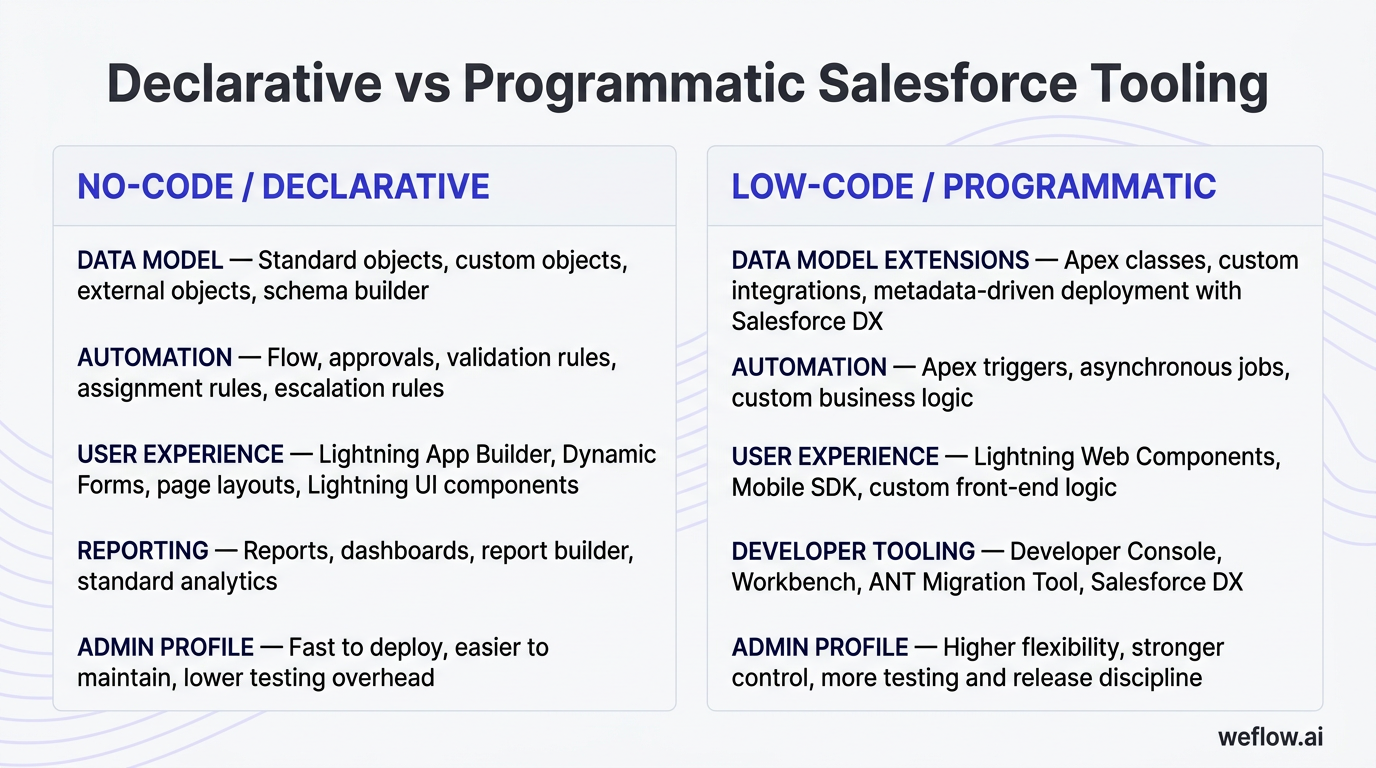
No-code / declarative | Low-code / programmatic |
|---|---|
Data model: Standard objects, custom objects, external objects, schema builder | Data model extensions: Apex classes, custom integrations, metadata-driven deployment with Salesforce DX |
Automation: Flow, approvals, validation rules, assignment rules, escalation rules | Automation: Apex triggers, asynchronous jobs, custom business logic |
User experience: Lightning App Builder, Dynamic Forms, page layouts, Lightning UI components | User experience: Lightning Web Components, Mobile SDK, custom front-end logic |
Reporting: Reports, dashboards, report builder, standard analytics | Developer tooling: Developer Console, Workbench, ANT Migration Tool, Salesforce DX |
Admin profile: Fast to deploy, easier to maintain, lower testing overhead | Admin profile: Higher flexibility, stronger control, more testing and release discipline |
A practical example: if your sales team needs a required “Next Step” field when an Opportunity moves to Commit, use a validation rule or Flow before you ask a developer for Apex.
Configure core enterprise security and compliance
Salesforce ships with a deep security and compliance model, but the value only shows up when admins configure it deliberately. Poor role design and loose permissioning create reporting gaps, adoption issues, and data exposure risk.
Security
Identity, single sign-on, and multi-factor authentication
User profiles, permission sets, and permission set groups
Object-level access, role hierarchy, sharing rules, and manual sharing
Field-level security for sensitive data like ARR, discounting, or legal terms
IP restrictions, session settings, and delegated administration
Mobility
Salesforce mobile app support for iOS and Android
Configurable mobile navigation and page behavior
Offline and disconnected access for supported workflows
Mobile extensibility for custom experiences
Compliance
Field audit trail and setup audit history
Platform encryption options
User activity monitoring and event logging
Multi-currency, translation, and locale support for global teams
For new admins, the most important lesson is simple: get role hierarchy, org-wide defaults, and field-level security right early. Fixing those after multiple teams, integrations, and managed packages are already in production is much harder—and mistakes there can expose data that should never be visible across territories, business units, or support teams.
Salesforce data model: map standard objects to sales workflows
The Salesforce data model is the backbone of almost every sales, service, and reporting workflow in the platform. If you understand how standard objects relate to one another, you can design cleaner automations, better reports, and fewer workarounds.
For most RevOps teams, the key is not memorizing every object. It’s knowing which objects represent people, companies, pipeline, support activity, and commercial records—and how those relationships affect attribution, forecasting, and downstream reporting.
Object | Description | Relationships |
|---|---|---|
Lead | An unqualified prospect record, usually created from inbound, outbound, events, or list imports. | Can convert into an Account, Contact, and Opportunity. |
Campaign | A marketing initiative used to group responses, members, and attribution touchpoints. | Connects to Leads and Contacts through Campaign Member records. |
Account | The company or customer entity at the center of most B2B CRM design. | Parent to Contacts, Opportunities, Cases, Contracts, Orders, and Assets. |
Contact | An individual person associated with an Account. | Links to Accounts, Cases, Campaigns, and Opportunities through Contact Roles. |
Opportunity | A revenue-bearing deal record used for pipeline, forecasting, and stage-based process tracking. | Connected to an Account and optionally to Contacts, Products, Quotes, Orders, and Contracts. |
Case | A service or support record used to track issues, requests, or incidents. | Usually tied to an Account and Contact. |
Product | An item or service your company sells. | Added to Opportunities through Price Books and OpportunityLineItems. |
Price Book | A set of prices for Products. | Required to associate Products with Opportunities. |
Quote | A commercial proposal linked to an Opportunity. | Often used before Order creation or CPQ-driven workflows. |
Order | A finalized commercial record after agreement or fulfillment starts. | Related to Account, Opportunity, and sometimes Quote depending on process design. |
Asset | A record of what a customer owns or has purchased. | Usually linked to an Account and Contact. |
Contract | The agreement record for commercial terms and dates. | Often tied to Accounts and renewal workflows. |
Task & Event | Activities like calls, emails, follow-ups, and meetings. | Can be related to Leads, Contacts, Accounts, Opportunities, and other records. |
Custom Objects | Objects created by admins or developers for business-specific use cases. | Can be related to standard or other custom objects through lookup or master-detail relationships. |
A standard lead-to-cash path usually looks like this: a Lead enters Salesforce, gets qualified and converted, creates an Account and Contact, and often creates an Opportunity. That Opportunity may later include Products, a Price Book, a Quote, and eventually an Order. After the sale, the customer relationship may continue through Cases, Assets, and Contracts for support, onboarding, and renewals.
Connect accounts, contacts, and opportunities
For B2B teams, this is the core hierarchy that drives pipeline visibility and reporting.
Account: The Account is the company record. It usually stores firmographic fields such as industry, account owner, segment, parent account, billing geography, and customer status.
Contact: Contacts are the people connected to that company. They may be buyers, champions, blockers, legal reviewers, or users. A single Account can have many Contacts.
Opportunity: The Opportunity is the deal. It stores commercial fields like stage, close date, amount, forecast category, type, and next step, and it rolls into pipeline and forecast reporting.
Contact Roles matter because they connect specific people to a deal. Without Contact Roles, your Opportunity may have revenue data but no clean record of who influenced the deal. That weakens campaign attribution, stakeholder mapping, and handoff visibility between marketing, sales, and customer success.
Track products, quotes, and finalized orders
Once a deal moves past qualification, Salesforce gives you a structured path for pricing and commercial records.
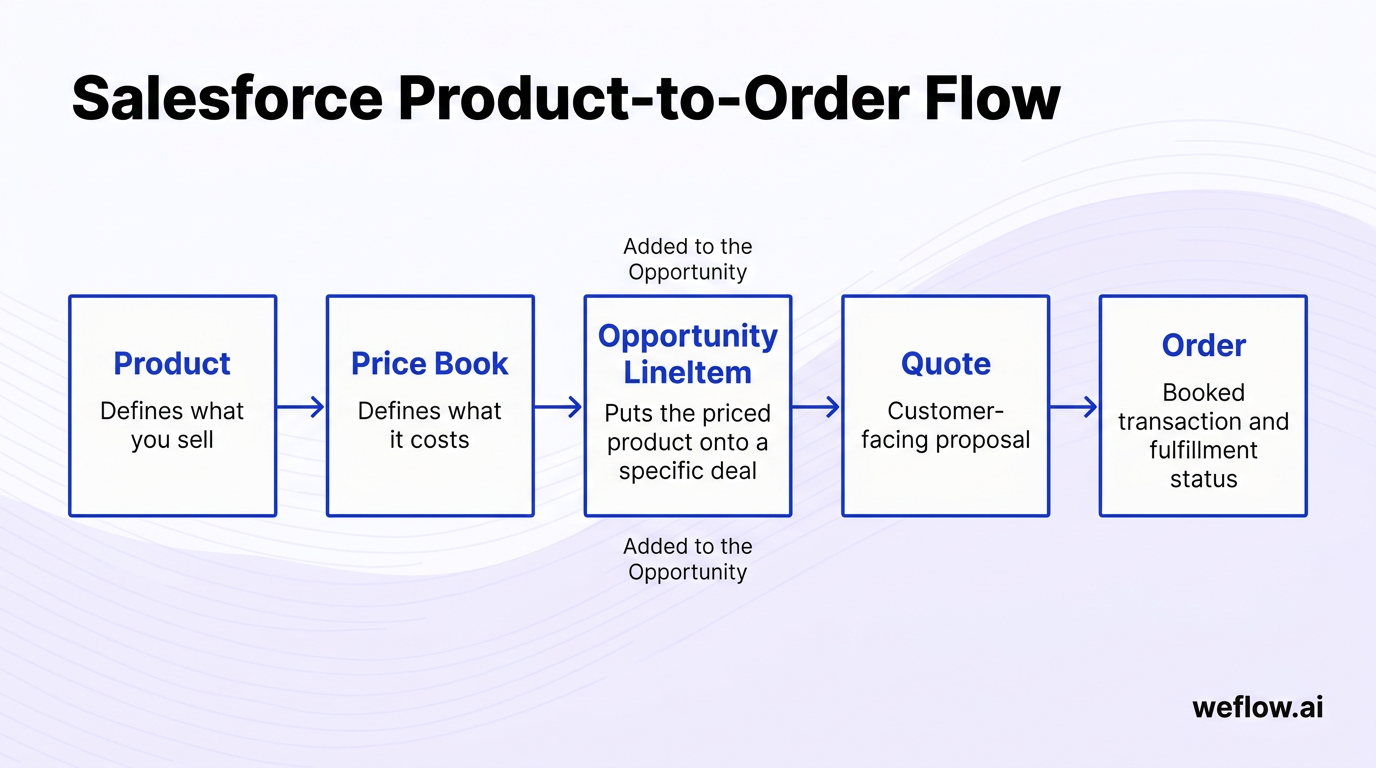
Create the Product catalog. Products represent the items or services you sell. These may be software plans, implementation packages, support tiers, or physical goods.
Assign Products to a Price Book. A Product doesn’t become sellable on an Opportunity until it exists in a Price Book with a defined price.
Add line items to the Opportunity. When you attach a Product from the selected Price Book to the Opportunity, Salesforce creates an OpportunityLineItem record.
Generate a Quote. Quotes package line items, totals, and terms into a customer-facing proposal.
Create the Order. After the commercial agreement is finalized, many orgs create an Order to represent the booked transaction and fulfillment status.
The relationship is straightforward once you see it in sequence: the Product defines what you sell, the Price Book defines what it costs in a given pricing context, and the OpportunityLineItem is the record that puts that priced product onto a specific deal.
Manage post-sale cases, assets, and contracts
Salesforce doesn’t stop at the closed-won stage. Standard objects also support support delivery, customer retention, and renewal management.
Case: Used to track support tickets, internal requests, or customer issues. In Sales Cloud, Cases may be light-touch. In Service Cloud, they often sit inside a more structured service process with queues, SLAs, routing, macros, and omnichannel handling.
Asset: Tracks what the customer owns or has in service. This is useful for support entitlements, installed base reporting, and renewal planning.
Contract: Stores agreement dates, status, and commercial terms that often feed renewal workflows or legal reporting.
For RevOps and Systems teams, these objects matter because lifecycle reporting depends on them. If your Opportunity data is clean but your Contract and Asset data is inconsistent, renewal forecasting and expansion reporting usually break down fast.
Core admin features: automate processes and secure user data
Once you understand the data model, admin work becomes more practical. You’re no longer just editing fields—you’re deciding how users interact with records, how automation enforces process, and how safely data moves across the org.
This is the daily toolkit for Salesforce admins: user access, data management, customization, automation, reporting, integrations, and release control. These are the features that keep the org usable as the business scales.
User and data management
Create and maintain users, roles, permission sets, and login controls
Import, export, deduplicate, and validate data
Monitor data completeness and record quality
Customization and automation
Create custom objects, fields, record types, and page layouts
Build Flows, approval processes, and validation rules
Standardize stage entry criteria and required field behavior
Reporting, analytics, and integration
Build reports, dashboards, and scheduled report delivery
Install and manage AppExchange packages
Support integrations, release changes, and environment management
Control user access and platform security
Security work is admin work. A clean org depends on access design just as much as field design.
Assign profiles and permission sets based on actual job function, not convenience.
Use role hierarchy and sharing rules to control record visibility across teams and territories.
Enable multi-factor authentication and review session settings and IP restrictions.
Run data imports and exports through controlled processes using tools like Data Loader or the import wizard.
Set up duplicate rules and matching rules to reduce duplicate Leads, Contacts, and Accounts.
Use field-level security to hide sensitive data such as compensation fields, legal terms, or pricing exceptions.
One common admin mistake is over-assigning the System Administrator profile. It solves short-term access issues, but it weakens governance, increases change risk, and makes auditability harder. If someone only needs one extra object permission, give them that permission—don’t give them the whole org.
Build custom automations and reporting flows
Admins do most of their business impact work here: reducing manual entry, enforcing process, and giving leadership cleaner data.
Feature | Business value |
|---|---|
Custom objects and fields | Model business-specific processes without forcing teams into spreadsheets or off-platform workarounds. |
Record types and page layouts | Show the right fields and paths to the right users based on segment, region, or process. |
Flow | Automate routing, field updates, approvals, notifications, and record creation with less manual admin work. |
Approval Processes | Control discounts, legal review, or exception handling with clear approval paths and audit history. |
Reports and dashboards | Give sales managers, RevOps leaders, and CROs visibility into pipeline coverage, stage movement, and forecast performance. |
Scheduled reports | Reduce recurring pull requests by sending leadership the same views on a set cadence. |
One platform shift is worth calling out directly: Salesforce is retiring Workflow Rules and Process Builder. If you’re learning automation now, spend your time on Flow. That’s where Salesforce is investing, and it’s the automation skill most teams expect admins to have.
Monitor system health and deployment releases
Strong admins don’t just build—they release safely. That means testing changes, monitoring org health, and keeping production stable.
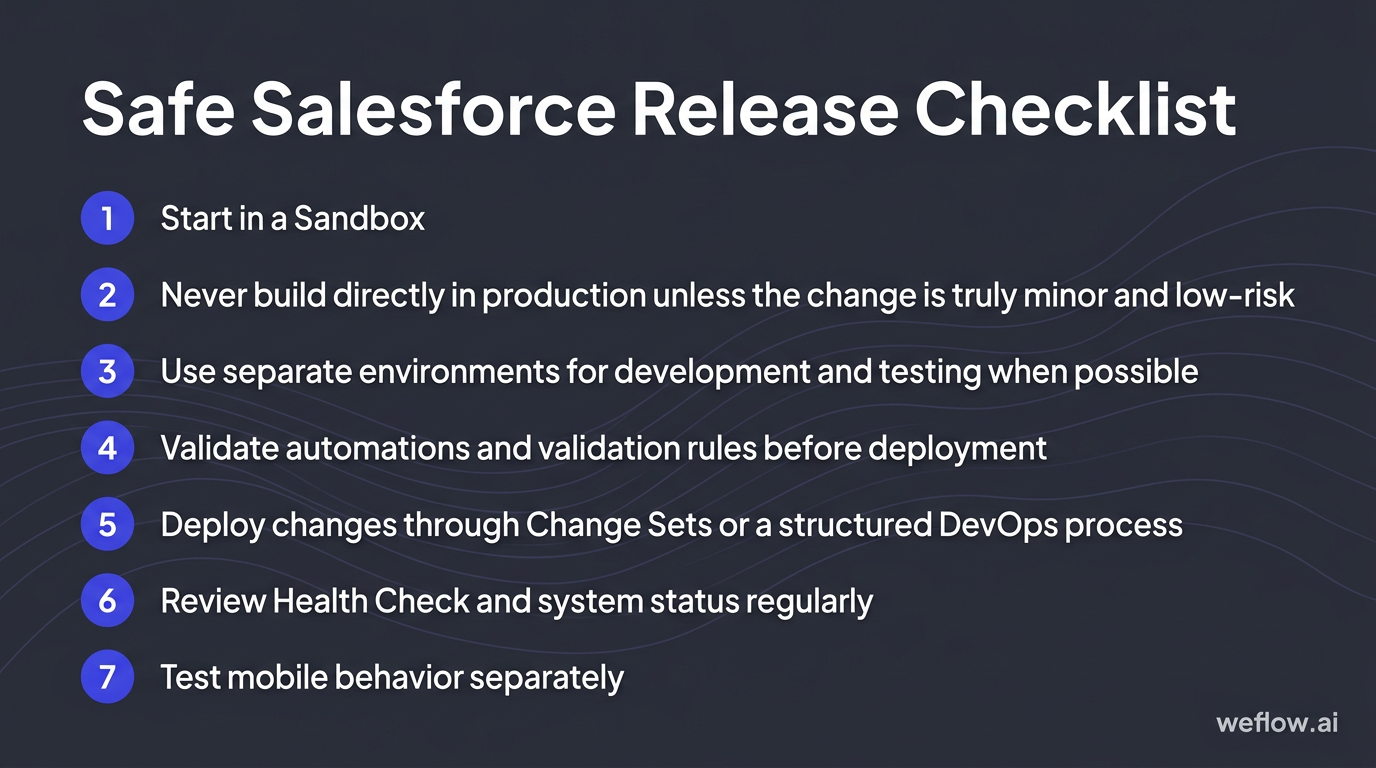
Start in a Sandbox. A Sandbox is a copy of your Salesforce environment used for development, testing, or training. It lets you test changes without affecting live users or production data.
Never build directly in production unless the change is truly minor and low-risk. Production-first changes are harder to validate, harder to roll back, and easier to break.
Use separate environments for development and testing when possible. Even a simple admin team benefits from a basic release path instead of direct edits.
Validate automations and validation rules before deployment. Check for side effects across profiles, record types, integrations, and dependent Flows.
Deploy changes through Change Sets or a structured DevOps process. For more mature teams, Salesforce DX and source-driven deployment give better control than manual clicking.
Review Health Check and system status regularly. Health Check surfaces security posture issues; debug logs help trace why automation or custom logic failed.
Test mobile behavior separately. If your field teams or managers use Salesforce mobile, validate navigation, layouts, and offline behavior before release.
Release discipline is one of the clearest differences between a stable Salesforce org and a fragile one. A few extra steps in a Sandbox usually save hours of production cleanup later.
Salesforce career paths: target high-value platform skills
Salesforce skills compound. Once you understand the data model, security model, and automation tooling, you can branch into administration, analysis, development, architecture, or cloud-specific consulting.
If you’re early in your Salesforce path, start with free platform-native resources before you pay for external training. Trailhead, documentation, and a Developer Edition org will take you further than most people think.
Best places to learn
Trailhead for guided modules, hands-on projects, and role-based learning
Salesforce Help and release notes for feature behavior and platform changes
Developer Edition orgs for practice without production risk
Trailblazer Community, Stack Exchange, and peer communities for real implementation questions
Best places to network
Dreamforce and World Tour events
TrailblazerDX for technical builders
Regional community groups and admin meetups
High-value credential paths
Administrator and Business Analyst for core platform operators
Platform Developer for builders who need code-level control
Architect tracks for data, identity, deployment, and integration specialists
Cloud-specific certifications for Sales, Service, Marketing, Commerce, Industries, CPQ, and Tableau
The best starting point for most people is still Trailhead. It’s free, official, and designed around the same concepts you’ll see in real Salesforce orgs.
Attend global developer and admin conferences
Events matter because Salesforce changes fast, and a lot of practical admin knowledge gets shared in sessions, side conversations, and community groups—not just in product docs.
Event | Typical location | Best for |
|---|---|---|
Dreamforce | San Francisco | Broad platform exposure, product announcements, executive sessions, and community networking |
Salesforce World Tour | Global city series | Regional access to Salesforce content without the scale or cost of Dreamforce |
TrailblazerDX | San Francisco | Admins, developers, architects, and technical builders who want deeper platform sessions |
Connections | Chicago | Marketing Cloud, Commerce Cloud, and customer engagement teams |
Basecamp / regional events | Regional | Local networking and lighter-weight learning |
Dreamforce to You | Virtual | Remote access to sessions and recorded content |
If you’re a beginner, World Tour or a regional event is usually the easiest first step. If you already manage deployments, integrations, or complex automation, TrailblazerDX is the better event.
Earn specialized platform certifications
Certifications don’t replace hands-on experience, but they help employers and hiring managers understand your baseline platform knowledge. The strongest certification path depends on the kind of work you want to own.
Start here for almost everyone
Salesforce Certified Administrator
For platform operators and process owners
Business Analyst
Advanced Administrator
Sales Cloud Consultant
Service Cloud Consultant
For developers
Platform Developer I
Platform Developer II
B2C Commerce Developer
Industries CPQ Developer
For architects
Data Architecture and Management Designer
Sharing and Visibility Designer
Development Lifecycle and Deployment Designer
Identity and Access Management Designer
Integration Architecture Designer
Heroku Architecture Designer
For cloud or product specialists
Marketing Cloud certifications
Tableau certifications
CPQ and Pardot credentials
Industries certifications
The clear starting point is the Salesforce Certified Administrator. It gives you the baseline language for objects, security, automation, reports, and platform setup—the same concepts that show up in nearly every other path.
FAQ
What are the core Salesforce standard objects?
The core standard objects are Account, Contact, Lead, Opportunity, and Case. They come out of the box and cover the main CRM workflows: companies, people, unqualified prospects, pipeline, and support issues. In practice, most sales orgs also rely heavily on Campaigns, Tasks, and Events, because attribution and activity reporting usually break without them.
How does Salesforce Lightning architecture work?
Lightning is a component-based, API-first framework that lets admins and developers build on the same platform using different levels of complexity. Admins can use declarative tools like Flow, App Builder, and Dynamic Forms to create business logic and user experiences, while developers can extend the same model with Apex, Lightning Web Components, and source-driven deployment. The practical benefit is speed: you can ship many business changes without a full custom development cycle, while still supporting enterprise requirements when the logic gets more complex.
Which Salesforce admin certification is best to start with?
The right place to start is Salesforce Certified Administrator. It’s the baseline credential because it covers the platform areas every admin touches: user setup, security, objects, automation, reports, and data management. Even if you plan to move into Business Analyst, Consultant, or Architect work later, this certification gives you the shared platform foundation those paths assume.
What are the top Salesforce acquisitions?
Some of the biggest Salesforce acquisitions are Slack, Tableau, MuleSoft, Demandware, ExactTarget, and Vlocity. Each added a major capability: Slack for collaboration, Tableau for analytics, MuleSoft for integration, Demandware for commerce, ExactTarget for marketing automation, and Vlocity for industry-specific workflows. For admins, the important point isn’t just the deal size—it’s that these products extend Customer 360 while still depending on strong identity, integration, and data governance patterns across the stack.
.avif)