Sales Forecasting Process: Build More Accurate SaaS Forecasts Every Quarter [Step-by-Step]


Sales forecasting isn’t a quarterly guessing exercise. It’s an operating process built on clean Salesforce data, clear definitions, and a weekly cadence that your reps, managers, RevOps leaders, and CRO can actually follow.
This guide breaks that process down step by step. You’ll learn how to set forecast baselines, choose the right forecasting model, run a consistent roll-up, and build the Salesforce architecture that keeps forecast calls tied to real deal data—not optimism.
[banner type="download" url="https://www.weflow.ai/content/sales-forecasting-cheat-sheet" text="Sales Forecasting Cheat Sheet for B2B SaaS" subtitle="Forecasting process, bookings vs revenue framework, and cadence checklist by sales cycle." button="Download now"]Forecast foundations: set baselines for predictable revenue
If the inputs are weak, the forecast will be weak. Before you talk about weighted models, AI, or manager roll-ups, you need a shared definition of what you’re forecasting, how often you’ll forecast it, and which Salesforce records belong in the forecast at all.
For most SaaS companies, bookings is the winner as the primary forecast number. Revenue matters for finance, but bookings is usually the cleaner operating metric for sales because it reflects signed contract value at the point of close, not revenue recognition over time.
- Forecast number: Decide whether sales is forecasting bookings or recognized revenue. Most SaaS teams forecast bookings because it lines up with seller behavior and quarter-end execution.
- Forecast frequency: Match the cadence to your sales cycle length. A high-velocity SMB motion can support daily or weekly reviews. A complex enterprise motion usually doesn’t produce enough new signal for daily calls.
- Opportunity segmentation: Split new logos, expansions, and renewals into separate opportunity record types or clearly governed fields in Salesforce.
- Forecast categories: Standardize Pipeline, Best Case, and Commit with defined win-rate ranges and exit criteria tied to Salesforce fields, not rep instinct.
Why do most SaaS companies forecast on bookings instead of revenue? Because recognized revenue often depends on billing terms, contract start dates, ramp schedules, and ASC 606 treatment. Those factors matter for finance planning, but they’re a poor fit for weekly sales inspection. Bookings tells the revenue org whether deals are actually getting signed.
Choose your forecast number and frequency
Your forecasting cadence should follow the pace of your sales motion. If your average deal closes in two weeks, waiting a month to review the forecast is too slow. If your average enterprise cycle runs 120 days, daily forecast submissions create admin work without adding much new information.
| Average sales cycle length | Recommended forecast frequency |
|---|---|
| 7–30 days | Daily to weekly cadence for B2C or SMB motions |
| 30–90 days | Weekly cadence for most mid-market SaaS teams |
| 90+ days | Weekly to bi-weekly cadence for enterprise motions |
If you forecast too frequently in enterprise sales, managers end up reviewing the same deals with the same evidence. That usually creates noise, meeting fatigue, and rep frustration—not better forecast accuracy.
Separate opportunity types for higher accuracy
Blended opportunity data is one of the fastest ways to damage a forecast. New business, expansions, and renewals behave differently, close at different rates, and should not share the same probability logic.
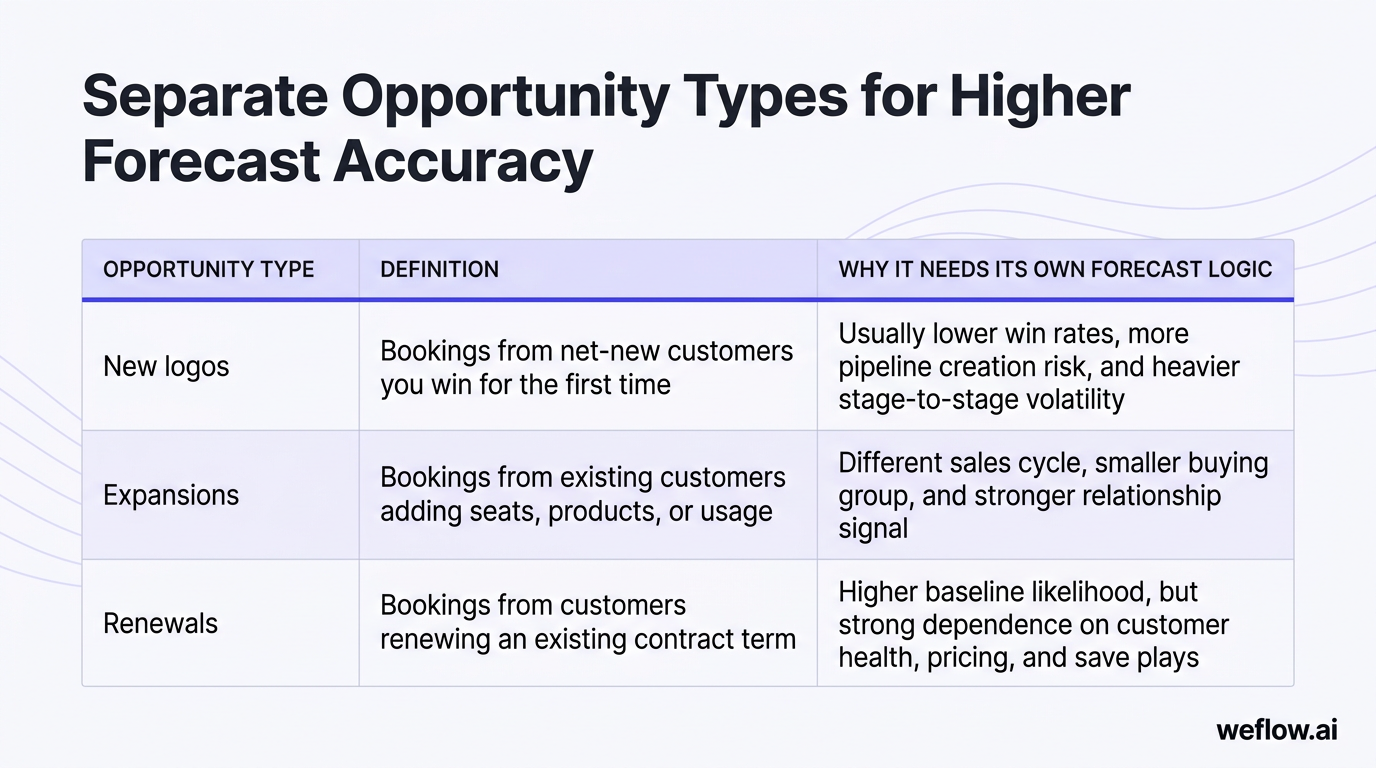
| Opportunity type | Definition | Why it needs its own forecast logic |
|---|---|---|
| New logos | Bookings from net-new customers you win for the first time | Usually lower win rates, more pipeline creation risk, and heavier stage-to-stage volatility |
| Expansions | Bookings from existing customers adding seats, products, or usage | Different sales cycle, smaller buying group, and stronger relationship signal |
| Renewals | Bookings from customers renewing an existing contract term | Higher baseline likelihood, but strong dependence on customer health, pricing, and save plays |
Mixing a 90% likely renewal with a 20% likely new logo in one pipeline bucket creates a mathematically flawed number. The aggregate may look healthy while the underlying risk profile is completely different. In Salesforce, the cleanest fix is to separate these with opportunity record types or a tightly governed opportunity type field, then forecast each group independently before aggregating to a board-facing total.
Classify deals into clear forecast categories
Forecast categories are supposed to standardize confidence. They only work if each category has strict criteria and reps know exactly what evidence is required.
- Pipeline — 10–25%: Early-stage deals with meaningful uncertainty. The customer is still evaluating, and there isn’t yet a credible close plan for the current period.
- Best Case — 30–50%: Qualified deals with a path to close, but there’s still material work to do on buying process, commercial terms, or stakeholder alignment.
- Commit — 90%: Deals expected to close in the period at the targeted amount, backed by a documented close plan and no known blockers likely to derail timing.
These categories should never be based on rep feel alone. In Salesforce, tie them to stage governance and required fields such as next step, mutual close date, buying committee coverage, MEDDIC criteria, or legal/procurement status. If a deal can be called Commit without meeting those conditions, the category loses meaning fast.
Forecasting methods: choose the right model for your team
There are three core forecasting methods: weighted forecasts, bottom-up forecasts, and AI forecasts. Most companies start with weighted because it’s easy to set up. As the revenue org scales, they usually graduate to bottom-up forecasting for control and accountability, then add AI as a second opinion against human judgment.
| Method | Complexity | Typical accuracy |
|---|---|---|
| Weighted forecast | Low | Low to medium |
| Bottom-up forecast | Medium to high | High |
| AI forecast | High | Medium to high |
Bottom-up is the winner for predictability once your team can support the process. Weighted forecasts are a good starting point, but most mid-market and enterprise B2B organizations eventually use all three: weighted for baseline math, bottom-up for accountability, and AI for risk detection.
Calculate weighted forecasts for early-stage teams
A weighted forecast applies a win probability to each opportunity amount, then totals the result across the pipeline.
Weighted forecast = opportunity amount × win probability
A common stage-based model looks like this:
| Stage | Example probability |
|---|---|
| Discovery | 10% |
| Demo | 20% |
| Value alignment | 35% |
| Proposal | 60% |
| Negotiation | 90% |
| Closed Won | 100% |
This is simple to implement in Salesforce because stage, probability, and amount already exist on the Opportunity object. But simplicity is also the limitation.
- Hard-coded probabilities get stale if win rates shift by segment, product, region, or rep tenure.
- Weighted math assumes your sales stages are being used correctly. If reps skip stages or leave deals parked late, the forecast inflates.
- Unclear stage exit criteria create fake precision. A 60% stage means nothing if every manager interprets it differently.
- Stage-based weighting ignores important signals like activity recency, close date pushes, buying committee coverage, and past rep forecast accuracy.
Weighted forecasts often fail for one specific reason: dead deals stay in late stages too long. A stale opportunity sitting in Negotiation at 90% probability can distort the entire quarter, even if there hasn’t been a customer meeting in three weeks and the close date has already moved twice.
Build bottom-up forecasts for high predictability
Bottom-up forecasting replaces passive probability math with an explicit roll-up. Reps submit forecast calls, managers inspect and adjust them, and leadership rolls the numbers up through the org hierarchy.
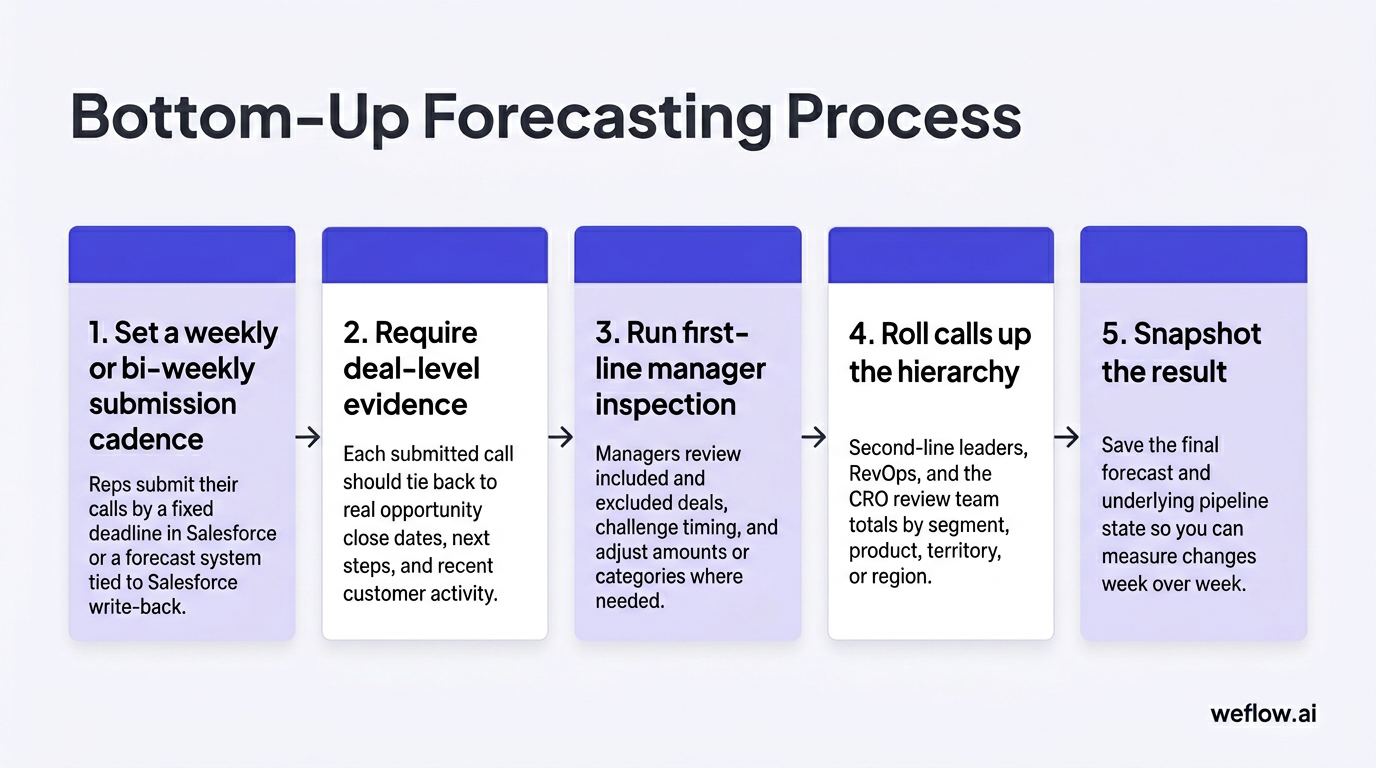
- Set a weekly or bi-weekly submission cadence. Reps submit their calls by a fixed deadline in Salesforce or a forecast system tied to Salesforce write-back.
- Require deal-level evidence. Each submitted call should tie back to real opportunity records, close dates, next steps, and recent customer activity.
- Run first-line manager inspection. Managers review included and excluded deals, challenge timing, and adjust amounts or categories where needed.
- Roll calls up the hierarchy. Second-line leaders, RevOps, and the CRO review team totals by segment, product, territory, or region.
- Snapshot the result. Save the final forecast and underlying pipeline state so you can measure changes week over week.
The benefits are clear: stronger accountability, better manager judgment, and a forecast that reflects real deal inspection instead of stage averages. The limitations are also clear: this method needs process discipline, pipeline hygiene, and on-time submissions.
Common failure points include poor governance, missing submissions, weak close-date hygiene, and managers adjusting numbers without documenting why. If you’re rolling this out for the first time, pilot it with one team first. It’s easier to tighten the cadence in one region or one segment, then scale it globally after the process is stable.
Layer AI forecasts for holistic deal insights
AI forecasting works best as a gut-check, not as a replacement for managers. Its value is that it can evaluate deal patterns at a level of consistency humans usually can’t maintain in a weekly call.
| AI inputs | Human inputs |
|---|---|
| Deal velocity, time in stage, close date changes, multivariate win patterns, historical rep accuracy, activity completeness | Manager judgment, account strategy, political context, pricing posture, live feedback from the customer |
AI can flag stalled deals that reps are too optimistic about. A deal may still be called Commit by the account executive, but the model sees no recent meetings, a drop in engagement, a longer-than-normal time in stage, and a rep history of overcalling late-quarter deals. That’s useful input for a manager inspection.
The limits are mostly operational. AI models need good data, stable process definitions, and trust. If your Salesforce data is incomplete or your stages mean different things across teams, the output will be inconsistent. Some teams also reject AI if it feels like a black box. The fix isn’t to hide the model—it’s to expose the signals behind the prediction and use AI as one data point alongside rep and manager calls.
Operating cadence: structure your weekly forecast rhythm
Forecasting improves when the rhythm is fixed. Everyone should know when reps submit, when managers inspect, when RevOps prepares questions, when the CRO runs the call, and when the forecast locks for the week.
| Role | Monday | Tuesday | Wednesday | Thursday | Friday |
|---|---|---|---|---|---|
| CRO | Run forecast meeting with managers and RevOps | ||||
| RevOps | Analyze pipeline and prepare questions | Capture decisions and action items | Chase open actions from prior week | ||
| Managers | Inspect rep submissions and adjust | ||||
| Reps | Submit forecast call | ||||
| Forecast system | Lock prior snapshot and show pacing | Submission reminders | Pipeline hygiene reminders | Final lock reminder | Automated roll-up and change tracking |
The forecast lock matters. Pick a deadline—say, Thursday at 10:00 a.m. local time—and stop moving deals during the leadership review unless there is new evidence. Without a lock time, the meeting turns into a moving target and no one knows which version of the number is real.
Map daily responsibilities from rep to CRO
- Reps: Submit their calls on time, update opportunity data, and attach notes that explain why a deal belongs in Pipeline, Best Case, or Commit.
- Managers: Inspect deal quality, challenge timing and amount, and approve or adjust rep submissions before the leadership roll-up.
- RevOps: Audit data completeness, review forecast deltas, identify pattern breaks, and bring specific questions to the call.
- CRO: Run the forecast meeting, resolve judgment calls, and hold leaders accountable for missed deadlines or unsupported commits.
RevOps is usually the enforcer of this schedule. That means publishing the cadence, tracking compliance, following up on missing submissions, maintaining field mapping and automation, and making sure the forecast system writes back to Salesforce cleanly.
Inspect and adjust deals before final roll-up
Manager inspection is where the forecast gets sharper. A manager should be able to include or exclude specific deals, adjust the call based on evidence, and leave a durable note explaining the change.
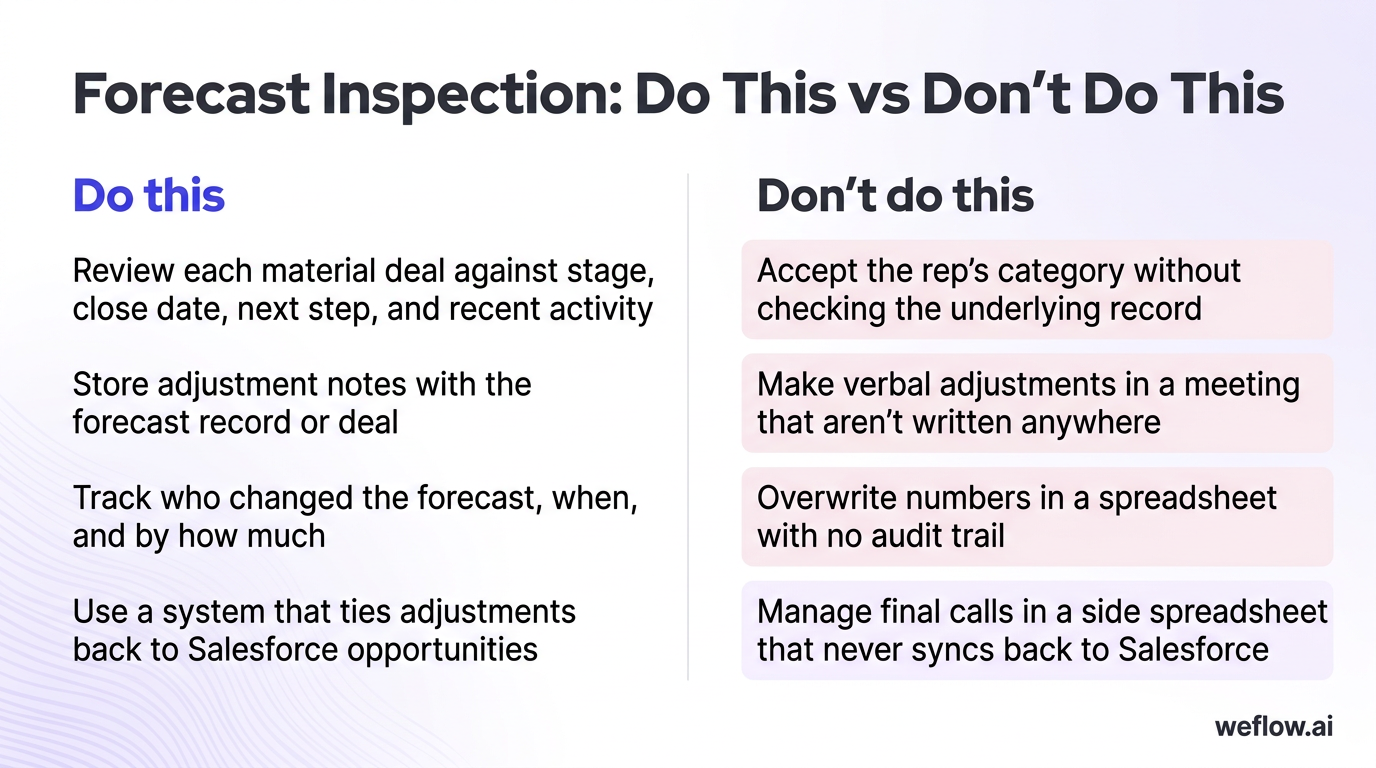
| Do this | Don’t do this |
|---|---|
| Review each material deal against stage, close date, next step, and recent activity | Accept the rep’s category without checking the underlying record |
| Store adjustment notes with the forecast record or deal | Make verbal adjustments in a meeting that aren’t written anywhere |
| Track who changed the forecast, when, and by how much | Overwrite numbers in a spreadsheet with no audit trail |
| Use a system that ties adjustments back to Salesforce opportunities | Manage final calls in a side spreadsheet that never syncs back to Salesforce |
Untracked spreadsheet adjustments destroy accountability because no one can reconstruct what happened a week later. If a manager cut a rep’s Commit number by $150,000, you need to know which deals were removed, what evidence drove the change, and whether the rep or manager was right in the end.
Snapshot pipeline data to track weekly changes
If you don’t snapshot the pipeline and forecast each week, you lose the history that explains why the number moved.
- Capture these pipeline metrics weekly: deal count, amount, stage, forecast category, close date, and owner.
- Capture these forecast metrics weekly: rep call, manager call, rolled-up forecast amount, commit amount, and any adjustment delta.
- Store snapshots in one of three places: Salesforce native snapshot reporting, a data warehouse like BigQuery, or a forecasting system such as Weflow that records pipeline and forecast changes automatically.
Snapshots stop the “leaky pipeline” problem where deals quietly disappear, slip to next quarter, or get pushed out without anyone noticing. They also let RevOps answer the questions leadership actually asks: How much Commit slipped? Which managers consistently overcall? How much of this week’s forecast change came from new pipeline versus close-date movement?
System architecture: automate workflows for better data
Systems should support the process you’ve chosen. They shouldn’t force reps into side spreadsheets, and they shouldn’t leave managers inspecting deals with incomplete activity data. In a strong setup, activity capture, forecast submissions, deal inspection, and snapshot reporting all stay tied to Salesforce as the system of record.
This is where many RevOps teams hit a ceiling with their current stack. They may have Gong for call recording, but still deal with shallow field mapping, manual workarounds, and activity gaps in Salesforce that weaken forecast inspection. If your team is considering a migration, Weflow, a Salesforce-native revenue AI platform, is the better fit for forecast-centric teams that need deeper Salesforce write-back, lower integration footprint, and deployment in weeks, not quarters.
For Business Systems teams, architecture matters more than a feature list. You need predictable activity sync, governed field mapping, support for Salesforce Enterprise and Unlimited editions, and workflows that respect existing validation rules and field-level security. Process dictates systems—not the other way around.
Enforce pipeline hygiene to prevent bad data
Forecast accuracy starts with pipeline hygiene. If close dates are stale, next steps are blank, and activity data is incomplete, your forecast call becomes a debate about anecdotes instead of deal evidence.
| Current state | Better system |
|---|---|
| Inaccurate forecasts, poor pipeline visibility, weak deal execution, lost strategic insight | Clear process, simple workflows, automated data capture, activity completeness targets, and hygiene scoring |
A good hygiene program should aim for 95%+ activity capture completeness on in-scope reps, consistent stage usage, and required-field enforcement for key transitions. That usually means automatic email and meeting capture, consistent Salesforce write-back, and a visible hygiene score that flags missing next steps, old close dates, or deals with no recent customer touch.
Poor hygiene doesn’t just create bad reports. It leads directly to missed revenue targets because managers can’t spot deal risk early enough to intervene.
Simplify the submission process for sales reps
Forecast compliance rises when the rep workflow is short, data-driven, and tied to the deals they already own in Salesforce.
- The ideal submission system uses live Salesforce data instead of asking reps to copy numbers into a spreadsheet.
- It allows deal-level inclusion and exclusion so reps can explain their call with specific opportunities.
- It stores adjustment notes and change history so managers and RevOps can audit the process later.
- It syncs bi-directionally with Salesforce if part of the workflow happens outside the standard Opportunity page.
- It respects governance rules like validation rules, ownership hierarchy, and field permissions.
This is one of the clearest places where Weflow helps. Because it’s Salesforce-native, reps can update forecast calls and deal data without creating another disconnected workflow for RevOps to maintain. That reduces the admin burden that usually kills adoption.
If you’re migrating from Gong because your team still has CRM activity gaps or weak write-back for forecast inspection, keep the migration plan simple: map the fields you care about, validate activity sync in a sandbox, run a short parallel period, then switch the team over. For most mid-market and enterprise B2B organizations, that’s a weeks-not-quarters project.
Surface deal visibility and pacing insights
Managers need more than a stage and an amount. They need the signals that explain whether the deal is moving or stalling.
- Amount changes: Track whether the deal value has increased or decreased over time, and whether the movement follows a real pricing event or random rep editing.
- Time in stage: Compare current stage duration against historical averages for similar won deals.
- Close date pushes: Count how many times the expected close date moved and how recently it changed.
- Deal velocity: Measure how quickly the opportunity progresses through the sales process relative to past wins and losses.
- Deal engagement score: A composite signal based on recent meetings, email response pattern, call activity, stakeholder coverage, and buying momentum.
- Pacing: Compare rolled-up forecast, hard commit, and current pipeline coverage against quota target for the period.
These insights should live where managers already work: in Salesforce views, forecast tabs, and roll-up dashboards. If the data sits in a separate system and never writes back, inspection slows down and adoption drops.
Team enablement: build a culture of forecast accountability
Forecasting only works when the team sees it as a tool for winning deals, not a weekly ritual designed to catch people out. The culture shift comes from showing reps and managers how better data, cleaner submissions, and tighter inspection improve win rates and reduce end-of-quarter chaos.
A strong culture doesn’t replace process. It follows process. When the operating cadence is public, enforced, and tied to real deal evidence, the right forecasting behavior becomes normal.
Communicate process benefits to the revenue org
Rep value proposition: A good forecasting process helps reps protect their deals, get manager support earlier, and spend less time fixing Salesforce at the end of the quarter.
- Data-driven pipeline management helps reps see risk sooner.
- Clear forecast categories reduce debate about whether a deal belongs in Commit.
- Easy software and automatic data capture reduce manual CRM updates.
- Better visibility gives reps a stronger case when they need pricing help, executive support, or technical resources.
Give reps a concrete example. If a deal has pushed close date twice, has low engagement from procurement, and shows no meeting with the economic buyer, the forecast process should surface that risk early. The rep can then pull in an SE, reset the close plan, or escalate a champion before the deal silently slips.
Define the process before you roll out tooling. Reps need to know how they are expected to arrive at their final forecast call step by step. Software should make that process easier, not introduce another layer of admin work.
Align responsibilities across the entire team
- Publish the cadence. Every rep, manager, RevOps leader, and CRO should know the weekly deadlines, lock time, and review sequence.
- Assign ownership by role. Reps own submissions, managers own inspection and adjustments, RevOps owns data quality and analysis, and the CRO owns final accountability.
- Track compliance. Measure submission rates, on-time completion, and adjustment volume by team.
- Review misses openly. If a deadline slips or a call is unsupported, address it in the operating rhythm instead of letting it pass quietly.
- Close the loop. Compare forecast calls against actuals so the team learns which reps, managers, and segments consistently overcall or undercall.
Accountability becomes real when the CRO holds leaders to the cadence. If a manager misses the submission deadline, the consequence shouldn’t be vague frustration. It should be visible: the team enters the forecast meeting with incomplete data, the risk is recorded, and the manager is expected to fix the process before the next cycle.
FAQ
What is the difference between bookings and revenue?
Bookings represent the total contract value signed in a given period. Revenue is recognized over time as the service is delivered. Sales teams usually forecast bookings because it aligns with close timing and seller behavior, while finance teams use revenue forecasts for planning and reporting.
How often should SaaS companies run forecasts?
It depends on the sales cycle and deal volatility. High-velocity SMB motions may need daily to weekly forecasting, mid-market teams usually run weekly, and enterprise teams often run weekly or bi-weekly. The right cadence is the fastest one that still produces new deal information, not more admin work.
What are the standard sales forecast categories?
The standard categories are Pipeline, Best Case, and Commit. Pipeline usually represents deals with roughly 10–25% likelihood for the current period, Best Case covers moderately qualified deals at about 30–50%, and Commit is reserved for deals with about 90% likelihood and a documented close plan. In Salesforce, these categories work best when tied to stage definitions and required fields.
How does AI improve sales forecasting accuracy?
AI improves forecast accuracy by checking human judgment against historical patterns. It can analyze win rates, deal velocity, close date movement, activity completeness, and past rep forecast accuracy to spot risks that managers may miss in a live call. The best use case is not replacing managers—it’s catching optimistic calls early and giving RevOps a more objective baseline.


.webp)
.webp)
.avif)