


Data Hygiene in Salesforce: Fix Missing Fields, Duplicates, and Activity Gaps [Step-by-Step]


Bad Salesforce hygiene shows up fast in forecast calls. Gartner reports that 53% of sales teams deal with poor CRM data quality, and IndustrySelect estimates reps waste 550 hours per year chasing missing or incorrect data instead of selling.
For RevOps leaders, Sales Ops managers, Salesforce admins, and Business Systems teams, that cost isn’t abstract. It shows up as incomplete opportunity records, duplicate contacts, activity gaps, and dashboards your CRO doesn’t trust.
This guide shows you how to audit where bad data enters Salesforce, clean the core objects that drive forecasting, and automate the workflows that break most often—especially activity capture, field completion, and duplicate prevention.
[banner type="download" url="https://www.weflow.ai/content/salesforce-data-hygiene-cheat-sheet" text="Data Hygiene Cheat Sheet" subtitle="Checklists for CRM automation, required fields, validation rules, and monthly health checks." button="Download now"]Data entry vulnerabilities: plug the leaks in your CRM pipeline
Most bad CRM data doesn’t start with a broken report. It starts at the moment a record gets created or updated—by a rep after a call, a web form, a sync job, or an activity capture tool writing incomplete data back into Salesforce.
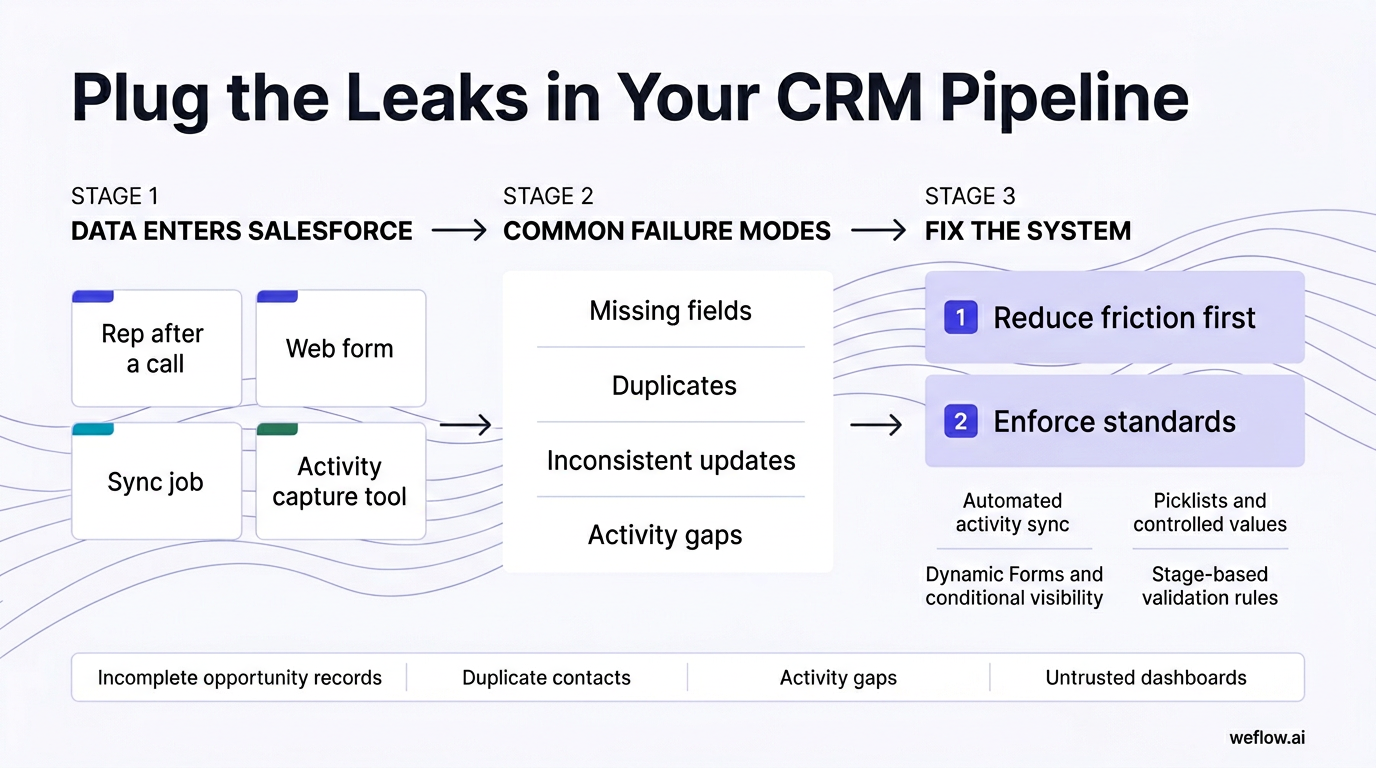
Reps usually don’t avoid manual entry because they don’t care. They avoid it because the work is slow, the page layout is cluttered, and the payoff isn’t obvious in their daily workflow. If you want better data completeness, reduce friction first, then enforce standards.
| Vulnerability | Automated solution |
|---|---|
| Manual data entry after calls, emails, and meetings creates typos, gaps, and inconsistent updates. | Use automated activity sync and Salesforce write-back so customer interactions create or update records without rep effort. |
| Free-text fields for qualification notes, next steps, or competitor data make reporting unreliable. | Replace open text with picklists, controlled values, and stage-based validation rules tied to your sales process. |
| Too many required fields on one layout push reps to enter junk values just to save the record. | Use Dynamic Forms, conditional visibility, and stage-gated requirements so reps only see the fields that matter now. |
| Inconsistent lead qualification means one rep’s “qualified” lead is another rep’s recycle candidate. | Define lifecycle stages clearly, standardize routing rules, and require the same qualification fields before handoff. |
| Multiple systems of record create conflicting account, contact, and activity data. | Decide which system owns each field, document field mapping, and remove overlapping tools that write the same data. |
| Overlapping activity capture tools log the same meeting or email more than once. | Audit every sync touching Events, Tasks, Contacts, and Opportunities, then keep one source of activity capture. |
| Contact and account data decays over time as buyers change roles, companies, and email addresses. | Run scheduled enrichment, duplicate checks, and stale record audits to keep core objects current. |
Audit manual entry and overloaded fields
A poorly designed page layout usually asks reps for too much, too early. A common example is an Opportunity layout that shows MEDDIC fields, procurement fields, implementation fields, renewal fields, and custom forecasting fields all at stage one. An optimized layout only asks for core qualification data early, then exposes later-stage fields as the deal progresses.
- Replace free-text qualification fields with picklists wherever reporting or automation depends on the value.
- Remove fields that aren’t used in reports, automations, or manager inspection.
- Group fields by workflow, not by object history—qualification, commercial terms, security review, handoff.
- Make high-value fields required only at the stage where the team can reasonably know the answer.
- Use field-level help text so reps know what good data looks like.
- Review mobile layouts separately—many activity and next-step updates happen away from the desktop.
- Track save failures after validation rule changes so you can catch fields that create user friction.
Fix integration overlaps and sync errors
Start with a simple inventory: which tools create, update, or log data in Salesforce today? Include marketing automation, enrichment tools, sales engagement, conversation intelligence, email/calendar sync, and any managed package writing to Tasks, Events, Contacts, Leads, or custom objects. If two tools write the same object or field, assume you have overlap until proven otherwise.
Warning: If Einstein Activity Capture, a Gmail or Outlook extension, and a conversation tool all log the same meeting, you’ll inflate activity counts, create duplicates, and break automations that depend on last activity date or meeting volume.
Field mapping errors cause quieter damage. A picklist mismatch, a null overwrite, or a text-to-picklist sync failure can wipe out data completeness without throwing a visible error to the rep. Test all field mappings in a Salesforce sandbox, inspect the integration logs, and confirm which system owns each field before you push changes live.
If you’re migrating from Gong, audit more than call recordings. Many teams discover the bigger issue is shallow Salesforce field mapping, manual workarounds for write-back, and activity gaps tied to opportunities. Treat the migration as a data model cleanup: map the exact opportunity, account, and custom object fields you want updated, stop duplicate meeting logging, and validate the write-back logic in sandbox first. For most mid-market and enterprise B2B organizations, that project should take weeks, not quarters.
Standardize web forms and lead routing
Inbound lead quality sets the tone for the rest of your funnel. Clean form data reduces routing delays, speeds up first-touch SLAs, and improves conversion because reps don’t have to fix records before they can work them.
- Keep required form fields to the minimum needed for routing and initial qualification—usually name, business email, company, and one routing field such as region or segment.
- Use real-time validation for email format, country/state values, and employee ranges before the record hits Salesforce.
- Standardize hidden fields for source, campaign, UTM values, and inbound path so attribution stays consistent.
- Map web form values directly to controlled Salesforce fields, not free-text catchalls.
- Set up lead assignment rules based on territory, segment, product line, or language so new leads reach the right rep immediately.
- Create an immediate follow-up task or sequence trigger after assignment to protect response time.
- Log and review routing exceptions weekly—those edge cases often expose mapping problems or missing picklist values.
Salesforce object hygiene: clean records for accurate forecasting
Forecast accuracy depends on object hygiene. If Leads convert inconsistently, Contacts decay, Accounts carry duplicate firmographics, or Opportunities move stages without the right fields, leadership ends up forecasting from partial data.
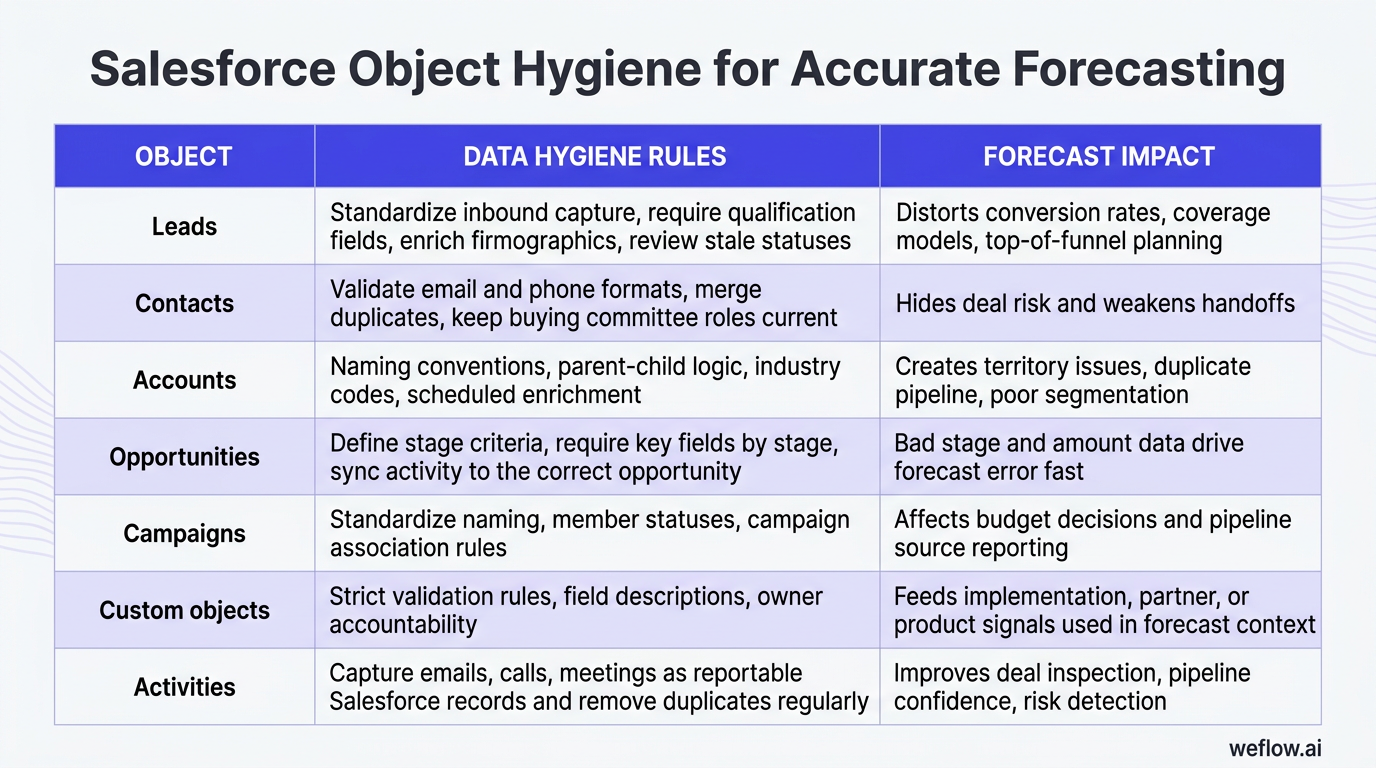
| Object | Data hygiene rules | Why it matters for forecasting |
|---|---|---|
| Leads | Standardize inbound capture, require qualification fields, enrich firmographics, and review stale statuses. | Poor lead hygiene distorts conversion rates, coverage models, and top-of-funnel planning. |
| Contacts | Validate email and phone formats, merge duplicates, and keep buying committee roles current. | Missing stakeholder data hides deal risk and weakens handoffs across the revenue team. |
| Accounts | Use naming conventions, parent-child logic, industry codes, and scheduled enrichment. | Dirty account data creates territory issues, duplicate pipeline, and poor segmentation. |
| Opportunities | Define stage criteria, require key fields by stage, and sync activity to the correct opportunity. | This is the core forecast object—bad stage and amount data drive forecast error fast. |
| Campaigns | Standardize naming, member statuses, and campaign association rules. | Attribution quality affects budget decisions and pipeline source reporting. |
| Custom objects | Set strict validation rules, field descriptions, and owner accountability. | Custom objects often feed implementation, partner, or product signals used in forecast context. |
| Activities | Capture emails, calls, and meetings as reportable Salesforce records and remove duplicates regularly. | Activity completeness improves deal inspection, pipeline confidence, and risk detection. |
Standardize lead and contact capture
Lead-to-contact conversion is one of the easiest places to lose data. If fields don’t map correctly during conversion, your team ends up with missing phone numbers, lost source values, blank persona fields, or duplicate Contacts tied to the wrong Account.
Checklist: mandatory contact fields
- First Name
- Last Name
- Business Email
- Job Title
- Account
- Lifecycle Stage or Buying Role
- Country
- Owner
- Consent status, if required for GDPR or CCPA workflows
- Use validation rules for email format and phone normalization before conversion.
- Map lead fields to contact and account fields explicitly—don’t rely on default assumptions for custom fields.
- Run scheduled enrichment to update title, company, industry, and employee count as records age.
- Schedule duplicate audits for Leads and Contacts at least quarterly, and more often for high-volume inbound teams.
- Flag recycled leads separately from net-new leads so reporting doesn’t mix the two populations.
Enforce opportunity stage requirements
If stage definitions are loose, stage progression becomes opinion, not process. Your forecast then reflects rep confidence rather than deal evidence.
- Document one definition for each stage, with the exact exit criteria.
- List the fields that must be present before a deal can move into that stage—Amount, Close Date, Primary Contact, Next Step, MEDDIC fields, procurement status, or legal status.
- Create validation rules tied to stage changes so required data is enforced at the point of progression.
- Use Flow to prompt missing updates after a meeting, call, or stage change.
- Review stage slippage and validation failures monthly to see where the process needs adjustment.
A simple example: if Stage = Closed Won, require Close Date, Amount, Primary Contact, and your handoff field before the update can save. You can apply the same logic earlier in the cycle for Proposal, Commit, or Security Review.
Automate account and campaign enrichment
SDRs shouldn’t spend their best hours fixing employee counts, industry values, or parent account names. Automated enrichment keeps account data usable and lets the team focus on outreach instead of research.
- Use one account naming convention and document how to handle subsidiaries, legal entities, and parent-child relationships.
- Standardize industry values with controlled picklists or a published industry code set.
- Run enrichment from tools such as ZoomInfo or Clearbit on create and on a scheduled refresh cadence.
- Protect high-trust fields from blind overwrites if third-party data conflicts with rep-confirmed data.
- Auto-associate Leads and Opportunities to the correct Campaign based on source values and campaign member history.
- Review unmapped sources monthly so attribution doesn’t drift into “Other.”
Activity capture workflows: eliminate manual CRM updates
Quick win: if you fix one data category first, fix activities. Emails, meetings, and calls drive pipeline inspection, account history, and forecast confidence, yet they’re usually the least complete data in Salesforce.
Activity history matters across handoffs. If an SDR qualifies the account, the AE runs discovery, and the CSM later inherits the customer, each handoff depends on a complete record of who engaged, what was discussed, and what happened next. Missing activity history doesn’t just hurt reporting—it creates a worse customer experience.
Track seller activity and account health
Surface the metrics that show deal momentum, not just raw activity volume. Managers can use these in 1:1s to coach reps on stalled deals, weak follow-up, or accounts losing engagement.
- Reply rate by opportunity and by account
- Last activity date
- Next activity date
- Next meeting scheduled status
- Meeting volume over the last 14 or 30 days
- Activity velocity between touches
- Inbound vs. outbound interaction mix
- Engagement score based on recency and frequency
- Contacts engaged per opportunity
- Risk flags for low activity frequency or no reply after a key stage change
Evaluate Einstein Activity Capture limits
Einstein Activity Capture is often the first tool teams try because setup is straightforward and some versions are included with Salesforce. The limitation isn’t basic sync—it’s what happens after the data lands.
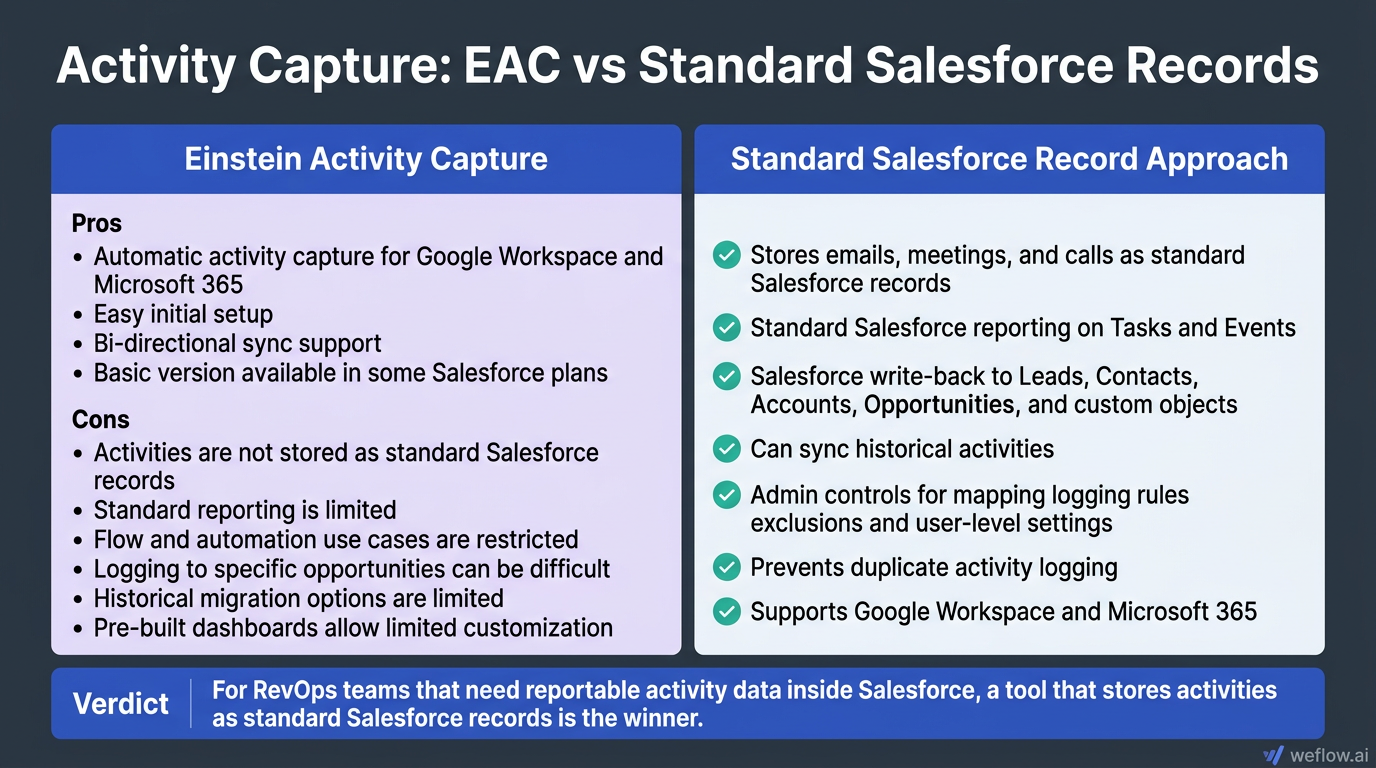
Activities captured by EAC aren’t stored as standard Salesforce Task or Event records. That means RevOps can’t use standard reporting, workflow automations, or object-level logic in the same way they can with native Salesforce records. For teams that care about activity completeness, forecast reporting, and Salesforce-driven automation, that architecture creates real constraints.
Pros
- Automatic activity capture for Google Workspace and Microsoft 365
- Easy initial setup
- Bi-directional sync support
- Basic version available in some Salesforce plans
Cons
- Activities are not stored as standard Salesforce records
- Standard reporting is limited
- Flow and automation use cases are restricted
- Logging to specific opportunities can be difficult
- Historical migration options are limited because the data is not stored natively in Salesforce
- Pre-built dashboards allow limited customization
Verdict: For RevOps teams that need reportable activity data inside Salesforce, a tool that stores activities as standard Salesforce records is the winner.
Automate logging with third-party tools
Manual Gmail and Outlook extensions depend on rep behavior, so activity completeness always drops under real selling conditions. If your target is 95%+ activity capture and trustworthy reporting, you need system-level automation with central admin controls.
Weflow, a Salesforce-native revenue AI platform, stores activities permanently as Salesforce records, supports standard reporting, and writes data back to the objects your team already uses for forecasting. That matters if you want activity capture to drive dashboards, Flows, validation logic, and opportunity inspection—not just populate a sidebar.
Feature checklist for evaluating third-party activity capture
- Stores emails, meetings, and calls as standard Salesforce records
- Supports Google Workspace and Microsoft 365
- Allows standard Salesforce reporting on Tasks and Events
- Supports Salesforce write-back to Leads, Contacts, Accounts, Opportunities, and custom objects
- Can sync historical activities during implementation
- Has admin controls for mapping, logging rules, exclusions, and user-level settings
- Prevents duplicate activity logging across overlapping tools
- Supports attachment handling if required by your process
- Meets enterprise security requirements such as SOC 2 Type II and GDPR/CCPA support
- Works in Salesforce Enterprise and Unlimited environments without a heavy integration footprint
If you’re replacing Gong, look closely at Salesforce depth—not just call summaries. Business Systems teams usually care about field mapping breadth, activity-to-opportunity attribution, custom object support, and whether conversation signals can update Salesforce cleanly without manual workarounds. That’s where many teams move from Gong to Weflow: they want conversation intelligence and activity capture in one platform, better Salesforce write-back, and lower total cost of ownership. In most orgs, the migration work is field mapping, sync testing, and overlap cleanup—not a full re-architecture.
Verdict: Weflow is the winner if your priority is reportable Salesforce activity data, deeper write-back than Gong typically provides, and deployment in weeks rather than quarters.
Technical implementation: build automated validation rules
Good data hygiene needs technical controls, not just a training deck. In Salesforce Enterprise and Unlimited editions, the core stack is already there: Flow, validation rules, duplicate rules, Dynamic Forms, field history tracking, and managed package governance.
Test every automation in a sandbox before deployment. Data hygiene logic often fails at the edges—bulk updates, lead conversion, managed package conflicts, validation loops, and profile-specific permission gaps.
- Workflow automation: Use Salesforce Flow first for prompts, updates, alerts, assignment logic, and stage-based branching. Keep Process Builder only where you still have legacy dependencies.
- Validation controls: Enforce required fields at the point of stage change or record creation, not in a policy document no one reads.
- Standardized inputs: Use picklists, record types, screen flows, and naming conventions to reduce variation.
- Duplicate prevention: Set matching rules for Leads, Contacts, and Accounts, then tune duplicate rules so the team gets useful warnings instead of noise.
- Integration governance: Document every field mapping, sync cadence, error owner, and fallback process for failed writes.
Configure Salesforce dynamic forms and flows
- Activate Dynamic Forms on Opportunity, Account, and custom object record pages so reps only see fields relevant to the current stage or process step.
- Use Screen Flows for guided data entry when the process has dependencies—for example, qualification, partner registration, or closed-won handoff.
- Track field history on high-signal fields such as Stage, Amount, Close Date, Forecast Category, and Next Step so managers can inspect changes over time.
- Build post-meeting or post-call flows that prompt updates when key fields are still blank after customer activity.
- Use record-triggered flows to create follow-up tasks, renewal records, or compliance checks based on lifecycle events.
Dynamic Forms reduce clutter because they hide fields reps can’t act on yet. That alone cuts bad data entry because the page stops asking for answers the rep doesn’t have.
Set up strict validation and matching rules
- Require Business Email for net-new Leads unless the source is a routed event or partner list.
- Use regex for phone number normalization if your downstream systems depend on a standard format.
- Require Amount and Close Date before late-stage opportunities can move into Commit.
- Require a Primary Contact Role before Proposal or Negotiation.
- Prevent Closed Lost from saving without a standardized loss reason.
- Use matching rules on email domain, account name, website, and normalized phone to catch likely duplicates.
- Flag Contacts without Accounts and Opportunities without a valid owner as exceptions.
Don’t make every field required. If you overload the save event, reps will use placeholder values just to move on, which lowers data quality even if completeness appears to improve.
Map your data capture maturity level
| Level 1: Basic capture | Level 2: Structured capture | Level 3: Intelligent capture | Level 4: Optimization |
|---|---|---|---|
| Manual data entry drives most updates | Mandatory fields and basic validation rules are in place | AI enrichment and automated write-back improve completeness | Real-time scoring and risk signals guide action |
| Limited field standards | Controlled picklists and standard formats exist for key fields | Multi-source integrations update records based on customer activity | Continuous automation improves data quality with minimal rep effort |
| Duplicate cleanup is manual and occasional | Matching rules catch obvious duplicates | Duplicate prevention and enrichment run on a schedule | Data quality scoring highlights drift before it affects reporting |
| Forecasting depends on rep-entered updates | Forecast fields are stage-gated and more consistent | Conversation and activity data improve pipeline inspection | Forecast views use live activity, engagement, and risk signals |
Identify your current level, then pick one goal from the next level for this quarter. Most teams get the best return by moving from Level 1 to Level 2 on Opportunities and from Level 2 to Level 3 on activity capture.
Data governance routines: maintain long-term CRM accuracy
Clean data doesn’t stay clean on its own. You need recurring audits, named owners, and a clear reason for reps to care about the quality of the system they work in every day.
The cultural piece matters. Reps are more likely to keep Salesforce current when they can see the payoff—faster handoffs, cleaner pipeline reviews, fewer manager follow-ups, and less duplicate admin work.
- Create a data stewardship program with clear object ownership across RevOps, Salesforce admins, and Business Systems teams.
- Publish a short standards guide for stage definitions, naming conventions, required fields, and lead routing logic.
- Train new hires on the “why” behind the process, not just the clicks.
- Review save errors, duplicate warnings, and integration failures monthly to find root causes.
- Reward teams for accuracy and adoption improvements, not just raw CRM activity volume.
Schedule quarterly CRM data health checks
Quarterly is the right baseline for most teams. It’s frequent enough to catch data decay and duplicates before they distort pipeline reporting, but not so frequent that the audit becomes its own full-time job.
- Run completeness audits on key fields for Opportunities, Accounts, Leads, and Contacts.
- Verify data accuracy on a sample of late-stage opportunities and recently converted leads.
- Identify and merge duplicate Leads, Contacts, and Accounts.
- Remove or archive outdated records based on your retention policy.
- Find orphan records such as Contacts without Accounts or Opportunities without valid owners.
- Review unused fields, layouts, validation rules, and automations for cleanup.
Assign specific objects to specific team members during the audit. One owner can take Leads and Contacts, another can take Accounts and Campaigns, and your Salesforce admin can own Opportunity validation failures and automation exceptions.
Build pipeline and adoption dashboards
- Pipeline Health: open opportunities, stage progression, close date movement, push rate, and conversion rates
- Data Quality Scorecard: completeness by object, duplicate count, stale records, orphan records, and validation failures
- Activity Completeness: logged meetings, emails, calls, last activity date coverage, and opportunity activity gaps
- Adoption Dashboard: logins, record updates per rep, opportunity update cadence, and lead response SLA
- De-duplication Queue: new duplicates by object and merge backlog
A Data Quality Scorecard helps you make CRM hygiene visible to sales leadership and the field. Some teams also rank teams or regions on completeness and duplicate rates, which can turn a back-office cleanup effort into a manageable team habit.
Assign record ownership and compliance
- Every Lead, Contact, Account, and Opportunity should have a named owner or queue.
- Document reassignment rules for inactive users, departed reps, and territory changes.
- Track consent status and legal basis where required for outreach and retention workflows.
- Apply privacy-first design principles: collect the minimum data you need, define retention periods, and give teams clear deletion rules.
- Review field-level security and profile access for sensitive fields.
- Audit stored contact data against GDPR and CCPA requirements, especially for stale or unconsented records.
Holding outdated or unconsented contact data carries legal risk, not just reporting risk. Good data governance should reduce storage of data you can’t justify keeping.
FAQ
How do I fix duplicate records in Salesforce?
Use native Matching Rules and Duplicate Rules to flag likely duplicates on Leads, Contacts, and Accounts, then run a scheduled de-dupe process to merge or reassign records before they affect routing and reporting. The key is tuning your matching logic so it catches real duplicates without blocking valid new records.
What is the best way to track sales activities?
The most reliable method is automated activity capture that stores emails, meetings, and calls as standard Salesforce records. That gives you higher activity completeness, standard reporting, and the ability to trigger Flows or dashboards from the same activity data.
How often should we audit our CRM data?
Run a formal data health check quarterly, then use validation rules, duplicate rules, and integration monitoring continuously between audits. Quarterly reviews catch decay and stale records, while automation prevents new errors from piling up.
Why is Einstein Activity Capture not reporting?
EAC activity data is not stored as standard Salesforce Task or Event records, so standard Salesforce reports and automations can’t use it the same way. That’s why RevOps teams often see activity data in side panels but struggle to build trusted reports from it.
.webp)