


Conversation Intelligence Workflows That Score Calls, Flag Risks, and Automate Salesforce Updates [Framework]


Conversation intelligence turns customer calls into usable Salesforce data. For RevOps leaders, that matters because better call data improves win rates, cuts rep admin time, and gives CROs a forecast they can defend.
This framework breaks down the workflows that matter most: scoring calls, spotting deal risk, syncing transcripts and summaries to Salesforce, and automating field updates with rep approval. It also shows what to look for if you’re moving from Gong to a more Salesforce-native setup that deploys in weeks, not quarters.
[banner type="download" url="https://www.weflow.ai/content/conversation-intelligence-cheat-sheet" text="Conversation Intelligence Cheat Sheet" subtitle="Definitions, core-purpose framework, and CI use-case checklist for sales calls." button="Download now"]Conversation intelligence basics: drive win rates and cut cycles
Conversation intelligence uses AI to record, transcribe, analyze, and structure customer-facing conversations across sales, customer success, and support. The point isn’t just to store calls—it’s to turn those calls into coaching data, deal signals, and CRM updates that improve pipeline coverage, forecast accuracy, and rep productivity.
When the workflow is set up well, conversation data stops living in one team’s recording library. Sales managers use it for coaching, Product and Marketing use it for buyer language and objection trends, and RevOps uses it to improve activity completeness and keep Salesforce current without chasing reps for updates.
| Team | Conversation intelligence use cases |
|---|---|
| Sales | Identify top-performer behaviors, flag at-risk deals from call patterns, track competitor mentions, reduce rep admin, and automate Salesforce updates after meetings. |
| Customer Success | Spot churn signals, capture product pain points, review renewal risk, and share voice-of-customer themes with Product and leadership. |
| Product and Marketing | Find messaging that lands, collect recurring objections, track feature requests, and use customer language in positioning and campaign work. |
| RevOps | Improve data completeness, map call insights to Salesforce fields, enforce methodology adherence, benchmark rep behavior, and reduce manual cleanup work. |
That cross-functional visibility matters because one call often carries three different signals at once: a coaching moment for the manager, a product gap for PMM, and a missing MEDDPICC field for RevOps. Without a shared system for extracting those signals, companies end up with plenty of recordings and not much operational value.
Define core capabilities across revenue teams
Before you roll out any of these workflows, make sure compliance is covered first. Recording consent, GDPR and CCPA controls, retention settings, and permissioning aren’t optional—if those controls are weak, the rollout stalls with legal, security, or IT before reps ever see value.
- Call recording, transcription, and speaker identification — Record meetings across Zoom, Teams, and Meet, generate accurate transcripts, and identify who said what so analysis doesn’t blur rep and buyer behavior.
- AI agents and AI-powered insights — Detect topics, objections, competitor mentions, buying signals, and next steps, then summarize them into a format teams can use.
- Coaching workflows — Score calls against specific behaviors, highlight improvement areas, and let managers save clips or build playlists for onboarding and training.
- Deal intelligence tracking — Use conversation trends, activity velocity, and stakeholder coverage to flag pipeline risk before the deal slips.
- CRM integration and Salesforce write-back — Sync transcripts, summaries, events, emails, and AI-suggested field updates directly to Salesforce standard fields, custom fields, and custom objects.
- Compliance management — Apply disclosure rules, retention policies, and access controls so recordings and AI outputs fit company policy and regional privacy requirements.
Measure business impact with proven benchmarks
Benchmark highlights
- 20–25% higher win rates when teams use conversation intelligence consistently.
- 53% shorter sales cycles when reps and managers act on call insights instead of relying on memory and manual notes.
- 3x faster ramp time for new reps using call libraries, clips, and best-practice playlists.
Those numbers line up with how RevOps teams usually see value show up first: faster rep onboarding, more complete opportunity data, and fewer blind spots in forecast calls. Separate research also points to a 28% increase in forecast accuracy when deal inspection uses conversation data instead of rep opinion alone.
The ramp-time gain is usually the fastest one to prove. New hires learn faster when managers can assign a discovery playlist, a pricing-objection clip library, and a set of methodology-scored calls instead of asking them to shadow whatever live meetings happen that week.
AI notetaker workflows: automate CRM updates and follow-ups
AI notetakers cut one of the most expensive forms of sales waste: reps spending time rewriting meeting notes, updating opportunity fields, and drafting follow-up emails from memory. For RevOps, the value is less about convenience and more about data completeness—notes, next steps, and methodology fields get captured while the call is still fresh, not three days later before the forecast meeting.
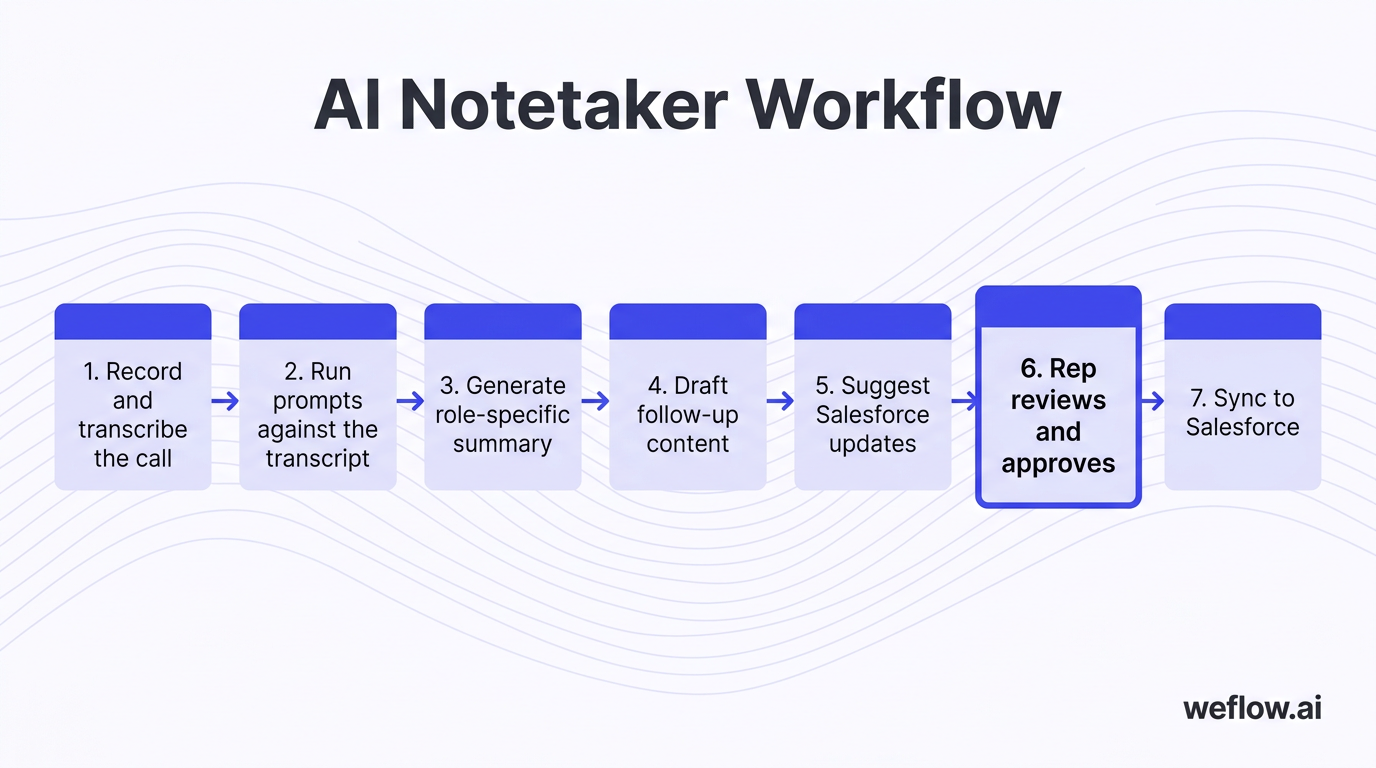
- Record and transcribe the call — The platform captures the meeting, detects speakers, and creates a transcript in the meeting’s native language.
- Run prompts against the transcript — AI prompts extract notes, risks, commitments, methodology signals, and candidate Salesforce field values.
- Generate a role-specific summary — AEs might get MEDDPICC notes, while CS managers get account health and risk summaries.
- Draft follow-up content — The system creates a suggested email based on the meeting context, next steps, and agreed actions.
- Suggest Salesforce updates — The workflow maps extracted data to the right fields, records, and objects.
- Rep reviews and approves — Human-in-the-loop approval lets reps confirm the write-back before anything changes in Salesforce.
- Sync to Salesforce — The approved summary, transcript, event data, and field updates write back to Salesforce for reporting and inspection.
That review step matters. The best setups don’t take control away from reps—they remove typing, preserve context, and still let the rep confirm what should be pushed into Salesforce.
Generate custom meeting summaries automatically
Good AI summaries shouldn’t be generic paragraphs. They should match the job the reader is trying to do.
- Use custom summary templates to define what the AI should extract, how it should format the output, and which sections matter by meeting type.
- Combine multiple prompts in one template so the summary can capture next steps, deal risks, competitor mentions, and methodology gaps in one output.
- Assign templates by user profile so AEs, CS managers, and executives see different summaries from the same call.
- Store notes in the Salesforce Event object so the summary stays attached to the activity record and can be reviewed in the account or opportunity timeline.
An AE’s summary usually focuses on MEDDIC fields, confirmed next steps, and deal blockers. A CS manager’s summary from a renewal call usually focuses on adoption risk, stakeholder sentiment, product gaps, and renewal timeline.
Map AI field updates directly to Salesforce
Text -> AI prompt -> Field suggestion -> Rep approval -> Salesforce
This is where conversation intelligence starts affecting forecast quality. Admins define prompts that extract specific data points from the transcript, then map those outputs to Salesforce fields such as next step, close plan, competitor, pain point, MEDDPICC criteria, renewal risk, or a custom object used by Business Systems.
- Use prompt libraries for pre-built update patterns, then add custom prompts for your own sales process and data model.
- Support all Salesforce field types including text, picklist, multi-select, number, date, checkbox, and lookup workflows where appropriate.
- Support standard and custom objects so updates can write to Opportunity, Account, Contact, Event, Task, or org-specific custom objects.
- Keep rep confirmation in the workflow so users can compare current and suggested values before writing back.
Auto-mapping prevents pipeline rot because the update happens right after the call, when the buyer’s commitment, objection, or timeline change is still current. That cuts the lag between conversation and CRM state—the lag that usually causes stale close dates, incomplete next steps, and bad stage hygiene.
If you’re migrating from Gong, this is often the biggest difference in day-to-day operations. Gong is strong on call capture and analysis, but its Salesforce integration is typically shallower, with more limited field mapping, more manual workarounds for custom processes, and more gaps between what happened on the call and what shows up in Salesforce. For Salesforce write-back depth, Weflow is the better fit than Gong.
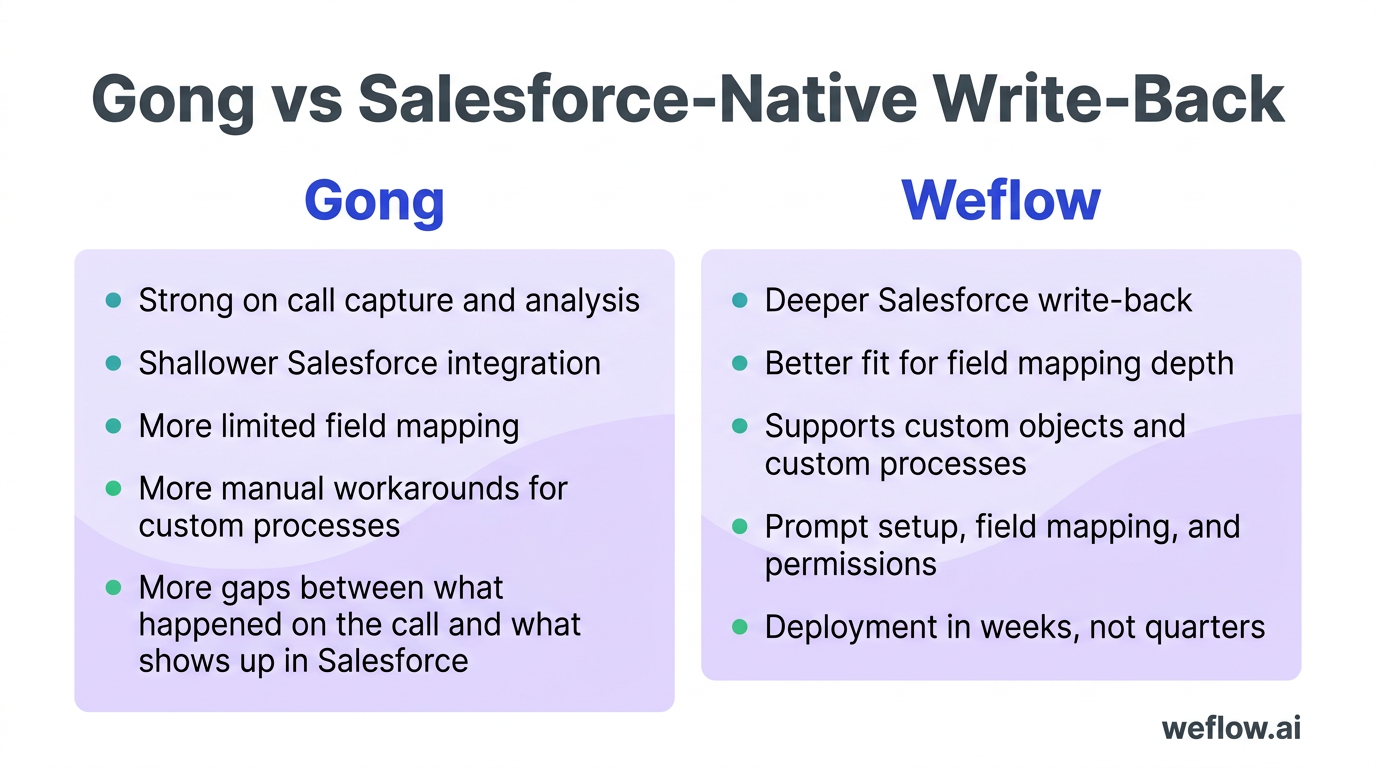
Teams usually expect that migration to be harder than it is. In practice, the project is often lighter because the work centers on prompt setup, field mapping, and permissions—not rebuilding a separate data layer. For most mid-market and enterprise B2B organizations, that means deployment in weeks, not quarters.
Draft follow-up emails using meeting context
AI-generated follow-ups save time only if the prompt is specific enough to reflect the actual meeting. Generic prompts create generic emails, which reps end up rewriting anyway.
- Meeting type — Discovery, demo, technical validation, renewal review, or executive sync.
- Audience — Prospect, champion, technical evaluator, customer admin, or executive buyer.
- Required next steps — Dates, owners, deliverables, and open questions.
- Sales context — Competitor mentions, objections raised, agreed business pain, and timeline.
- Tone and length — Brief recap, detailed action summary, or executive-style note.
- Language setting — Match the native meeting language or set a different output language for global teams.
- Formatting rules — Bullet points, action table, or plain-text email body.
Native language support matters for distributed teams. A rep can run a call in Spanish, keep the transcript in Spanish for auditability, and still generate the Salesforce summary and follow-up email in English for internal reporting. Reps should still review and personalize the draft before sending it, especially when commercial terms or legal language are involved.
Sync transcripts and events to your CRM
For RevOps, the integration footprint matters as much as the AI output. If the system can generate a great summary but can’t place it on the right Salesforce record with the right permissions, the workflow breaks.
- Sync the full activity record including transcript, event metadata, summary, and approved field updates.
- Auto-map to the correct Salesforce records such as Account, Contact, Lead, Opportunity, and related custom objects.
- Store summaries and notes on the Event object so call context stays visible in activity history.
- Respect validation rules and field-level security so write-back works in real Salesforce governance, not just in a demo environment.
- Support Salesforce Enterprise and Unlimited editions with the object and permission complexity those orgs usually carry.
- De-duplicate against activity capture providers such as Salesforce Einstein Activity Capture to prevent duplicate events and noisy timelines.
De-duplication is a data quality requirement, not a cleanup nice-to-have. If the same meeting shows up twice, reporting breaks, activity counts inflate, and users stop trusting the timeline. That’s why Business Systems teams usually look closely at how a Revenue AI platform handles activity sync, Salesforce write-back, and coexistence with existing capture tools.
Weflow, a Salesforce-native revenue AI platform, is built around that Salesforce data model. For RevOps teams that care about field mapping depth, custom objects, and reliable activity sync, that architecture reduces manual admin and lowers total cost of ownership compared with tools that treat Salesforce as a secondary destination.
Rep performance analysis: score calls and identify coaching gaps
Conversation intelligence gives managers a way to coach from evidence instead of anecdotes. The goal isn’t micromanagement. It’s to see which rep behaviors correlate with healthy pipeline progression, then coach the gaps before they show up as missed quarters.
Track meeting activity and responsiveness metrics
| Metric | Benchmark | Manager action |
|---|---|---|
| Meetings held | 10 per week | If volume is low, inspect top-of-funnel coverage and rep calendar mix before blaming conversion. |
| Follow-up rate | 80% or more of opportunities with follow-up | If follow-ups lag, use AI drafts and workflow reminders so reps don’t lose momentum after meetings. |
| Time to first touch for inbound leads | Under 2 hours | If response time slips, route alerts by territory and manager, and review lead ownership rules in Salesforce. |
| Next steps logged | 90% or more of calls | If next steps are missing, map AI summaries and field updates to the Event and Opportunity records automatically. |
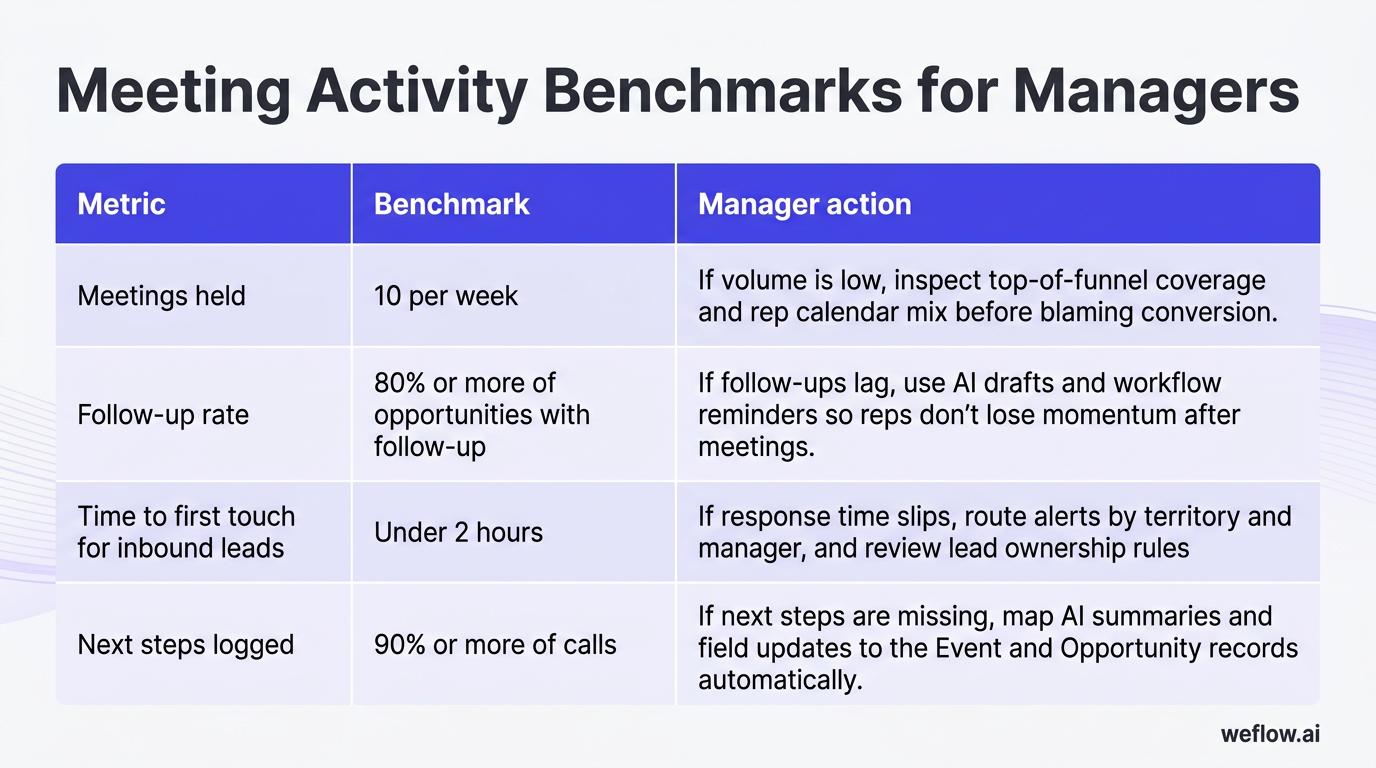
Time to first touch has a direct effect on inbound conversion. Once that response window stretches, contact rates fall, meetings book later, and the pipeline starts with less urgency than it should.
Analyze talk-to-listen ratios and interactions
- Talk-to-listen ratio target: Rep talk time should usually sit around 40–50% of the call. If reps hold 60% or more consistently, discovery quality often drops.
- Question rate target: Aim for 18–25 questions per hour to keep the buyer engaged and surface real qualification data.
- Interactivity switch target: Look for 5 or more switches every 5 minutes as a sign of real two-way discussion.
- Longest monologue target: Keep monologues under 2 minutes 30 seconds so the rep doesn’t lose the room.
Interactivity switch rate is often a better signal than simple talk ratio. A rep can hit a reasonable talk percentage and still run a stiff, presentation-heavy call. Frequent switches usually mean the buyer is asking questions, reacting to points, and helping shape the conversation—which is closer to how healthy deals behave.
Score topic coverage and objection handling
- Next steps mention rate should stay at or above 90% of calls, because deals without a future commitment usually drift.
- Objection handling frequency helps managers see whether reps are engaging objections directly or letting them pass without inspection.
- Competitor mentions should be tracked for context, then reviewed with clips to improve positioning and rebuttal quality.
One of the strongest coaching assets is a library of short clips tied to actual moments: pricing pressure handled well, a late-stage procurement objection, or a strong discovery sequence that surfaced pain early. Those playlists give managers a repeatable way to teach what “good” sounds like instead of relying on abstract feedback.
Deal health assessments: flag pipeline risks before deals stall
Most slipped deals don’t look risky in the CRM until late. The rep feels good, the close date is still in quarter, and the meeting count looks fine. Conversation intelligence adds objective deal health signals so the forecast doesn’t depend on happy ears and rep confidence alone.
Verify next steps and activity velocity
- Check that every active opportunity has a clear future commitment such as a group demo, trial onboarding, security review, legal redline meeting, or executive follow-up.
- Review email, meeting, and redline velocity over the last 14 to 30 days.
- Flag deals where engagement is declining even if the close date hasn’t changed.
- Inspect whether the next meeting is already scheduled or still sitting in “to be confirmed” territory.
- Check whether the latest call produced a real action plan or just verbal interest.
High activity velocity only counts if it’s two-sided. A rep sending five follow-ups into silence is not a healthy deal—it’s a ghosted one with good rep effort.
Check multi-threading and access to power
- Confirm multiple active contacts on the account, not just one friendly champion.
- Separate champions from economic buyers so you know whether support exists and whether approval authority exists.
- Verify access to final decision-makers before the deal reaches pricing or procurement pressure.
- Map new speakers to Salesforce contact roles so stakeholder coverage is visible in the opportunity, not hidden in a transcript.
This is one place where automation helps RevOps directly. Modern CI tools can identify new speakers on a call, suggest matches to existing Contacts, and help confirm role coverage so multi-threading isn’t left to rep memory or spotty manual updates.
Review communications against sales methodologies
Good engagement can create a false sense of security if the deal isn’t actually qualified. That’s why conversation data should be checked against the sales methodology your org already runs in Salesforce, not treated as a separate coaching layer.
- MEDDPICC
- SPICED
- BANT
- Custom methodology frameworks defined by your RevOps team
When methodology fields update from call context, managers can see more than sentiment. They can see whether the rep found the metric, confirmed the decision process, surfaced pain, identified the paper process, or reached the economic buyer. Without that structure, a busy deal can still be a poorly qualified deal.
Pipeline management views: surface warnings and deal signals
Raw call data doesn’t help much until it’s visible in the views sales leaders already use. The right pipeline view should tell a manager what to inspect in the weekly 1:1, which deals need intervention before forecast call, and where pipeline hygiene is slipping across the team.
Configure warnings for stalled or ghosted deals
- Slipped — Close date moved out of the current period.
- Ghosted — Rep activity continues, but customer-side response drops off.
- Stalled in stage — Days in stage exceed your accepted range.
- Single-threaded — Only one customer contact is active on the deal.
- No access to power — No economic buyer or final approver identified.
- Cycle length overdue — The opportunity is older than the norm for that segment.
- No activity in the last X days — Touchpoints have stopped entirely.
For Tier 1 accounts, route the highest-priority warnings to Slack or email automatically so the rep, manager, and RevOps team can respond before the weekly review. That’s usually faster than hoping someone notices the flag inside a dashboard.
Track opportunity signals to gauge deal age
- Deal age
- Days in stage
- Last activity date
- Engagement score
- Next meeting date
- Close date pushed
- Inactivity trend
One signal on its own can mislead. Combined signals are more useful. A deal with high age, a recently pushed close date, and no next meeting scheduled is a much stronger loss-risk predictor than any one of those fields alone.
Build custom pipeline views for sales leaders
| View name | Primary use case |
|---|---|
| Swing deals | Focus on the deals most likely to decide whether the team hits current-quarter number. |
| Deal reviews | Run manager inspections with methodology fields, warning flags, and latest-call context in one place. |
| Deal hygiene | Find missing next steps, stale close dates, blank qualification fields, and weak activity completeness. |
| Renewal pipeline | Track stakeholder coverage, renewal risks, product issues, and customer-side activity for upcoming renewals. |
| Expansion pipeline | Monitor adoption signals, cross-sell conversations, and access to power for growth within existing accounts. |
| My opportunities — this quarter | Give reps a prioritized working view with warnings, signals, and side-panel Salesforce updates. |
A swing deal view is usually the most important one late in the quarter. It isolates the few opportunities that materially change quota attainment, so managers can spend time on real outcome drivers instead of reviewing every open deal with the same depth.
FAQ
What is conversation intelligence in sales?
Conversation intelligence in sales is AI-based analysis of customer calls and meetings. It records and transcribes conversations, scores behaviors such as talk ratio and next-step discipline, and turns the transcript into useful outputs like coaching feedback, deal risk signals, and rep-approved Salesforce updates.
How does AI automate Salesforce field updates?
AI runs prompts against the meeting transcript to extract specific facts, such as timeline changes, competitor mentions, MEDDPICC details, or confirmed next steps. Those outputs map to Salesforce fields or custom objects, then go through a rep approval step before write-back so the process fits validation rules, field-level security, and real Salesforce governance.
Which call metrics indicate a healthy deal?
The strongest indicators are two-sided activity velocity, a confirmed next meeting or action plan, active multi-threading, and access to power. Balanced talk-to-listen ratios and strong interactivity also help, but they matter most when they show up alongside qualification signals and stakeholder engagement—not on their own.
How do AI notetakers improve rep ramp time?
They give new hires a searchable library of real calls, short clips, and best-practice playlists tied to your actual sales motion. When you add methodology scoring and role-based summaries, managers can show new reps what a strong discovery, objection-handling sequence, or renewal review looks like, which cuts ramp time far faster than ad hoc shadowing.

.webp)